Our Top Picks
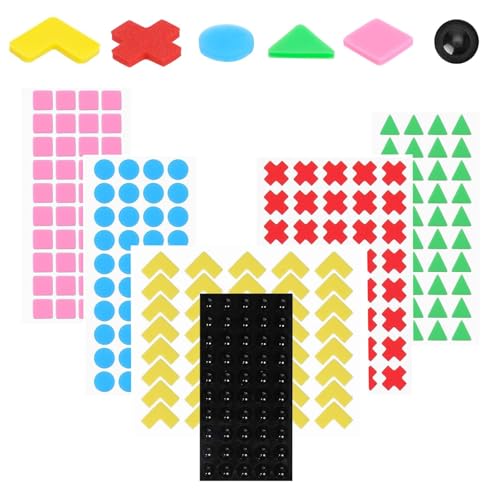
 BLEWAY Braille & Tactile Appliance Control Stickers9 inches x 5 inches9 x 5 x 0.2 inchesCheck on Amazon


What's inside
- Start with the cook, not the appliance
- Physical knobs at the front: the single biggest factor
- Detents, clicks, and raised reference marks
- Knob shape, size, and grip
- Displays for low vision: contrast, size, and placement
- Sound: confirmation tones, timers, and spoken feedback
- Voice control and companion apps
- Safety signals: burner-on indicators and automatic shut-off
- Layout consistency and the geography of the cooktop
- Oven lighting and seeing the food itself
- Aftermarket aids: bump dots and tactile marking systems
- Design in the spirit of accessibility standards
- Wall ovens and installation height
- Questions to ask before buying
- Fuel choice through ears and eyes: gas flame, radiant coil, smooth glass, induction
- Cookware, racks, and the physical work of the oven
- Keeping the appliance clean and safe when you cannot inspect it visually
- Renters, relatives, and retrofitting the oven already in the kitchen
- How support organizations and instructors fit in
- One kitchen, arranged end to end
- Check prices on Amazon
- Disclosure
As an Amazon Associate I earn from qualifying purchases. This post may contain affiliate links at no extra cost to you.
Cooking is one of the daily skills that blindness and low vision do not remove, but the modern oven has quietly become harder to use without sight. The flat glass control panel that looks so clean in a showroom offers nothing to a fingertip: no edge, no position, no confirmation that a touch registered. For a cook who navigates by touch, memory, and sound, the difference between a frustrating appliance and a genuinely usable one is a handful of design decisions — knobs that can be read by hand, displays that can be read at a glance by someone with partial sight, sounds that confirm actions, and layouts that stay put. This guide explains those features in plain terms, so a shopper, a family member, or a housing provider can evaluate an oven by how it behaves under a hand and an ear, not by how it photographs.
The material here is drawn from manufacturer documentation, accessibility design literature, and guidance published by organizations that teach independent living skills. It describes categories of features and the reasoning behind them. It does not name specific models as recommendations, because control layouts change between model years and because the right combination depends on how much vision a cook has, how they use their hands, and how their kitchen is arranged. What can be stated firmly is which features exist, why each one helps, and which questions expose whether a given oven actually has them.
Start with the cook, not the appliance
Visual impairment is a wide spectrum, and oven design serves different points on it differently. A cook with low vision may read a large, bright display comfortably while finding small grey lettering on stainless steel impossible. A cook with no light perception relies entirely on touch, sound, and spatial memory. A cook whose vision is changing — after surgery, with a progressive condition, or with age — needs an appliance that remains usable as sight declines, not one that works only at today’s level. The most future-proof choices are therefore the ones that provide information through more than one channel at once: a knob whose position can be felt, a setting that can also be heard, a display that can also be interpreted by the click of a detent.
Redundancy is the governing principle in accessible design, and it applies to ovens with unusual force because an oven is a heat appliance. A sighted cook glances at a display to confirm the burner is off; a cook working by touch needs that same confirmation delivered another way — a knob resting in a distinct off position that the fingers recognize, a tone that sounds when a timer ends, an indicator that a second person or a phone app can check. When evaluating any oven, the useful question is never simply “can this be operated without sight?” but “through how many independent channels does this appliance report what it is doing?”
Household context matters as well. An oven used by one cook who works by touch should be set up entirely around that cook’s system. An oven shared with sighted family members needs features that serve everyone without conflict — which, fortunately, describes most tactile features, since sighted cooks also benefit from knobs that click and displays that are easy to read. The sections that follow take the feature groups one at a time, in roughly the order a shopper encounters them standing in front of an appliance.
Physical knobs at the front: the single biggest factor
If one feature dominates accessibility discussions about ranges, it is the presence of real, rotating knobs for the burners, positioned on the front panel of the appliance. A knob communicates through the hand. Its rotation maps directly onto burner power: turn further, get more heat. Its angle can be read by touch the way a clock face is read, and its off position is a physical place the fingers can verify in a second. A cook can set a burner, leave the kitchen, return, and re-check the setting by touch alone — something no flat panel permits without vision or a connected app.
Front placement matters for two reasons beyond reach. Controls on the front edge are encountered in a consistent line, close to the body, at a predictable height. Controls on a raised back panel — the traditional backguard of many ranges — force a reach across or over hot cookware to adjust a burner, which is a burn risk for any cook and a serious one for a cook who cannot see where a pot handle sits. Front knobs keep hands in front of the cooking zone, and they pair naturally with a consistent left-to-right burner mapping that can be memorized once and used for years. The ranges gathered under best 30 electric ranges illustrate the standard thirty-inch format in which front-knob layouts are most common, and comparing their control panels shows how much knob size and spacing vary even within one width class.
Flat touch panels are not automatically disqualifying — some cooks with low vision prefer them, and the voice and app controls discussed later can operate them — but a panel of capacitive glass offers no tactile landmarks at all. Every function is a location on an identical smooth surface, distinguished only by printed icons. For a cook with no usable vision, such a panel can only be managed with applied tactile markers and memorized positions, and even then it gives no confirmation of state. Shoppers comparing the two styles should perform a simple exercise in the showroom: close your eyes, and try to set the oven to a moderate baking temperature, then verify what you set. The appliance that lets you complete both halves of that exercise is the accessible one.
Detents, clicks, and raised reference marks
A knob becomes far more informative when its rotation is not perfectly smooth. A detent is a small mechanical notch — a position where the knob settles with a faint click or a perceptible catch. Detents at the off position, at ignition on gas burners, and at intervals along the heat range turn a continuous dial into a countable one: a cook can advance two clicks from off and know the burner sits at a repeatable low simmer, every time, without any visual check. Manufacturers describe this in specification language as indexed or stepped control, and it appears most often on burner knobs; oven temperature knobs with detents at common baking temperatures are rarer and worth asking about specifically.
The pointer on the knob is the second half of the system. Most knobs carry a line or indicator mark showing which way they point; on accessible-friendly designs that mark is raised, so a fingertip can find where the pointer sits relative to the panel. A raised line that can be felt at the twelve o’clock position, combined with a fixed raised reference dot on the panel beside the knob, gives the hand a complete coordinate system. Where the factory mark is only printed, the aftermarket markers covered later in this guide can supply the raised reference — one small adhesive dot at the off position transforms a smooth knob’s usability.
Knob rotation range also carries information. A burner knob that turns through roughly a quarter-turn from off to high compresses the whole heat range into a small arc, making each degree of rotation significant and hard to reproduce by feel. A wider arc spreads the settings out, giving the fingers more room to distinguish low from medium. Specification sheets rarely state rotation angle, which makes this a showroom question: turn the knob slowly, note where the arc starts and ends, and judge whether the positions you use most — a gentle simmer, a rolling boil — land at angles your hand can find again reliably.
Knob shape, size, and grip
Two knobs with identical detents can feel completely different in use, because shape decides how confidently a hand can turn and read them. A knob with a distinct pointer bar or a flattened section gives the fingers an orientation cue the moment they close around it — the hand knows which way the knob points before it moves. Round, smooth, barrel-shaped knobs provide the least information; they can also be the hardest to turn when fingers are wet or greasy, which in a kitchen is often. Knobs with knurled edges, fluted sides, or a matte texture reward the grip that cooking actually involves.
Size interacts with spacing. Large knobs are easier to grasp and to read, but on a thirty-inch range with four or five controls across the front, large knobs crowd together, and a hand adjusting one burner can brush its neighbour. For a cook working by touch, accidentally moving an adjacent knob is more than an annoyance — it changes a setting without any signal. Generous spacing, or a layout that staggers the oven control away from the burner row, reduces that risk. Arthritis and reduced grip strength, which frequently accompany the age-related conditions that also reduce vision, argue for knobs that turn with modest torque; a stiff new knob in a showroom may soften with use, but a shopper should not have to count on that.
Removable knobs introduce a household consideration. Most range knobs pull off for cleaning, and in homes with small children they are sometimes removed as a safety measure. For a cook who relies on knob position as information, a knob replaced one notch off its true alignment after cleaning is a quiet hazard, because the pointer no longer tells the truth. Designs whose knobs can only seat in one orientation — keyed shafts rather than plain splines — protect against that error, and households that remove knobs should make a habit of verifying the off position by touch after every refit.
Displays for low vision: contrast, size, and placement
For cooks with partial sight, the electronic display is often the primary channel, and its quality varies enormously. The characteristics that matter are measurable ones. Character height: temperature digits large enough to read at arm’s length serve a cook standing back from a hot door. Contrast: bright digits on a dark background, or the reverse, with a strong luminance difference — pale blue or grey digits on brushed metal are the combination most often criticized in low-vision literature. Glare: a display recessed under an angled panel reads better under kitchen lighting than one flush behind glossy glass that mirrors the ceiling lights.
Colour coding deserves a sceptical note. Displays that distinguish states by colour alone — a subtle shift from white to amber to signal preheating, for instance — fail cooks with colour-vision deficiency as well as many with low vision. The information that matters, such as whether the oven has reached temperature, should also arrive through another channel: a tone, a change in the digits, or an indicator light with a distinct position. Backlight behaviour matters at the other end of the day as well; a display that cannot dim may glare in a dark kitchen, while one that blanks entirely after a few minutes forces a touch to wake it — a small interaction that a tactile button handles better than a glass panel.
Placement completes the picture. A display at the front of the appliance, angled slightly upward, can be read by a cook standing close and looking down — the natural posture. A display on a high backguard demands distance and a level gaze, precisely what a cook managing hot pans cannot spare. Wall ovens change the geometry again, since their displays sit at whatever height the cabinetry dictates; the installation section of this guide returns to that, because a display placed for a standing sighted cook may sit above the comfortable reading zone of a shorter cook or a wheelchair user.
Sound: confirmation tones, timers, and spoken feedback
An oven that speaks through sound gives a cook working by touch the confirmations a display gives everyone else. The basic layer is the confirmation tone: a short beep when a control accepts an input. On knob-based ovens the mechanical click of a detent plays this role for burners, but electronic oven functions — setting a bake temperature, starting a timer — need an electronic voice. Better designs use distinct tones for distinct events: one note for a keypress accepted, a different pattern when the set temperature is reached, a repeating signal for a timer ending. When every event sounds identical, the cook learns less from each sound; when tones differ, the kitchen becomes legible by ear.
The kitchen timer is the most-used audible feature in most homes, and its details decide its worth. A timer that can be set in fixed increments by a knob or by repeated presses of a single button — each press adding a minute with a beep — can be operated entirely by counting. A timer that requires watching digits scroll on a display cannot. Volume adjustability matters in real houses: a timer that cannot be heard over a running extractor fan or from the next room fails at its one job, while one with a persistent, repeating end signal — sounding until cancelled rather than beeping twice and falling silent — respects the fact that the cook may be across the room with wet hands. Some appliances offer a spoken layer through a connected app or assistant, announcing the remaining time on request; that belongs to the voice-control family covered next, but its timer announcements alone justify the setup for many households.
Preheat notification deserves specific attention during shopping, because it is the moment an oven most often communicates. An audible preheat signal — a tone sequence when the cavity reaches the set temperature — lets a cook load food at the right moment without opening the door to guess or reading a display. Where no tone exists, a cook with low vision may still read a bright indicator; a cook without sight has no channel at all, and will reasonably choose a different appliance or lean on a talking thermometer and experience. Ask the question directly in the showroom, because brochures list preheat signals inconsistently even for models that have them.
Voice control and companion apps
Connected ovens add a control channel that bypasses the panel entirely. Through a voice assistant — a smart speaker or a phone — a cook can set a bake temperature, start preheating, ask how much time remains, and turn the oven off, all by speaking. For a cook who cannot read the panel, this is not a convenience layered on top of the real controls; it can be the primary interface, with the physical controls as backup. The safety architecture around remote operation is deliberate in manufacturer documentation: remote start is typically something the owner must enable at the appliance itself, often for each use, so that a voice command alone cannot start an oven nobody has checked. Remote monitoring and remote switch-off, by contrast, are usually always available once the appliance is connected, and those are the functions with the clearest safety value.
The companion app is the other half of the connected picture, and its accessibility depends on how well it works with a phone’s screen reader. A well-built appliance app exposes the oven’s state — current mode, set temperature, timer remaining, whether a surface element is on — as text a screen reader can announce, and presents its controls as labelled buttons rather than images. App quality varies far more than oven hardware quality, and it changes with updates, so this is the one area where current accessibility reviews and the lived reports of blind cooks carry more weight than a specification sheet. A household considering a connected oven should install the app in the showroom, connect it to the display model if staff permit, and navigate it with a screen reader before money changes hands.
Connectivity also brings honest caveats. Voice control depends on a home network and on the manufacturer’s servers remaining available for the appliance’s lifetime; a cook should never be left unable to operate the oven when the internet drops, which is another argument for physical controls underneath the smart layer. Commands can be misheard in a noisy kitchen. And an oven that receives a software update may rearrange its app menus, breaking a memorized routine — a disruption sighted users absorb visually and screen-reader users absorb with real effort. None of this cancels the value of the voice channel; it simply means the accessible kitchen treats connectivity as one channel among several, never the only one.
Safety signals: burner-on indicators and automatic shut-off
The most consequential information an oven holds is whether something is still hot or still on. Sighted cooks get this from indicator lights; the accessible question is how that information reaches everyone else. A burner-on indicator with a fixed, known position can be found by a cook with low vision who knows where to look, and a bright, high-contrast lamp serves that purpose well. For a cook without sight, the indicator must pair with a tactile truth: the knob position itself. This is the deeper reason knob-based burner controls dominate accessibility guidance — the control and the indicator are the same object, and its state can be verified by hand at any moment, including the final check before leaving the kitchen or going to bed.
Automatic shut-off features add a second layer. Many ovens include a maximum cooking duration — commonly around twelve hours — after which the oven turns itself off, and some offer shorter programmable limits. Surface elements on some electric models include boil-over or empty-pan sensing that cuts power; induction cooktops, which heat only in the presence of a suitable pan, remove several hazards at once and cool quickly, though their controls are usually the flat glass kind and their operation is silent in a way that removes the auditory cues a gas flame or a glowing element provides. Each technology moves the risk rather than deleting it, and the right trade-off depends on the cook. What matters for every household is that the shut-off behaviour be known, not assumed: the manual states the duration limit, and a family setting up an oven for a relative should read that line aloud and record it in whatever notes accompany the appliance.
Alarms beyond the appliance deserve a mention in any safety discussion. A working smoke alarm and, for gas appliances, a carbon monoxide alarm are part of the cooking environment for every household, and they are doubly relevant for a cook who cannot see smoke beginning or read a warning light across the room. Their placement and maintenance are outside the oven choice itself, but no guide to cooking without full sight is complete while pretending the appliance is the whole system.
Layout consistency and the geography of the cooktop
Memory is a control interface. A cook who works by touch builds a precise spatial map of the appliance: which knob serves which burner, where the large burner sits, how the oven handle feels, where the timer button lives. Layouts that support that map share recognizable traits. Burner controls arranged in the same order as the burners themselves — left knobs for left burners, front knobs for front burners — remove a translation step that costs attention every time. Cooktop burner arrangements that follow a simple grid are easier to map than artistic staggered layouts. And an oven whose controls stay in the same family arrangement across model years lets a cook replace a worn-out range without relearning the kitchen from zero, a continuity argument for staying within a brand whose layout a household already knows.
Compact kitchens sharpen these questions, because a smaller range compresses the same decisions into less space. The twenty-inch format examined in best 20 inch electric ranges shows the trade clearly: fewer burners and a narrower oven, but also a shorter control row that a hand can span in one sweep, which some cooks who navigate by touch genuinely prefer. What a compact range must not sacrifice is knob spacing and a legible off position; in a small format those matter more, not less, because every control sits closer to its neighbour.
The surrounding kitchen is part of the layout too. A cook working by touch unloads hot pans toward a known clear surface, so the counter beside the oven should be a permanent landing zone rather than a rotating storage spot — a household agreement, not an appliance feature, yet one that decides whether a well-chosen oven actually delivers independence. Consistent placement of the oven mitts, the trivet, and the timer in fixed homes completes the geography. Appliances earn their accessibility in this ecosystem or not at all.
Oven lighting and seeing the food itself
For cooks with partial sight, the cavity light is a working tool rather than a courtesy. A bright interior light, switched by a button reachable without opening the door, lets a cook check browning through the door window — and the window matters as much as the bulb. A large door window with minimal tinting or decorative screening preserves the view; heavily meshed or darkened glass, chosen for looks, dims exactly the image a low-vision cook needs. Two bulbs, or a light positioned to illuminate the centre racks rather than a top corner, reduce the shadows that hide one side of a tray.
Halogen and LED cavity lights differ in colour rendering in ways specification sheets rarely discuss: a warmer light flatters food and can mask the difference between golden and deep brown, while a cooler, brighter light shows browning more literally. Cooks with low vision often pair the oven light with task lighting outside the appliance — an under-cabinet strip aimed at the cooktop, switched separately, transforms the visibility of pan contents and is among the cheapest upgrades in this entire guide. None of it replaces tactile and timed methods, which experienced blind cooks rely on heavily: doneness judged by time, temperature probes that speak or beep, and the resistance of a skewer. The accessible kitchen layers these methods rather than choosing between sight-based and touch-based cooking.
Aftermarket aids: bump dots and tactile marking systems
A remarkable amount of accessibility is sold in small packets. Bump dots — small adhesive raised dots in silicone, felt, or firm rubber — are the standard tool for marking appliance controls. Placed on the off position of a knob, at a frequently used temperature, beside a chosen button on a flat panel, or on the start control of a timer, they give the fingertip fixed landmarks on an appliance that shipped without them. Independent-living instructors teach a restrained approach: mark only the positions used weekly, because a panel crowded with dots communicates as little as a panel with none. Different shapes and sizes can encode different meanings — a large dot for off, a small one for a favourite temperature — building a private tactile vocabulary across the whole kitchen.
Raised-line and tactile-tape products extend the same idea to ranges and scales: a strip of raised marking along a temperature dial converts printed numbers into positions that can be counted. High-contrast marking serves low vision in parallel — bold tape in a colour that stands out against the appliance finish, wide markers labelling shelves and settings in large print, and label makers that produce raised lettering for containers and controls. The combination is characteristic of real accessible kitchens: tactile marks for the hand, contrast marks for the eye, both applied by the household to whatever appliance it owns. This is also why the absence of factory tactile features, while a genuine shortcoming, is not always decisive — a knob-based oven with smooth rotation can be given a reference dot in a minute, whereas no adhesive product can give a glass panel a verifiable off state.
Marking needs maintenance. Adhesive dots on a warm oven surround loosen over months, and a dot that migrates is worse than none, because it teaches the hand a wrong position with confidence. Households should treat the marks as part of the appliance’s upkeep — checked when the oven is cleaned, replaced when an edge lifts — and the cook who relies on them should be the one to place them, since the right position is the position that cook’s hand expects.
Design in the spirit of accessibility standards
Formal accessibility standards for buildings — the family of requirements associated with the Americans with Disabilities Act and similar codes elsewhere — address appliances in kitchens of public and multi-unit housing, and their reasoning is instructive even in a private home. Those provisions concern reach ranges, clear floor space in front of the appliance, and controls that can be operated with one hand without tight grasping, pinching, or twisting of the wrist. A range with front controls sits naturally within that logic: nothing requires reaching across burners, and the controls fall inside the comfortable reach envelope of a seated or standing cook.
The spirit behind those numbers generalizes into questions any shopper can apply. Can every control be reached without leaning over a hot surface? Can each control be operated with a closed fist or the side of a hand on a bad-arthritis day, or does it demand a precise fingertip on glass? Is there clear space to approach the oven squarely, with room to step back quickly? Does the door, when open, create a barrier or a bridge — noting that a drop-down oven door at shin height is both a loading shelf and an obstacle, one reason side-opening doors and wall ovens enter accessibility conversations. Manufacturers rarely market home ovens against these criteria directly, but the criteria themselves are public, stable, and far more useful in a showroom than adjectives on a brochure.
Wall ovens and installation height
A wall oven separates the baking cavity from the cooktop, and that separation is an accessibility decision in itself. Installed at the right height, a wall oven lets a cook slide a tray in and out at waist or chest level, facing the cavity squarely, without bending over a drop-down door or reaching across burners. For a cook working by touch, that square approach matters: both hands can locate the rack edges symmetrically, and the pan’s position can be judged by contact with the rack rather than by eye. The smaller format surveyed in best 24 inch wall ovens suits a single cook or a compact kitchen, and its narrower cavity brings the side walls within easy reach of both hands, which simplifies exactly that kind of tactile orientation.
Height is specified during installation, not by the appliance, which makes it a conversation to have before cabinetry is fixed. Guidance for accessible installation commonly places the oven’s centre — and its controls — within the band a seated or standing cook can reach without stretching upward, roughly keeping the control panel below the height where a raised arm loses precision. A double wall oven stacks two cavities and inevitably puts one of them in a poor position for somebody; households choosing that format for a cook with low vision should designate the lower or middle cavity as the primary one and confirm its controls, not the upper unit’s, carry the accessible features. The twenty-seven-inch class covered by best 27 inch electric wall ovens shows the middle format, wide enough for family trays while still fitting the cabinetry of an ordinary kitchen remodel.
Under-counter installation — an oven built into a base cabinet, sometimes beneath the cooktop — serves wheelchair users particularly well when paired with knee space beside it, allowing a sideways transfer of hot dishes onto an adjacent surface at the same level. Whatever the configuration, the landing-zone principle from the layout section applies with double force to wall ovens, because the cook’s hands are fully occupied at chest height: the counter beside the oven, at the same height as the cavity floor, is where the tray will go, and it must be clear every time, as a matter of household discipline rather than luck.
Questions to ask before buying
A short list of questions, asked of a retailer or answered from a manual, will sort suitable ovens from unsuitable ones faster than any feature chart. Can every burner be set, adjusted, and confirmed off by touch alone? Does the oven temperature control have detents, a knob, or only a keypad — and if a keypad, does each press beep, and does the setting announce itself in any non-visual way? Is there an audible signal when preheating finishes, and can its volume be raised? Does the timer repeat its end signal until cancelled? Are the indicator lights for hot surfaces and active burners positioned where a cook with low vision can find them, and are they bright enough to read in daylight? What does the manual say about automatic shut-off, and after how many hours does it act?
Follow with the connected questions where relevant. Does the app work with the screen reader on the cook’s phone — not in principle, but demonstrably, today, in the store? Can a voice assistant turn the oven off and report its state, and what must be enabled at the appliance before remote commands are accepted? Then the installation questions: at what height will the controls sit, is there clear approach space, and can the household add tactile markers and task lighting as part of the same job? A retailer who answers these patiently, with the manual open, is also information — households will return to that retailer with the next appliance question, and the quality of the answers compounds.
Finally, plan the first week with the appliance as part of the purchase. The cook should set the tactile marks, learn the knob map with the oven cold, practise the timer until its signals are familiar, and cook one well-known dish before attempting anything ambitious. Independent-living instructors structure new-appliance learning exactly this way, because confidence with an oven is built from routine, and routine is built deliberately in the first days rather than discovered under the pressure of a holiday meal.
Delivery and installation day deserve the same deliberateness. Ask the installers to leave the manual in a known place — and, where the manufacturer offers it, note the address from which a digital copy can be downloaded and read by a screen reader, since a printed booklet is the least accessible document in the whole transaction. Before the crew leaves, the cook should stand at the appliance and run the cold checks personally: find every knob, confirm each off position by touch, locate the timer controls, and hear every tone the oven can make. Discovering a missing detent or a silent keypad while the delivery team is still in the driveway is a solvable problem; discovering it a week later is a negotiation.
Fuel choice through ears and eyes: gas flame, radiant coil, smooth glass, induction
Each cooktop technology reports itself differently, and the differences are worth weighing alongside the control style. A gas burner announces itself generously: the whoosh of ignition, the visible blue flame for anyone with partial sight, the hiss that rises and falls with the knob. Its heat is also instantly absent when the knob returns to off, a property a tactile cook can verify at the pan’s handle and the surrounding air within moments. Against that, an unlit burner passing gas is a hazard with an odour cue but no visual one, and the open flame itself demands respect around sleeves and towels — the balance that leads many households with a blind cook to choose gas knowingly, and many others to avoid it knowingly.
An exposed electric coil offers its own legibility. It glows at higher settings, giving partial sight a direct read of its state, and its heat can be felt radiating before a hand comes anywhere near contact distance. Its weakness is persistence: a coil stays dangerous long after its glow fades, which is why the hot-surface indicator and the knob-position check matter so much on this format. A smooth glass-ceramic top hides its elements entirely; the surface gives partial sight a glowing ring when hot, but to touch it offers nothing until it is far too close, and its controls are usually the flat kind. Induction removes residual heat almost entirely — the surface warms only from the pan — and many blind cooks value that safety highly, accepting flat controls in exchange, often paired with voice or app operation and a strict bump-dot system. Its quietness cuts both ways: a pan coming to the boil makes its own sounds, but the element itself is silent, so the cook’s information comes from the food and the timer rather than from the appliance.
There is no universal ranking here, only a matching exercise between a technology’s signals and a particular cook’s senses. The showroom exercise described earlier — eyes closed, set and verify — should be repeated for each fuel type under consideration, because the answer is empirical and personal in a way no brochure can settle.
Cookware, racks, and the physical work of the oven
Accessibility conversations often stop at the controls, but the cook’s hands spend most of their time on pans and racks. Rack position is a tactile system waiting to be used: oven racks sit in a ladder of supports, and counting rails from the bottom gives a repeatable position — third rail for a roast, second for a tray bake — that can be set by touch when the oven is cold and trusted when it is hot. Racks that slide smoothly and stop positively at a safety notch, rather than pulling free without warning, protect a cook who unloads by feel. A rack that extends on rails, staying supported while pulled out, turns loading into a two-handed placement onto a stable platform instead of a reach into a hot box.
Pans contribute their own cues. Heavy, flat-bottomed cookware sits stably and predictably; a pan with two loop handles can be located and lifted symmetrically by touch, while a single long handle must be found, oriented, and kept clear of neighbouring burners — and its direction matters, since a handle turned outward is a collision waiting for a passer-by. Consistent households develop a handle discipline: always to the same side, always turned in. Oven mitts that fit the individual cook — not floppy shared ones — preserve the fingertip sensitivity that tactile cooking depends on; gauntlet length protects forearms during the deep reach into a wall oven, and silicone-faced mitts keep their grip on a wet tray where cloth alone would slip.
Thermometers close the information loop that eyes usually serve. Talking probe thermometers announce internal temperature aloud; simpler models beep at a set target. For a cook working without sight, the probe converts doneness from a colour judgement into a number, and it does so for the sighted members of the household just as reliably. Paired with the timer discipline described earlier — every dish timed, every time recorded in a personal recipe notebook in large print, braille, or a phone note — these tools make results repeatable, which is the real substance of cooking confidence.
Keeping the appliance clean and safe when you cannot inspect it visually
Maintenance has an accessibility dimension that manuals rarely address. Spills inside a cooling oven can be located by careful touch once surfaces are genuinely cold, and a regular wipe-down rhythm — little and often, on a schedule rather than in response to visible dirt — prevents the baked buildup that eventually smokes. Boil-overs on a cooktop announce themselves by smell and by the sound of liquid meeting a hot surface; a cook who responds by switching off, waiting for full cooling, and then cleaning by touch with a cloth whose movements follow a fixed pattern misses nothing that a glance would catch. The pattern is the method: overlapping strokes in one direction, then the other, so the whole surface is covered by system rather than by inspection.
Knobs and markers need their own upkeep, already noted for adhesive dots, and one more item belongs on the list: the indicator bulbs and display segments themselves. A failed hot-surface lamp removes a safety channel silently, and a household member with sight should include those lights in an occasional check — or the cook can add the check to a phone-based routine, using the appliance app where one exists to confirm element state independently. Batteries in talking thermometers and timers fall into the same category of small maintenance that keeps the whole system trustworthy; a household calendar note, renewed twice a year alongside the smoke alarm check, covers most of it.
Renters, relatives, and retrofitting the oven already in the kitchen
Many cooks who lose vision, or whose vision declines, live with an oven chosen by somebody else — a landlord, a previous owner, a family member years earlier. The retrofit path deserves as much attention as the showroom path. On a knob-controlled range, the household can add bump dots, high-contrast tape, a talking timer, task lighting, and a strict landing-zone agreement in a single afternoon, and those measures recover most of the appliance’s potential. On a flat-panel range, the same afternoon adds markers and lighting, but the panel’s missing off-state remains missing; where a tenancy is long-term, a conversation with the landlord about a swap to a front-knob model — framed around safety documentation and the modest cost of the format — succeeds more often than families expect, particularly when the request is made in writing with the reasoning attached.
For adult children setting up a kitchen for a parent, the respectful sequence matters. The parent’s existing routines are data, not obstacles: watch how they already cook, note where the current appliance fights them, and change only what the evidence indicts. Replacing a familiar oven wholesale can subtract independence even when the new appliance is objectively better suited, because the spatial map of years disappears with the old one. Sometimes the best intervention is a new set of markers, a brighter bulb over the stove, and one afternoon of practice together — the appliance stays, and the friction leaves.
How support organizations and instructors fit in
Vision rehabilitation services and independent-living instructors work with exactly the material of this guide, and their involvement is practical rather than clinical. An instructor visiting a home kitchen will assess the actual appliance, mark its controls with the cook, set up a timer system, and rehearse the movements of loading and unloading until they are routine. Charities and public programs in many regions lend or fund the small equipment — talking thermometers, timers, marking kits, liquid-level indicators for the kettle that shares the counter — and some run group kitchens where cooks can handle several oven styles before choosing one. A household facing a purchase after a recent change in vision does well to book such a visit before the showroom, because the instructor’s questions are the ones this guide has been circling: how does this cook verify, by hand and ear, that the heat is on, set correctly, and off again? Many of these services are free at the point of use, funded publicly or charitably, and a single visit routinely saves a household from an expensive appliance mistake that no return policy fully repairs afterward.
One kitchen, arranged end to end
Abstract features become clearer in a single concrete arrangement, so consider a composite example assembled from the patterns instructors describe — not a specific household, but a realistic one. The cook has partial sight in one eye and cooks most evenings. The range is a front-knob electric model: burner knobs with a firm detent at off, a raised line on each pointer, and one adhesive dot added beside the front-left burner control, the burner used for the morning kettle. The oven temperature is set by a knob rather than a keypad, and a second dot marks the moderate baking position the household uses for most trays. The timer is a separate talking unit kept in a fixed spot to the right of the range, because its voice is louder and clearer than the oven’s own beeper and because it can travel to the table when a dish rests.
Light does heavy work in this kitchen. A strip under the wall cabinet washes the cooktop in even light with no shadows from the cook’s own body, and the oven’s interior bulb was replaced promptly the one time it failed, because the household treats that bulb as equipment rather than decoration. The landing zone is the stretch of counter to the right of the range, kept empty by agreement; mitts hang on a hook at the same place every day, handles of pans turn to the right by habit, and the talking thermometer lives in the drawer directly beneath the landing zone. Recipes the cook makes often exist as phone voice notes recorded after each success, with times and rack positions counted aloud — third rail, twenty-two minutes — so the record itself is usable with wet hands and no reading.
Nothing in that arrangement is exotic, and its total additions beyond the appliance itself are modest: dots, a timer, a thermometer, a light strip, and a set of agreements. What the example shows is the compounding effect the earlier sections described separately. The knob gives verification; the dot gives a landmark; the timer gives time a voice; the light gives partial sight a fair chance; the landing zone gives hot pans a destination. Remove any one and the kitchen still functions, but each removal is felt daily. Households planning a purchase can use the example as a checklist in reverse — walk the intended appliance through this cook’s evening, task by task, and note precisely where the routine would snag. The snag points, not the brochure, should drive the final choice between two otherwise similar ovens.
It is worth adding that this kitchen belongs to its cook in a way that goes beyond equipment. Every mark was placed by the person who uses it, every agreement was negotiated rather than imposed, and the system can be explained to a visiting grandchild in two minutes. That ownership is the quiet goal underneath all the specifications in this guide: not a kitchen that accommodates a cook with impaired vision as a special case, but a kitchen that is simply, thoroughly, that cook’s own.
Check prices on Amazon
Live listings for the shortlist in this guide are pulled from Amazon below, so prices and availability are always current at the moment you look.


Disclosure
Nothing in this guide comes from a placement arrangement with an appliance maker; the feature descriptions rest on published manufacturer documentation, accessibility standards literature, and the teaching materials of independent-living organizations. As an Amazon Associate we earn from qualifying purchases. Readers choosing an oven for a specific person should treat that person’s own hands, ears, and remaining vision as the final authority — showroom exercises and the questions above exist to put those senses in charge of the decision.
An oven chosen this way repays the effort every single day, because a cook who can verify a burner by touch, hear a timer from the next room, and trust a layout learned once is not merely managing an appliance — that cook has the run of the kitchen again, and dinner becomes an ordinary pleasure instead of a negotiated risk.