What's inside
- Key Takeaways
- Quick Picks
- What Does a Custom-Design Workflow Actually Consist Of?
- Custom Pipelines, Compared on Stated Facts Only
- How Do You Digitise a Drawing Without Losing Its Soul?
- What Does On-Screen Editing Let a Creator Fix Before It Costs Fabric?
- How Does a Custom Machine Earn Its Keep Outside a Business?
- What Mistakes Do First-Time Custom Designers Make?
- How Should a Custom Design Library Be Archived and Versioned?
- How Do You Match Thread Colours to a Client’s Artwork?
- What Does It Cost to Run Custom Work, and How Should It Be Priced?
- How Should You Work With a Client’s Artwork Without Wounding It — or Them?
- What Separates a Custom Design That Sells From One That Merely Stitches?
- What Maintenance Does a Multi-Needle Custom Machine Demand?
- How Does a Home Creator Grow From Remixing to Digitising?
- How Should a Custom Setup Be Arranged in the Room?
- Final Recommendation
- Frequently Asked Questions
- Related Guides
As an Amazon Associate I earn from qualifying purchases. This post may contain affiliate links at no extra cost to you.
cottageverdict.com is reader-supported. When you buy through links on our site, we may earn an affiliate commission.
Each machine below is sold on Amazon under its own listing, so when a design pipeline matches the way you work you can check price on Amazon for that exact model. The best embroidery machines for custom designs are not defined by the designs they contain; they are defined by the designs they accept. A custom-design workflow begins outside the machine — a drawing, a logo, a child’s artwork, a family crest — and the machine’s job is to receive that file gracefully, let you adjust it intelligently, and stitch it faithfully. This guide judges the six picks on exactly that journey.
The honesty rule for this topic is strict, because transfer claims are easy to inflate: a loading channel — USB, Wi-Fi, on-screen editing, companion software — is only asserted in these reviews where the listing title itself names it. Where a title is silent about how designs arrive, the spec box says so, and the review discusses the machine on the facts it does print. One pick here states WiFi and USB outright; others state screens, needle counts, and software-adjacent facts; one beloved combo states its library and sewing figures while leaving its import route to the documentation.
The picks divide by ambition. Three are multi-needle machines from Ricoma and Brother for makers whose custom work is a business. Two are Janome multi-needle machines, one distinguished by a remote computer screen. And one is a sewing-and-embroidery combination with a stated library of 241 designs, for creators whose custom work grows out of a home sewing practice.
Key Takeaways
- Only the Ricoma Marquee 1501 states its import channels outright in this guide: WiFi and USB, beside a 14.2 x 19.7 inch area and 1200 SPM speed.
- Needle counts stated in words run from 4 (Janome MB-4S) through 6 (Brother PR680W) to 10 (the Ricoma EM-1010); the Janome MB-7 states a multi-needle configuration without printing a count, so its exact setup joins the verification list.
- The Janome MB-7’s stated 5.7 inch remote computer screen is this guide’s most explicit editing-interface claim.
- The Ricoma EM-1010 states an automatic thread trimmer and a 10.1 inch touchscreen, but no transfer channel — its import route requires verification.
- The Janome Memory Craft 1000 combo states 241 built-in designs and a 5.5 x 5.5 maximum field, serving creators who customise from a library outward.
Quick Picks
| Machine | Badge | Its custom-design argument |
|---|---|---|
| Ricoma EM-1010 Commercial Embroidery Machine | The trimmer-equipped ten | Ten needles, a 10.1 inch touchscreen, and an automatic thread trimmer for small-business custom work across caps, flats, and tees. |
| Ricoma Marquee 1501 Commercial Embroidery Machine | The connected flagship | WiFi and USB stated outright, a 14.2 x 19.7 field, 1200 SPM, and a 10.1 inch screen — the fullest custom pipeline here. |
| Brother Entrepreneur PR680W 6 Needle Embroidery Machine | The six-needle Brother | A multi-needle Entrepreneur-line machine for creators stepping into production-grade custom work. |
| Janome MB-7 Multi Needle Embroidery Machine | The remote-screen multi | Multi-needle embroidery with a stated 5.7 inch remote computer screen for stitching control away from the machine’s face. |
| Janome MB-4S Four Needle Embroidery Machine | The four-needle step | The gentlest multi-needle entry in this guide, with an exclusive bonus bundle named in its title. |
| Janome Memory Craft 1000 Embroidery Sewing Machine Combo | The combo creator | 241 stated designs, 300 sewing stitches, and an easy hoop tightening system in a 5.5 x 5.5 field for home creators. |
What Does a Custom-Design Workflow Actually Consist Of?
Four stages, and the machine touches all of them. Creation happens in digitising software, where artwork becomes stitch instructions — fills, satin columns, underlay, pull compensation — and where most of a custom design’s quality is decided before any machine is switched on. Transfer moves the file from computer to machine by whatever channel the machine supports. Preparation at the machine covers sizing, rotation, positioning, and colour assignment against the threads actually loaded. Production is the stitching itself, supervised at the colour changes a multi-needle machine minimises and a careful operator plans for.
The screening for this guide weighted the middle two stages — transfer and preparation — because they are where custom work differs from library work. A built-in design arrives pre-fitted to its machine; a custom design arrives as a stranger, in a format, at a size, with assumptions the operator must verify. Machines whose titles state their channels and screens earned their places on evidence; machines whose titles are silent are presented with the silence labelled, so the buyer’s documentation check is targeted rather than general.
One stage deserves emphasis because beginners underrate it: the test stitch. A custom file has never existed in thread before, and its first performance should be on scrap, at full size, in the actual thread — because digitising decisions that looked reasonable on a monitor reveal themselves honestly only in fabric. Every machine in this guide will stitch a flawed file faithfully; the workflow, not the hardware, is what catches the flaw cheaply.
Custom work also dirties a room in its own way — proof squares, trimmed jump threads, and stabiliser offcuts accumulate around any productive bench — and producers who share their space with household life plan the cleanup with the same seriousness as the stitching, which is the practical spirit behind guides like Best Carpet Cleaning Machines for the rooms that host both a family and a small embroidery trade.

Ricoma EM-1010 Commercial Embroidery Machine — The trimmer-equipped ten
The EM-1010’s title builds its case from production comforts: a commercial machine for small business, ten needles, a 10.1 inch touchscreen, an automatic thread trimmer, and stated range across 3D cap, flat, T-shirt, and fabric embroidery — with the frank note that a steel stand is not included. For custom work, the trimmer is the detail that reveals intent. Custom designs carry more jump stitches and colour segments than library motifs, and automatic trimming converts the cleanup between elements from a manual ritual into a machine behaviour, which across a day of one-off commissions is the difference between flow and friction.
Ten needles serve custom production the way they serve patch batches — palettes resident, designs running without rethreading — with one custom-specific dividend: a house palette can stay loaded permanently. Shops develop signature thread sets for repeat clients, and a machine that holds ten of those colours ready turns a returning customer’s new design into a setup measured in minutes. The 10.1 inch screen supports the preparation stage at a size where positioning a stranger’s artwork can be judged calmly.
The title states no transfer channel, and that gap is the EM-1010’s one documentation debt: Wi-Fi, USB, or another route must be confirmed in the manufacturer documentation before a buyer builds a pipeline around it. The stand note cuts the other way — it is stated, honest, and budget-relevant, since the stand becomes a separate purchase to plan rather than a surprise.
- Needles: 10, per the listing title
- Display: 10.1 inch touchscreen
- Trimming: automatic thread trimmer, stated in the title
- Stated work: 3D cap, flat, T-shirt, and fabric embroidery
- Stand: not included, per the title
- Transfer channel: the title names none — check the manufacturer documentation before planning your import route
- Where to buy: the Ricoma EM-1010 listing on Amazon — check price on Amazon
Strengths
- Automatic trimming suits the jump-heavy reality of custom files.
- Ten resident needles keep a house palette ready for repeat clients.
- A large touchscreen supports careful preparation of unfamiliar designs.
Trade-offs
- The import channel must be verified; the title does not name one.
- The stand is a separate purchase, stated plainly but still a cost.
- Its commercial focus is wasted on makers who only stitch library designs.
Best for: small businesses producing varied custom commissions daily. Not suited for: buyers who need the transfer route confirmed in the title itself.
Ricoma Marquee 1501 Commercial Embroidery Machine — The connected flagship
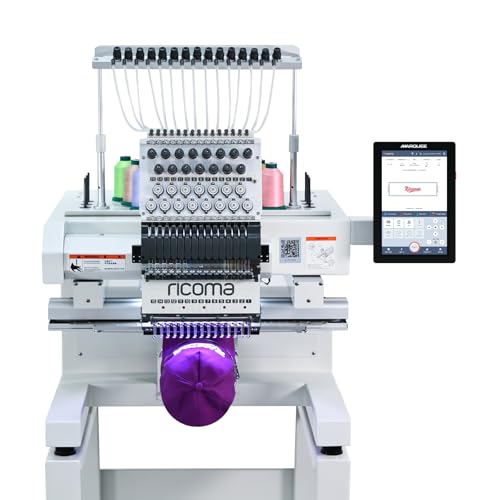
The Marquee 1501 is the only machine in this guide whose title completes the custom-design sentence: a 14.2 x 19.7 inch embroidery area for business, 1200 SPM speed, a 10.1 inch touch screen, WiFi and USB transfer, and stated range across 3D hat, flat, T-shirt, and fabric work. Both import channels are printed. A creator can plan the entire pipeline — digitise at the desk, send by WiFi when the network is kind, carry by USB when it is not — from the title alone, and that completeness is the flagship quality the name promises.
The field deserves its own paragraph. At nearly twenty inches in its long dimension, it holds jacket backs, banners, and large custom compositions in a single hooping, which for custom work means the client’s artwork is not negotiated down to a smaller machine’s geometry. Combined with the stated speed, the Marquee describes a throughput story: large custom pieces, produced at commercial pace, with the file arriving by the two most standard channels in the trade.
The title does not state a needle count in its text — the 1501 model name carries the family implication, but this guide reports title facts, and the needle configuration belongs on the verification list alongside it. That single gap aside, the Marquee is the most completely specified custom-design platform in this pool, and the benchmark against which the others’ silences should be measured.
- Embroidery area: 14.2 x 19.7 inches, the title’s stated figure
- Speed: 1200 SPM
- Display: 10.1 inch touch screen
- Transfer: WiFi and USB — both stated in the title
- Stated work: 3D hat, flat, T-shirt, and fabric embroidery
- Needle count: not stated in the listing title text — verify with the manufacturer documentation
- Where to buy: the Ricoma Marquee 1501 listing on Amazon — check price on Amazon
Strengths
- Both major import channels stated — the pipeline can be planned from the title.
- The largest custom canvas here holds commissions at their intended scale.
- Stated commercial speed matches the field’s production intent.
Trade-offs
- Needle configuration requires a documentation check despite the flagship billing.
- Its scale claims serious room; this is a business footprint, not a craft corner.
- Creators with small-format work will not use most of the field.
Best for: custom shops taking large commissions over both WiFi and USB. Not suited for: home creators whose designs live at motif scale.

Brother Entrepreneur PR680W 6 Needle Embroidery Machine — The six-needle Brother
The PR680W’s title is the tersest in this guide: a brand, a line, a needle count, and the words “multi embroidery machine.” Six needles, Entrepreneur line, Brother. Everything else — field, screen, transfer, speed — awaits the documentation, and this review will not decorate that silence. What the stated facts support is a positioning judgment: six needles is the deliberate middle of multi-needle territory, holding the core colours of most custom work resident while keeping the machine’s scale, threading burden, and price of entry below the ten-needle class.
For custom production, six resident colours cover the statistical bulk of commissions — logos rarely exceed five or six threads, monogramming needs fewer, and the designs that exceed six usually arrive as planned projects rather than daily work. The Entrepreneur name places the machine in Brother’s production-minded family, the same lineage as the PR1X elsewhere in this series, which signals the intended owner: a maker whose custom designs have begun to organise a working week.
The verification list is this guide’s longest per word of title: embroidery area, display, transfer channels, and speed all need confirming before the PR680W can be weighed against the fully stated Marquee. Buyers who do that reading will be comparing a six-needle specialist against flagships on honest numbers; buyers who skip it are buying a badge. The badge is a good one — but badges are not specifications.
- Needles: 6, multi-needle configuration, as the title states
- Line: Brother Entrepreneur series, per the title
- Embroidery area: the title gives no dimensions — consult the manufacturer documentation
- Display: the title gives no screen details — check the product page
- Transfer channel: unnamed in the title — verify before planning your import route
- Speed: no figure appears in the listing title — check the manufacturer documentation
- Where to buy: the Brother PR680W listing on Amazon — check price on Amazon
Strengths
- Six resident needles hit the palette size most custom commissions actually use.
- Entrepreneur-line positioning targets production-minded creators.
- A middle-scale multi-needle keeps threading and upkeep proportionate.
Trade-offs
- Nearly every comparative figure requires verification before purchase.
- Colour-rich artwork beyond six threads reintroduces rethreading pauses.
- Its title gives the least planning information in this guide.
Best for: creators whose custom work has outgrown single-needle pacing. Not suited for: specification-first buyers unwilling to read documentation.
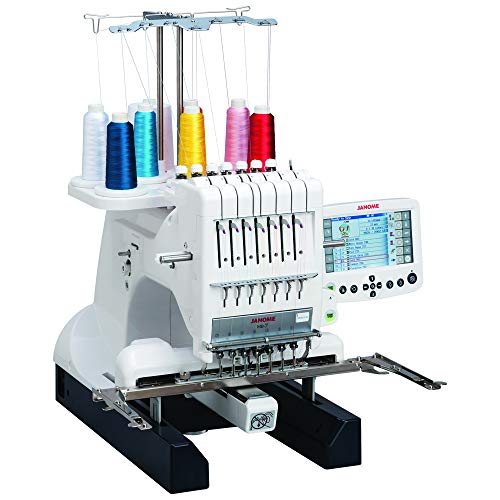
Janome MB-7 Multi Needle Embroidery Machine — The remote-screen multi
The MB-7’s title contains this guide’s most distinctive interface claim: a 5.7 inch remote computer screen for stitching. The word “remote” is the idea — the control screen is not fixed to the machine’s face but serves as a separate command post, which changes the ergonomics of preparation. A custom design can be reviewed, positioned, and managed from where the operator sits or stands most comfortably, with the machine itself arranged for the work rather than for the screen. In a production corner where the machine’s placement is dictated by hoops and garments, that separation is a thoughtful piece of industrial design.
The title frames the machine broadly — heavy duty, computerized, for beginners to experts, embroidery and quilting in its description — and states its multi-needle configuration without printing a needle count in words. Consistent with this guide’s rule, no count is asserted here beyond what the title states; the exact configuration joins the field size and transfer channel on the verification list. What is stated suffices to place the machine: a Janome multi-needle platform whose preparation interface is its headline.
For custom work, that interface emphasis is well aimed. Custom designs demand more preparation per piece than library work — every file is a first encounter — and a machine that invests its stated identity in the preparation surface understands where custom hours actually go. The stitching, once begun, is the easy part to automate; the judgment beforehand is the craft, and the MB-7’s title bows toward it.
- Configuration: multi-needle, per the title
- Interface: 5.7 inch remote computer screen, stated in the title
- Framing in title: heavy duty computerized machine for beginners to experts
- Needle count in words: not printed in the listing title — verify the exact configuration with the manufacturer documentation
- Embroidery area: not stated in the listing title — check the manufacturer documentation
- Transfer channel: not named in the listing title — verify before purchase
- Where to buy: the Janome MB-7 listing on Amazon — check price on Amazon
Strengths
- The remote screen rethinks preparation ergonomics for production corners.
- Multi-needle running brings custom batches up to unattended pace.
- Janome’s platform depth stands behind the terse specification.
Trade-offs
- Field, transfer, and exact needle configuration all need verification.
- A remote interface is one more component to place, power, and keep track of.
- Its breadth of framing — beginners to experts — means focused buyers must read carefully.
Best for: production creators who prepare designs away from the machine’s face. Not suited for: buyers wanting a fully stated specification in the title.

Janome MB-4S Four Needle Embroidery Machine — The four-needle step
Four needles is where multi-needle embroidery begins, and the MB-4S’s title keeps its pitch at that threshold: a four-needle embroidery machine with an exclusive bonus bundle. For custom work, the step from one needle to four is the single largest workflow jump in this guide — larger, in daily feel, than the step from four to ten. A four-colour design, which is most logos and nearly all lettering work, suddenly runs start to finish without a human hand touching thread, and the operator’s job transforms from attendant to supervisor.
The bonus bundle is named but not itemised in the title, so its contents join the verification list rather than being guessed at here. What can be said is that bundles at this level usually address the accessories a new multi-needle owner needs first, and that a buyer should confirm the list against their own setup gaps — hoops, threads, and tools — before valuing it.
The MB-4S suits the creator whose custom designs are real but whose palettes are disciplined: the café logo in three colours, the team wordmark in two, the monogram programme in one. Such work is the majority of the custom economy, and a machine sized exactly to it — no needles standing idle and expensive, no colour ceiling encountered weekly — is not a compromise purchase. It is a fitted one.
- Needles: four, as printed in the title
- Included: exclusive bonus bundle, named but not itemised in the title — confirm contents on the listing
- Embroidery area: not stated in the listing title — verify with the manufacturer documentation
- Display: not described in the listing title — confirm on the product page
- Transfer channel: not named in the listing title — verify before planning your import route
- Where to buy: the Janome MB-4S listing on Amazon — check price on Amazon
Strengths
- The one-to-four needle jump transforms custom workflow more than any other step here.
- A fitted palette size for the logo and lettering work that dominates custom orders.
- The named bonus bundle may cover first accessories — worth confirming in detail.
Trade-offs
- Designs beyond four colours reintroduce attended changes.
- Field, screen, and transfer all require verification.
- Growing catalogues may outgrow four needles sooner than ten.
Best for: creators stepping up from single-needle custom work. Not suited for: colour-rich production needing large resident palettes.
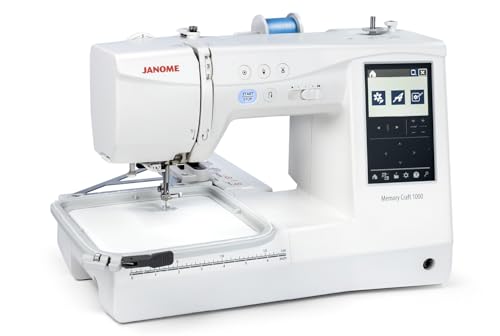
Janome Memory Craft 1000 Embroidery Sewing Machine Combo — The combo creator
The Memory Craft 1000 approaches custom work from the opposite direction to the commercial picks: not a production machine seeking designs, but a home creator’s combination machine — 300 built-in sewing stitches, 241 embroidery designs, 12 one-step buttonholes, an easy hoop tightening system, and a maximum embroidery size of 5.5 x 5.5 inches, all stated in its title. Its custom story is the home studio’s story: a maker who sews garments and wants to personalise them, combining built-in designs, editing them into originals, and gradually importing artwork of their own.
The easy hoop tightening system deserves its sentence, because hooping is the manual step custom work cannot automate away, and a system that makes hoop tension quicker and more consistent quietly improves every design the machine ever stitches — custom or library. The 5.5 x 5.5 field matches the combo’s honest scale: garment motifs, quilt blocks, personalised linens, the domestic custom catalogue in full.
The title states no transfer channel, so the import route for fully external designs must be verified in the documentation before a creator builds a plan on it — the one gap in an otherwise forthcoming title. What is stated describes a coherent home position: library depth for immediate creating, sewing power for whole-object making, and a field and hoop system sized to the work such a studio actually produces.
- Embroidery designs built in: 241, given in the title
- Sewing stitches: 300 built in, with 12 one-step buttonholes
- Maximum embroidery size: 5.5 x 5.5 inches
- Hooping: easy hoop tightening system, named in the title
- Transfer channel: the title is silent on this point — consult the manufacturer documentation
- Where to buy: the Janome Memory Craft 1000 listing on Amazon — check price on Amazon
Strengths
- A deep stated library lets customising begin by remixing from day one.
- Sewing and embroidery in one body serves whole-object home creation.
- The hoop tightening system improves the manual step every design depends on.
Trade-offs
- The import route for external files needs verification before planning around it.
- The 5.5 inch field caps design scale at domestic size.
- Single-workstation queuing applies, as with all combination machines.
Best for: home creators personalising their own sewing projects. Not suited for: commission producers needing multi-needle throughput.
Custom Pipelines, Compared on Stated Facts Only
| Machine | Needles stated | Field stated | Transfer stated | Preparation highlight stated |
|---|---|---|---|---|
| Ricoma EM-1010 | 10 | Not stated | Not stated | Auto trimmer; 10.1 in touchscreen |
| Ricoma Marquee 1501 | Not stated in text | 14.2 x 19.7 in | WiFi and USB | 10.1 in touch screen |
| Brother PR680W | 6 | Not stated | Not stated | Entrepreneur-line positioning |
| Janome MB-7 | Multi (count not in words) | Not stated | Not stated | 5.7 in remote computer screen |
| Janome MB-4S | 4 | Not stated | Not stated | Bonus bundle named |
| Janome Memory Craft 1000 | Combination machine | 5.5 x 5.5 in max | Not stated | 241 designs; easy hoop tightening |
The table’s lesson is the guide’s thesis in miniature: at the custom end of embroidery, titles state identities more readily than pipelines. One machine prints its channels; the rest print their characters. A custom workflow is a chain — file, transfer, preparation, stitch — and the buyer who verifies the unstated links before purchase owns a chain with no surprises in it.
How Do You Digitise a Drawing Without Losing Its Soul?
Digitising is translation, and every translation chooses what to keep. A pencil drawing’s soul usually lives in its proportions and its few boldest lines; the stitch file that honours it simplifies everything else. Fills become flatter, shading becomes two tones instead of six, and details smaller than a thread’s width are enlarged or mercifully omitted. The beginner’s error is fidelity to the pixel; the craft’s wisdom is fidelity to the impression, tested — always — by a stitched proof judged at the distance the finished object will live at.
Children’s artwork is the beloved test case. Its lines wander, its colours ignore anatomy, and its charm is inseparable from both. Digitised patiently — bold shapes kept, wobbles preserved where they read as joy rather than error — it becomes the most requested custom product in home embroidery: the drawing on the tea towel, the self-portrait on the tote. Machines in this guide stitch such files as happily as any logo; the artistry is entirely in the file’s preparation, which is why this guide treats digitising as a first-class stage rather than a preliminary.
Logos invert the problem: their soul is precision. A business mark must land at exact proportions, in exact colours, at sizes from cap to jacket back. The custom producer’s discipline there is version control — one master file, sized variants derived deliberately, thread colours recorded by number — so that the fiftieth shirt matches the first. The multi-needle machines here reward that discipline with resident palettes; the file discipline itself remains gloriously manual.
What Does On-Screen Editing Let a Creator Fix Before It Costs Fabric?
Nearly everything except the digitising itself. Placement against a pocket seam. Rotation to match a garment’s grain or a quilt block’s geometry. Scale within the honest limits that keep density believable. Combination — a name married to a motif, lettering arced over a crest — and colour reassignment, where the file’s abstract colour blocks are matched to the threads actually loaded on the machine’s needles. Each of those decisions, made on a screen with the hooped fabric in view, is a fault prevented rather than repaired.
The screens stated in this guide — the two 10.1 inch Ricoma touchscreens and the MB-7’s 5.7 inch remote computer screen — serve that preparation stage at different scales and in different postures. The principle outlives the particulars: preparation quality is the strongest predictor of custom-work quality, because a custom file has no track record. Library designs arrive pre-proven; custom designs are proven by you, on screen first and on scrap second, or expensively on the garment third.
Editing also owns the last honest checkpoint: the design’s size against the field. A file that exceeds the hoop must be split, shrunk, or refused, and the screen is where that arithmetic is faced. Creators who build the checkpoint into habit — field first, then fabric — almost never meet the mid-stitch discovery that a design’s final centimetre has nowhere to go.
How Does a Custom Machine Earn Its Keep Outside a Business?
Not every custom workflow is commercial, and the household version has its own economy: gifts that cannot be bought, because they carry a grandchild’s drawing or a family’s private joke; heirlooms repaired with a recreated motif; the household’s textiles gradually personalised into a set no shop sells. The Memory Craft 1000’s combination format serves exactly this economy, where the value is measured in occasions rather than invoices.
Household custom work also feeds the rest of the home’s making. The same room that personalises a cushion cover mends the garments beneath it, and a household deciding its bench often weighs plain sewing power alongside embroidery — the territory of Best Portable Sewing Machines at one end and heavy-duty specialists at the other. A custom embroidery machine chosen with the whole bench in mind integrates; one chosen in isolation sometimes duplicates what the room already owned.
There is a maintenance-of-meaning point here too. Custom designs accumulate into a family archive — the crests, drawings, and wordmarks of a household’s years — and that archive deserves the same backup discipline as photographs. The machine is replaceable; the file of a late grandparent’s handwriting, digitised and stitched onto linen, is not.
What Mistakes Do First-Time Custom Designers Make?
The first is importing a design at the wrong scale and letting the machine’s resize stretch density into nonsense — threadbare fills when enlarged, clogged detail when shrunk. Custom files carry an intended size the way sheet music carries a tempo, and the screen’s resize is for adjustment, not reinvention. The second is skipping the proof stitch on a new file, for the reasons this guide has repeated until they rhyme: the file has never been thread before, and scrap is where its surprises belong.
The third mistake is channel assumption — buying a machine whose import route was never verified, then discovering the pipeline fights the household’s devices. It is the most preventable disappointment in this entire category, and the spec boxes above mark exactly which machines ask that question loudly. The fourth is rights carelessness: stitching a found logo or artwork for sale without the owner’s blessing. Custom capability is not a licence, and the producers who thrive are the ones whose catalogues are theirs.
Fifth, a quieter error: letting the machine’s library go unexplored while chasing custom everything. The Memory Craft 1000’s stated 241 designs — and every library in this series — are raw material for remixing, resizing, and recombining, which is custom work with a head start. The creators who learn their libraries first digitise better afterwards, because they have studied how proven files are built.
Sixth, and closest to the fabric: embroidering a custom design onto a garment that cannot carry it — a motif too dense for a light tee, lettering across a seam that will distort it. The garment side of the partnership matters, and makers who also construct what they decorate, in the territory of Best Sewing Machines for Denim and its heavy-fabric cousins, learn quickly which cloth deserves which design. A custom file is only ever as good as the ground it is stitched into.
How Should a Custom Design Library Be Archived and Versioned?
A custom producer’s files are the business. Every commissioned logo, every digitised drawing, every corrected variant represents hours that a lost drive can delete in a second. The archive discipline that protects them is unglamorous and absolute: a folder per client or project, file names that carry the design’s name and version, the master file preserved untouched, and working copies derived from it. When a client returns after two years for the same crest on new garments, the archive is what turns that reorder from archaeology into administration.
Versioning deserves its own sentence because custom files mutate. A design approved at one size gets resized; a colour gets substituted; a letter gets respaced after a proof. Each change should produce a new version, never an overwritten master, because the question “which file made the good ones?” must always have a documentary answer. The machines here will stitch any version with equal fidelity — fidelity to a mistake included — so the discipline lives entirely in the filing.
Backups close the topic: the library should exist in at least two places, one of them not in the same room as the machine. Cloud storage, a drive kept elsewhere, even a periodically updated stick in a drawer across the house — the medium matters less than the redundancy. Creators insure their machines without thinking; the archive deserves the same instinct, because unlike the machine, it cannot be reordered.
How Do You Match Thread Colours to a Client’s Artwork?
Colour is where custom work is judged most harshly, because the client arrives with a reference — a logo file, a printed card, a photograph — and the finished embroidery will be held beside it. Screens lie about colour in both directions, so the professional method is physical: pull candidate spools, lay them on the actual garment fabric, and judge under the light the object will live in. A stitched colour chart, made once and kept, converts that judgment from memory into evidence.
Brand colours deserve special rigour. A business’s red is a specific red, and “close” reads as wrong at conversational distance precisely because the shape is familiar. Where an exact thread match does not exist, the honest conversation happens before stitching: show the client the nearest spool on the fabric, get the agreement in the open, and record the substitution in the job’s notes so the reorder matches the first run rather than the original file.
Metallics, variegated threads, and matte-versus-shine finishes are the custom palette’s expressive end, and they should be proofed with extra care because their stitched appearance departs furthest from their spool appearance. The multi-needle machines here make such experiments cheaper to run — a specialty thread can occupy its own needle during a proof session — but the proof itself remains non-negotiable craft law.
What Does It Cost to Run Custom Work, and How Should It Be Priced?
Custom pricing fails when it copies library-work pricing, because the custom job carries invisible hours the library job does not: consultation, digitising, proofing, and the correspondence that surrounds all three. The honest price counts those hours alongside the visible ones — hooping, stitching, finishing — plus the blank, the stabiliser, the thread, and a spoilage allowance drawn from the producer’s own proof history. Shops that track a month of real times discover their price; shops that guess discover it in public, mid-season.
Digitising is the line item clients most often expect to be free, because the file’s creation leaves no physical trace they can hold. The professional answer is to price it as what it is — skilled work that produces a reusable asset — and to say plainly who owns the file and what a reorder costs because the file already exists. Clients respect the clarity; the producers who skip it end up donating their most skilled hours and resenting their best customers.
Reorders are where custom economics turn kind. The file exists, the colours are recorded, the proof is history — the second run of a design is nearly pure production, and pricing can honour that while still paying the bench fairly. A custom shop’s catalogue, properly archived, is therefore an appreciating asset: every proven design makes the next sale easier to fulfil than the last.
How Should You Work With a Client’s Artwork Without Wounding It — or Them?
Client artwork arrives in every condition: the crisp vector file from a designer, the photograph of a napkin sketch, the beloved logo that exists only as a low-resolution image on a website. The custom producer’s first skill is translation diplomacy — explaining, kindly and concretely, what embroidery can and cannot carry. Thread cannot render photographic gradients at garment scale; tiny text will not survive; a rainbow of fourteen colours will cost like one. Each limit, shown with a proof or a sample rather than asserted, becomes a design conversation instead of a disappointment.
The redesign that follows should be presented as a stitched proof, not a screen mockup, wherever the commission matters. Thread behaves differently from pixels in ways even experienced clients do not predict, and a proof on the actual fabric — or its twin — settles colour, scale, and density questions in one object. Producers who proof before production almost never argue after it.
Rights and records close the relationship properly. The client’s artwork remains the client’s; the digitised file’s ownership and reuse should be agreed in plain language at the start, and the job’s record — file version, thread colours by number, size, fabric, stabiliser — should be kept as carefully as the embroidery itself. A custom shop’s reputation is built as much in its filing cabinet as at its needle, because reorders are where the profit and the trust both live.
What Separates a Custom Design That Sells From One That Merely Stitches?
Restraint, mostly. The designs that endure in a custom catalogue share a family resemblance across every subject: a silhouette readable at three paces, a palette disciplined to the needles the producer actually keeps loaded, lettering edited to the fewest honest words, and a size range the producer has proofed rather than assumed. They are designed for thread from the first sketch, not adapted to it as an afterthought, and the difference is visible in every finished piece.
Producers build such catalogues iteratively. A design enters as a commission or an experiment, survives its proofs, sells or delights, gets its colours and sizes recorded, and graduates into the permanent library with its documentation complete. Designs that fail any stage are retired without sentimentality, because a catalogue is a promise, and every weak entry dilutes the strong ones’ testimony.
The machines in this guide support that iteration at different scales — the combo’s library for the home creator’s remixes, the multi-needle platforms for the producer’s growing archive — but the editorial judgment is the same at every scale. Custom embroidery’s scarce resource was never stitch capacity. It is the taste to know what deserves twelve thousand stitches, and the discipline to proof it before a client’s garment volunteers.
What Maintenance Does a Multi-Needle Custom Machine Demand?
Multi-needle machines multiply everything, including housekeeping. Each needle has its own thread path, its own tension behaviour, and its own appetite for lint, and a custom workload — varied fabrics, dense designs, frequent colour work — feeds all of them generously. The producers who keep multi-needle machines sweet treat cleaning as a per-shift ritual rather than a per-month event: bobbin areas brushed, needle bars checked, thread paths inspected wherever a shred or a nest announced itself during the day.
Needle management becomes a system at this scale. With six or ten needles in play, the question is never whether a needle is dull but which one, and the honest method is scheduled replacement informed by the run log rather than by failure. A needle that fails mid-commission costs a garment’s placement window; a needle replaced on schedule costs pennies and a minute. Custom work, where every piece is someone’s artwork, prices that insurance correctly.
Calibration of expectations belongs in this section too. A multi-needle machine is a small factory, and factories have service intervals. Owners should learn from the manufacturer documentation what the maker recommends, keep the machine’s environment — dust, humidity, power quality — within civilised bounds, and treat unusual sounds as information rather than atmosphere. The machines here are built for production; production is a partnership between the hardware and the habits around it.
How Does a Home Creator Grow From Remixing to Digitising?
The path has three honest stages. First, the library stage: built-in designs stitched as they come, until the machine’s behaviour is understood in the hands. The Memory Craft 1000’s stated 241 designs make this stage long and varied for its owners, and every machine in this series offers some version of it. Second, the remix stage: library designs resized, recoloured, combined with lettering, and personalised — custom work with training wheels, where the file’s engineering is proven and only the arrangement is new.
Third, the digitising stage, entered when a design the creator wants does not exist in any library: a drawing, a photograph’s essence, an original motif. The first digitised files should be small, bold, and destined for forgiving fabric, because the stage’s lessons — density, pull compensation, stitch order — are learned by stitching and studying, not by reading. Creators who climb the stages in order arrive at original work with judgment; creators who leap to stage three with a complex commission learn the same lessons at a client’s expense.
The stages never really end. Established producers still remix library elements into custom compositions when the deadline is kind and the fit is right, and home creators still return to a favourite built-in design for the pleasure of its reliability. A custom practice is not a ladder climbed and kicked away; it is a workshop whose every bench stays in use.
How Should a Custom Setup Be Arranged in the Room?
Custom work needs two workstations in conversation: the digitising desk and the machine bench, with the proofing habit travelling between them. The desk wants the good screen and the thread chart; the bench wants the hoops, the blanks, and light that tells colour truthfully. Where space forces them into one surface, the discipline is zoning — files and screens at one end, fabric and stabiliser at the other, and a clear middle where the hooped piece is inspected before it commits to the needle.
Thread storage at production scale stops being a drawer and becomes a wall or a rack, organised by number so the palette a design requests can be assembled without a search. Blanks deserve the same order: sorted by garment and size, counted against the order book, with the proof fabrics — the sacrificial twins of everything stocked — kept in their own clearly marked place, because the fastest way to ruin a commission is to proof on the last good blank by mistake.
Finally, give the finished work a destination that is not the bench. Custom pieces waiting for collection should hang or lie where dust, sunlight, and workshop traffic cannot reach them, each with its job record attached. A custom shop’s final product is not the embroidery alone; it is the embroidery, correct and clean, attached to the right name — and the room’s arrangement is what keeps that sentence true on busy days.
Photograph finished commissions before they leave, with the client’s permission, in consistent light. The photographs become the catalogue that sells the next commission, the colour reference that settles the next reorder, and — years on — the archive of what the room made, which is a thing worth having for reasons beyond business entirely.
Keep the job tickets with the photographs, filed by client rather than by date. Custom work is a relationship business wearing a production costume, and the producer who can say “the same crest as March, in the deeper green” without a search has understood the assignment completely.
Review the file quarterly, the way you would service the machine. Dead contacts, superseded versions, and designs whose licences have lapsed all surface in a calm half-hour of housekeeping — and surface far more expensively when they are discovered in the middle of a rush order instead.
Add one line to each job ticket while the work is still warm: what you would do differently next time. Custom production improves through exactly such marginal notes — a stabiliser upgraded, a colour sequence reordered, a proof size changed — and a ticket file full of them becomes, within a year, the most practical training manual a small shop can own, written in its own orders and its own thread.
Final Recommendation
Choose the Ricoma Marquee 1501 when the pipeline must be provable from the title — both channels stated, the largest canvas, commercial speed. Choose the EM-1010 when daily commissions prize trimming automation and a resident ten-colour palette. The Brother PR680W is the considered middle step into multi-needle production, the Janome MB-7 the preparation-ergonomics pick, and the MB-4S the fitted first multi-needle for disciplined palettes. The Memory Craft 1000 serves the home creator whose custom work grows from sewing itself. Whichever you choose, may your files arrive clean and your proofs be honest.
Frequently Asked Questions
What file work must happen before a custom design reaches the machine?
The artwork must be digitised — converted into stitch instructions with fills, satin columns, underlay, and colour stops — in software suited to the task, then saved in a format the machine accepts. The machine stitches files; it does not interpret photographs or drawings on its own, so the digitising stage is where custom quality is truly decided.
Which of these machines states WiFi transfer in its title?
The Ricoma Marquee 1501, which names WiFi and USB both. The other picks’ titles do not state a transfer channel, and this guide flags each of those for verification in the manufacturer documentation rather than assuming a route. Always confirm the channel against your own devices before purchase.
Can I edit a custom design on the machine itself?
Preparation editing — sizing, rotating, positioning, combining, colour assignment — is the on-machine stage, served here by the Ricoma touchscreens and the MB-7’s remote computer screen as stated in their titles. Creating the stitch file itself remains the digitising software’s work, done before transfer.
Is six needles enough for custom work?
For the majority of commissions — logos, wordmarks, monograms — yes: most designs use six colours or fewer. Colour-rich artwork will pause for rethreading on any machine whose resident palette it exceeds, which is why the ten-needle Ricomas exist for varied daily production.
Do I need digitising software to use a custom-design machine?
To create new stitch files from artwork, yes — that conversion is the software’s job, and no machine in this guide claims to perform it from a photograph or drawing by itself. To stitch existing files, no: designs can be bought, commissioned from a digitiser, or built from the machine’s own library and editing tools, which is how many producers work for their entire first year. Software also earns its keep later, when a proven design needs a new size or a cleaner border, because editing a master file properly is always cheaper than re-digitising from the original artwork under deadline pressure.
What should I verify before buying any machine in this guide?
The transfer channel, the exact field dimensions, and — where a title omits it — the needle configuration and speed, all in the manufacturer documentation. The spec boxes mark each machine’s specific gaps. Five minutes of verification per machine is the cheapest insurance in custom embroidery.
Related Guides
Custom embroidery finds its most gifted canvas in the everyday textile — the hand towel turned into a monogrammed present, the plain linen made personal. If your custom designs are headed for the guest bathroom and the gift drawer, Best Affordable Decorative Hand Towels collects the towels that take personalisation most gracefully.