What's inside
- Key Takeaways
- Quick Picks
- What Did We Require Before a Combo Earned Its Place?
- Comparing the Settlements: Hoops, Libraries, and Screens
- Why Does Hoop Size Matter More Than Any Other Number?
- How Do You Run a First Embroidery Without Ruining the Garment?
- What Goes Wrong Most Often for New Combo Owners?
- What Does the Sewing Side Owe You Every Single Week?
- How Should You Think About Stabilizer, Thread, and the Invisible Budget?
- When Do Two Separate Machines Beat One Combo?
- How Do You Learn Two Crafts on One Chassis Without Confusing Yourself?
- What Should You Verify on the Product Page Before Ordering Any Combo?
- What Do the Big Numbers in Combo Titles Actually Promise?
- How Does Embroidery Change the Way You Finish Sewing Projects?
- How Do You Care for a Machine That Works Two Jobs?
- Final Recommendation
- Frequently Asked Questions
- Related Guides
As an Amazon Associate I earn from qualifying purchases. This post may contain affiliate links at no extra cost to you.
cottageverdict.com is reader-supported. When you buy through links on our site, we may earn an affiliate commission.
Ordering any of these six takes one click from the tables and headings below, since each pick links straight to its own Amazon page. The interesting decision happens earlier: a sewing and embroidery machine asks you to marry two crafts in a single chassis, and the marriage works only when you understand which partner you will actually spend your evenings with. Buyers who sew weekly and embroider monthly need a different machine from buyers who embroider daily and sew only to finish what they hoop, and this guide keeps that distinction at the center of every verdict.
Here is the tension built into every combo machine. Sewing wants an open throat, a willing feed system, and stitches by the hundred for construction. Embroidery wants a hoop field large enough for your designs, a screen you can read at arm’s length, and a library or import path for artwork. A single chassis funds both wish lists from one budget, so every model in this guide is a negotiated settlement: hoop size traded against sewing depth, screen size against price tier, design counts against stitch counts. The listings themselves advertise the settlement terms — the Brother SE700 states its 4 x 4 inch hoop and 135 designs outright, the SINGER SE9180 counters with a 7-inch touchscreen and WiFi — and reading those terms honestly matters more than any ranking.
One more premise before the picks: a combo machine is not two cheap machines glued together, nor is it automatically inferior to separates. For the crafter whose embroidery grows out of sewing projects — monogrammed quilt labels, embellished garments, personalized gifts — the shared footprint, shared bobbin system, and single learning curve are genuine advantages. The reader whose embroidery ambitions already strain at a 4-inch hoop’s edges should hear this guide’s quieter message, which is that field size is the one specification you cannot upgrade later, and it deserves to outrank every other number in the titles below. Those ready to consider embroidery-only hardware at a larger scale will eventually graduate toward the machines in Best Professional Embroidery Machines, but most home crafters live happily for years inside the settlements reviewed here.
Key Takeaways
- Hoop field is the permanent constraint: the SE700’s stated 4 x 4 inch field suits monograms and small motifs, while larger fields elsewhere in this guide open jacket-back and quilt-block territory.
- Design and stitch counts measure different crafts — weigh the 135-to-241 design libraries against the 103-to-300 sewing stitch menus according to which craft dominates your week.
- Connectivity divides the field: wireless LAN, WiFi, and USB transfer decide how easily artwork travels from a computer to the hoop.
- A combo machine’s sewing side must still earn its keep on plain construction, because most owners sew far more hours than they embroider.
- Screen size is a daily comfort feature, not a luxury, when you are editing designs standing at the machine.
- Every pick here is a settlement between two budgets; the right one is the settlement whose sacrifices fall on the craft you practice less.
Quick Picks
| Combo machine | Calling card | The case for it in one line |
|---|---|---|
| Brother SE700 Sewing and Embroidery Machine | The stated-spec starter | Its title spells out hoop, designs, stitches, and screen, making it the easiest first combo to evaluate honestly. |
| Brother SE2000 Sewing and Embroidery Machine | The quiet step-up | A computerized Brother combo whose spare listing asks you to verify its terms on the product page. |
| SINGER SE9180 Sewing and Embroidery Machine | Screen and WiFi forward | A 7-inch touchscreen and WiFi connectivity headline a listing built for design-led buyers. |
| Brother Innov-is NQ3550W Sewing & Embroidery Machine | Bundle-backed Innov-is | Arrives with a bonus bundle under Brother’s Innov-is badge, aimed at sewers upgrading in earnest. |
| Janome Memory Craft 1000 Embroidery Sewing Machine Combo | The deepest menus | States 300 stitches and 241 designs — the richest pair of libraries in this guide. |
| Caydo ES200 2-in-1 Sewing and Embroidery Machine | Two hoops included | Ships with two hoops and both Wi-Fi and USB transfer, an unusually complete starter arrangement. |
What Did We Require Before a Combo Earned Its Place?
Each pick had to be a true combination — a machine that sews construction seams as a native craft and embroiders through a hoop as another — rather than a sewing machine with a decorative-stitch marketing gloss. We then read the titles the way a buyer should: extracting the hard numbers where sellers state them (hoop dimensions, design counts, stitch counts, screen sizes, transfer methods) and refusing to invent the numbers where they do not. Two listings in this guide are nearly silent about their specifications, and their reviews below say so plainly and treat that silence as a cost: a buyer comparing settlements deserves the terms in writing.
We also weighted the sewing side more heavily than roundups usually do. In household after household, the embroidery unit spends its first month in constant use and its first year in occasional use, while plain sewing — hems, curtains, costumes, repairs, quilting — runs every week. A combo whose sewing manners disappoint will be resented daily for the sake of a craft practiced monthly. Buttonholes, feed behavior, and throat comfort therefore counted alongside hoop fields in every judgment that follows.
Finally, we considered the artwork pipeline. A machine with 200 built-in designs and no import path is a closed garden; a machine with fewer designs and easy wireless or USB transfer owns the whole internet’s worth of artwork, subject to licensing. Where a title states its connectivity, we treated that statement as a first-class specification, because for most owners it will shape the machine’s useful life more than any single stitch.

Brother SE700 Sewing and Embroidery Machine — The stated-spec starter
The SE700’s listing is a small lesson in how a title should behave. It states wireless LAN connectivity, eight included feet, 135 built-in embroidery designs, 103 sewing stitches, a 4 x 4 inch hoop, and a 3.7-inch touchscreen — nearly every term of its settlement, printed where a buyer can weigh it. That completeness makes the SE700 the natural first machine to understand, because nothing about its offer requires faith.
The settlement itself suits the embroidery-curious sewer. A 4 x 4 field covers the monograms, pocket motifs, baby-gift names, and quilt labels that make up most first-year embroidery, and 135 designs is a library large enough to learn on without immediate recourse to downloads — though the wireless LAN stands ready when that day comes, moving designs from computer to machine without a cable ritual. The 103-stitch sewing menu is modest beside the Janome in this guide, yet it covers construction, finishing, and a respectable spread of decorative work; the eight included feet signal that Brother expects the sewing side to be used, not merely owned.
Its limits are the honest kind. The hoop field will eventually wall in ambitious designs, forcing split-and-rehoop workarounds on large motifs, and the 3.7-inch screen asks you to lean in for detailed editing. Buyers should hear both limits as the price of the tier rather than as defects: this is the machine that teaches you whether embroidery is your craft, at a commitment level that forgives a no. If the answer turns out to be yes, the SE700 remains a capable sewing machine long after a larger embroidery field joins the household.
- Hoop field stated in the title: 4 x 4 inches
- Built-in embroidery designs stated: 135; sewing stitches stated: 103
- Display stated: 3.7-inch touchscreen; connectivity stated: wireless LAN
- Included feet stated: 8
- For today’s terms on the SE700, head to its Amazon product page
Strengths
- Nearly every material specification is stated in the listing, so the purchase needs no guesswork.
- Wireless design transfer removes the cable friction that quietly kills embroidery habits.
- Eight included feet show the sewing side is equipped for real construction work.
Trade-offs
- The 4 x 4 hoop field is the ceiling ambitious designs will eventually strike.
- A 3.7-inch screen is workable rather than generous for on-machine editing.
- Its 103-stitch menu is the slimmest sewing library in this guide.
Best for: sewers taking a first, honest step into embroidery with small-to-medium motifs. Not suited for: anyone already planning large-format designs or heavy on-machine editing sessions.

Brother SE2000 Sewing and Embroidery Machine — The quiet step-up
Where its smaller sibling narrates everything, the SE2000’s listing says almost nothing: a sewing and embroidery machine, computerized. This guide includes it because Brother’s combo lineage is the category’s backbone and many buyers will meet this model in their research — but its review must begin with the discipline this batch applies everywhere. A title that withholds hoop size, design count, and screen dimensions has not earned your assumptions. Whatever this machine’s virtues, they live on its product page and in the manufacturer’s documentation, and a careful buyer will extract them before money moves.
What can fairly be said from the listing alone? That it is Brother’s computerized step above the entry tier in name and numbering, that computerized control implies a screen-driven workflow rather than dials, and that it shares a design philosophy with the SE700 — one chassis dividing its budget between construction sewing and hoop work. Buyers cross-shopping the two Brothers should treat the comparison as an exercise: list the SE700’s stated terms down one column, then fill the SE2000’s column only from verified manufacturer figures, and let the completed columns — not the model numbers — argue.
There is a broader lesson here that this guide will repeat in other categories: in a market where some sellers print every specification and others print almost none, silence is itself information about how a purchase will feel. The SE2000 may well be the stronger machine; several buyers will conclude exactly that after doing the homework. But the homework is mandatory in a way it simply is not for the SE700, and shoppers who dislike homework should price that difference honestly.
- Control type stated in the title: computerized
- Hoop dimensions: the listing title gives no figure — pull it from the manufacturer’s documentation before comparing
- Design and stitch counts: likewise absent from the title, so verify both at the source
- Transfer method: not described in the title; confirm how designs reach the machine
- To price the SE2000, consult its page on Amazon directly
Strengths
- Brother’s combo platform is the category’s most traveled road, with a deep owner community.
- Computerized control promises a modern, screen-led workflow for both crafts.
- Numbering positions it as a step-up option for buyers outgrowing entry terms.
Trade-offs
- The listing title states almost nothing, shifting the entire verification burden onto you.
- Hoop field — the permanent constraint — cannot be judged from the title at all.
- Comparison shopping against stated-spec rivals is slower and more error-prone.
Best for: Brother loyalists willing to verify specifications at the source before buying. Not suited for: shoppers who want the settlement terms printed plainly before they commit research time.

SINGER SE9180 Sewing and Embroidery Machine — Screen and WiFi forward
The SE9180 argues its case through the interface. A 7-inch touchscreen — the largest display in this guide by a wide margin — changes what on-machine editing feels like: designs can be inspected, positioned, and adjusted at a scale where mistakes are visible before they are stitched, and menus stop being an exercise in squinting. Pair that screen with stated WiFi connectivity and the machine presents itself as the design-led option, built for owners who expect to browse, transfer, and tweak artwork as a central pleasure of the craft rather than an occasional chore.
The stated libraries support the pitch. Two hundred fifty sewing stitches delivering 401 applications is Singer’s way of saying the construction side is deep, and 150 embroidery designs with 10 fonts give the personalization work — names, monograms, lettered gifts — a running start. The one-step buttonhole keeps a daily sewing essential painless. Notice what the title does not state, though, because this guide’s discipline cuts both ways: no hoop dimension appears, and hoop field remains the permanent constraint discussed throughout. A buyer seduced by the screen should still extract the hoop figure from the manufacturer before ordering, since a glorious interface editing designs for a small field is a particular kind of heartbreak.
In the household division of labor, the SE9180 suits the crafter whose projects begin on a screen — downloaded artwork, customized lettering, designs adjusted per recipient — and whose sewing runs to garments and gifts that receive embroidery as their finishing flourish. Its accessory kit inclusion rounds out a package that asks the least additional shopping of any pick here besides the Caydo.
- Display stated in the title: 7-inch touchscreen
- Sewing stitches stated: 250, delivering 401 applications; embroidery designs stated: 150, with 10 fonts
- Connectivity stated: WiFi
- Buttonhole stated: one-step
- Hoop size: absent from the title — source it from Singer’s own documentation
- The SE9180’s current Amazon listing holds the live price
Strengths
- The 7-inch touchscreen transforms design editing from squinting to seeing.
- WiFi transfer plus 150 designs and 10 fonts serve personalization-heavy work.
- A 250-stitch sewing menu keeps the construction side genuinely deep.
Trade-offs
- Hoop dimensions go unstated in the title and must be verified before purchase.
- Interface-led value matters less to buyers who embroider from built-ins alone.
- Ten fonts still will not replace dedicated lettering software for complex text work.
Best for: design-led crafters who edit and transfer artwork constantly. Not suited for: buyers who rank hoop field first and are unwilling to verify it separately.

Brother Innov-is NQ3550W Sewing & Embroidery Machine — Bundle-backed Innov-is
The NQ3550W arrives under Brother’s Innov-is badge with a bonus bundle, and its listing — like the SE2000’s — declines to print the numbers. Two silent Brother listings in one guide might look like an oversight; it is instead the market as buyers actually meet it, and this review follows the same rule as its sibling’s: the badge and the bundle are what the title offers, so the badge and the bundle are what we can weigh, while hoop, library, and screen figures await your verification at the source.
What does the Innov-is badge itself argue? Within Brother’s range it marks the line aimed at committed hobbyists rather than first-timers — buyers who already sew, already know their frustrations, and are shopping for a machine that removes them. The bonus bundle sweetens that proposition in the currency experienced sewers actually value: the feet, hoops, and extras that otherwise accumulate as a trail of separate orders after the main purchase. A bundle’s worth, though, is entirely in its contents list, which the title does not enumerate — one more verification errand, and one with real money riding on it, since a bundle of things you need is a discount and a bundle of things you do not is packaging.
Position this machine in your shortlist accordingly. If you are a Brother owner upgrading from an entry combo, the NQ3550W is the natural candidate to research first, with the SE9180 and the Memory Craft 1000 as the cross-brand challenges it must beat on verified figures. If you are a first-time buyer, the stated-spec picks in this guide will teach you the category’s terms faster, and you can return to this machine fluent enough to interrogate it properly.
- Line: Brother Innov-is, with bonus bundle, per the listing title
- Bundle contents: not enumerated in the title — read the itemized list on the product page
- Hoop field and libraries: no figures appear in the title; the manufacturer’s documentation is the authority
- Format: combined sewing and embroidery machine
- See the NQ3550W on Amazon for its current selling terms
Strengths
- Innov-is positioning targets experienced sewers rather than absolute beginners.
- A bonus bundle can retire a whole list of follow-up accessory purchases.
- Brother’s combo ecosystem brings deep community knowledge and support.
Trade-offs
- Specifications and bundle contents both require verification beyond the title.
- Upgrade-tier pricing logic is hard to judge until the figures are in hand.
- First-time buyers get less guidance from this listing than from stated-spec rivals.
Best for: committed Brother sewers upgrading, who will verify the bundle and figures before buying. Not suited for: first-time combo shoppers who need the terms spelled out up front.
Janome Memory Craft 1000 Embroidery Sewing Machine Combo — The deepest menus
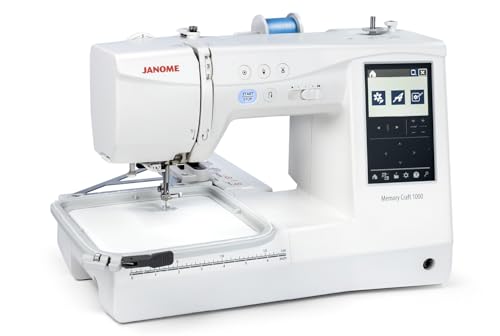
Janome’s Memory Craft 1000 makes the opposite choice from the silent Brothers: it publishes the richest pair of libraries in this guide, 300 built-in stitches and 241 embroidery designs, alongside 12 one-step buttonholes and a stated maximum embroidery size of 5.5 x 5.5 inches. That hoop figure deserves attention — it is half again the field of the SE700 in each dimension, which in practice means quilt blocks, larger motifs, and small garments’ fronts become single-hooping work rather than split-design puzzles. For the crafter whose embroidery ambitions are already concrete, this is the settlement whose sacrifices fall most lightly on the embroidery side.
The sewing numbers argue equal seriousness. Three hundred stitches is a construction and decorative library a garment sewer can inhabit for years, and twelve one-step buttonholes — a figure that counts buttonhole styles, each produced in a single step — speaks to shirtmaking and tailoring workloads where buttonholes arrive in batches, not singles. The easy hoop tightening system named in the title addresses a small, real misery of the craft: hoop screws that fight arthritic or tired fingers at exactly the moment fabric must not shift. Details like that mark a machine designed by people who have watched embroiderers work.
What the title leaves unstated is the transfer story and the screen, so the artwork pipeline question — how designs beyond the 241 built-ins reach the machine — needs a source check, as does display size for editing. Even with those errands outstanding, the Memory Craft’s printed terms make it the easiest premium pick in this guide to justify on paper: biggest stated hoop, deepest stated libraries, and a buttonhole bench built for garments.
- Stitches stated in the title: 300 built-in; embroidery designs stated: 241
- Maximum embroidery size stated: 5.5 x 5.5 inches
- Buttonholes stated: 12 one-step styles
- Hoop handling stated: easy hoop tightening system
- Transfer method and screen size: not covered by the title — confirm both with Janome’s documentation
- Check the Memory Craft 1000’s Amazon page for the present figure
Strengths
- The largest stated hoop field and deepest stated libraries in this guide.
- Twelve one-step buttonholes serve serious garment construction.
- Easy hoop tightening removes a small daily friction every embroiderer knows.
Trade-offs
- Connectivity and display details require a separate source check.
- Premium depth is wasted on buyers whose embroidery stays at monogram scale.
- A 5.5-inch field still will not swallow jacket-back designs in one hooping.
Best for: garment sewers whose embroidery plans are already ambitious and specific. Not suited for: casual embroiderers paying for depth they will never open.

Caydo ES200 2-in-1 Sewing and Embroidery Machine — Two hoops included
The Caydo ES200 is the insurgent in this guide — a 2-in-1 machine from outside the heritage brands — and its listing competes the way insurgents should: by printing numbers and including hardware. Two hoops in the box is its signature move, because a second hoop is the accessory experienced embroiderers buy first: while one design stitches, the next piece can be hooped and stabilized, and the machine’s idle time collapses. Sellers of far pricier machines leave that purchase to you; Caydo simply includes it.
The stated libraries are competitive rather than token: 207 sewing stitches, 168 embroidery designs, 8 fonts, a 4.3-inch touchscreen, and both Wi-Fi and USB transfer — the only listing here offering the belt-and-braces of two import paths. The claim of sewing up to seven fabric layers speaks to the construction side’s ambition, though buyers should read layer claims as we read them throughout this batch: a title-stated figure, useful for comparison, awaiting the testimony of your own denim hems. Fonts at eight sit between the SE700’s unstated lettering story and the Singer’s ten, adequate for the name-and-date personalization that dominates home embroidery.
The honest reservation is ecosystem depth. Brother, Singer, and Janome owners inherit decades of tutorials, dealer knowledge, and secondhand accessories; a Caydo owner walks a newer road with fewer fellow travelers. For the self-reliant crafter who learns from manuals and experimentation, that is a fair trade for the hardware generosity. For the buyer who knows they lean on community answers at midnight, it belongs in the calculation beside the hoop count.
- Hoops included, per the title: 2
- Libraries stated: 207 sewing stitches, 168 embroidery designs, 8 fonts
- Display stated: 4.3-inch touchscreen; transfer stated: Wi-Fi and USB
- Layer claim stated in the title: up to 7 fabric layers
- Current terms for the ES200 sit on its Amazon listing
Strengths
- Two included hoops enable a prep-while-stitching workflow from day one.
- Dual Wi-Fi and USB transfer covers both network and sneakernet artwork.
- Printed specifications rival the heritage brands’ stated-spec models.
Trade-offs
- A younger brand means a thinner owner community and tutorial library.
- The seven-layer claim needs your own heavy-fabric tests to confirm.
- Resale and accessory ecosystems are less developed than the big three’s.
Best for: self-reliant crafters who value included hardware and dual transfer paths. Not suited for: buyers who rely on dealer networks and deep community troubleshooting.
Comparing the Settlements: Hoops, Libraries, and Screens
| Model | Stated hoop field | Designs / stitches stated | Interface and transfer, as titled |
|---|---|---|---|
| Brother SE700 Sewing and Embroidery Machine | 4 x 4 in | 135 / 103 | 3.7-inch touchscreen; wireless LAN |
| Brother SE2000 Sewing and Embroidery Machine | Not in title | Not in title | Computerized; details to verify |
| SINGER SE9180 Sewing and Embroidery Machine | Not in title | 150 / 250 | 7-inch touchscreen; WiFi |
| Brother Innov-is NQ3550W Sewing & Embroidery Machine | Not in title | Not in title | Bonus bundle; details to verify |
| Janome Memory Craft 1000 Embroidery Sewing Machine Combo | 5.5 x 5.5 in max | 241 / 300 | Easy hoop tightening; transfer to verify |
| Caydo ES200 2-in-1 Sewing and Embroidery Machine | Two hoops included; field to verify | 168 / 207 | 4.3-inch touchscreen; Wi-Fi and USB |
Why Does Hoop Size Matter More Than Any Other Number?
Every other specification in a combo machine has a workaround. A small design library yields to downloads; a modest stitch menu yields to technique; a small screen yields to editing on a computer. Hoop field yields to nothing except splitting a design across multiple hoopings and re-aligning fabric between them — a skill that is learnable, genuinely useful, and nobody’s favorite way to spend an evening. The field stamped into a machine’s arm geometry is therefore the one decision in this purchase that cannot be revised, and it should be made against the largest work you realistically foresee, not the work you did last month.
Be honest in both directions, though. A field bought for a jacket back you will embroider once is money parked in empty space, and larger fields bring larger hoops, larger stabilizer bills, and more fabric consumed by test stitch-outs. The 4 x 4 field of the SE700 honestly serves the monogram-and-gift economy most home embroiderers actually inhabit. The Memory Craft’s 5.5-inch square earns its premium when quilt blocks and garment fronts are already on your project list, not on your someday list. And when even that field feels small every single week, the signal is not a bigger combo — it is that embroidery has become your primary craft, which is the moment the cold-brew logic of specialization applies and dedicated machines enter the conversation, much as our guide to Best Cold Brew Coffee Machines argues for giving a daily ritual its own dedicated equipment.
How Do You Run a First Embroidery Without Ruining the Garment?
Stitch your first design on scrap, full stop — a woven cotton offcut, hooped with the same stabilizer your real project will use. The first stitch-out teaches you the machine’s threading path, its tension manners, and the design’s true finished size, none of which should be learned on a christening gown. Watch the first minutes closely: most early disasters announce themselves as thread nests beneath the hoop within thirty seconds, and a hand on the stop control saves the fabric.
Then graduate in a deliberate order. A built-in motif on a tea towel. Lettering on a tote bag, where slight imperfection reads as charm. Only then the garment, positioned with the design marked in chalk and the hoop checked from the underside for sleeves or backs caught in the field — the classic combo-machine heartbreak is embroidering a front beautifully to its own back. Keep a stitch-out diary, even three lines per project noting design, stabilizer, and thread; combo machines reward owners who treat the second craft with the same methodical respect as the first, and your future self, reordering the stabilizer that worked, will be grateful.
What Goes Wrong Most Often for New Combo Owners?
The signature mistake is buying by design count, as if 241 built-ins were 241 reasons; within a year most owners stitch a personal greatest-hits of thirty designs and import the rest. Second is under-buying hoop field for a known project — the quilt already planned, the team jackets already promised — and spending the machine’s life splitting designs. Third is starving the sewing side: choosing entirely on embroidery terms, then discovering the construction manners you live with weekly are the ones you never examined. Fourth is stabilizer neglect, treating the invisible layer under the fabric as optional and harvesting puckered motifs. And fifth is letting the embroidery unit gather dust after the first month because transferring designs felt like a chore — the reason this guide weighs connectivity as a first-class term of every settlement. A sixth, quieter mistake deserves naming because it surfaces a year in: keeping no record of what worked. The owner who cannot remember which stabilizer saved the knit polo, or which needle ended the thread shredding, repeats experiments they already paid for, while the owner with a three-line project diary simply repeats successes.
What Does the Sewing Side Owe You Every Single Week?
Strip the embroidery unit away in your imagination and interrogate what remains, because that remainder is the machine you will live with most. It owes you a straight stitch that does not wander on long seams, a zigzag that finishes edges without tunneling light fabrics, and buttonholes that emerge the same size four times in a row down a shirt front. It owes you feed behavior that walks two layers together rather than creeping the top one forward, a throat that admits a rolled quilt or a winter coat without a wrestling match, and presser feet for the work you actually do — zipper, buttonhole, walking work if quilts are your habit — either in the box, like the SE700’s stated eight feet, or honestly priced as additions.
It also owes you manners. A combo machine lives on a household table, often shared, frequently moved between storage and service. Weight, footprint, and the choreography of converting between sewing and embroidery modes — arm off, unit on, hoop fitted — shape whether the machine gets used or gets admired. The Memory Craft’s easy hoop tightening belongs to this same ledger of daily manners: small frictions, repeated hundreds of times, are what separate the machine owners recommend from the machine owners apologize for. When two settlements look equal on paper, choose the one whose daily handling you can picture without sighing.
Finally, the sewing side owes you a future. Stitch libraries in this guide run from the SE700’s stated 103 to the Janome’s 300, and the honest question is not which number is bigger but which menu covers the techniques on your three-year horizon: heirloom work, stretch fabrics, decorative topstitching, free-motion quilting. A library you will grow into is value; a library you will never open is brochure ink, and the difference is visible in your own project list if you read it before you shop rather than after.
How Should You Think About Stabilizer, Thread, and the Invisible Budget?
Every combo machine’s true price includes a consumables economy that listings never total. Stabilizer is the big one: cut-away for knits and garments that will be washed and worn, tear-away for stable wovens and quick gifts, wash-away for lace and freestanding work — a household that embroiders monthly will cycle through all three, and the larger your hoop field, the more stabilizer each design consumes. The Memory Craft’s generous 5.5-inch square is not only a capability; it is a slightly larger grocery bill, forever, and that is a fair price for the capability as long as it is paid knowingly.
Thread follows. Embroidery thread is its own wardrobe — the 150 designs in the Singer or the 241 in the Janome assume colors a starter spool collection only begins to cover — and bobbin thread, needles rated for embroidery speeds, and replacement hoops join the ledger over time. None of this is an argument against the category; it is an argument for buying the machine whose settlement leaves room in the household budget for the craft itself. The owner who stretches to the largest field and then cannot afford stabilizer owns a very capable paperweight, while the SE700 owner with a stocked notions drawer produces finished work every week.
Keep a simple running total for your first year — machine, hoops, stabilizers, threads, designs purchased — and the category becomes refreshingly legible. Most households discover the machine itself was barely half the story, which is precisely why this guide treats included bundles, second hoops, and built-in libraries as economic features rather than garnish.
When Do Two Separate Machines Beat One Combo?
The combo’s case collapses in three recognizable situations. The first is simultaneous demand: a household where one person sews while another embroiders will spend its evenings negotiating custody of a single chassis, and separates end the negotiation. The second is embroidery volume — a side income in monogrammed goods, team wear, or market-stall personalization — where the embroidery unit’s field, speed, and downtime-while-sewing become business constraints rather than hobby quirks; that road leads toward the dedicated machines of our professional coverage. The third is a lopsided love: the quilter who wants one small monogram a year is over-buying embroidery hardware in any combo, and the embroiderer who sews only to finish hooped pieces is over-buying a sewing machine.
Notice what is absent from that list: quality. The persistent myth that combos sew worse than comparably priced sewing machines survives because owners compare across tiers. Within a tier, the settlements in this guide sew honestly, and the buyer who needs both crafts in one footprint gives up field size and simultaneity — not stitch quality. Choose a combo when one maker, one table, and interwoven projects describe your household; choose separates when the crafts have different owners, different volumes, or different ambitions. The machines will not be offended either way.
How Do You Learn Two Crafts on One Chassis Without Confusing Yourself?
The combo’s hidden curriculum is that it teaches two crafts whose habits sometimes contradict. Sewing rewards momentum: cut everything, chain-piece, press as you go. Embroidery rewards preparation: stabilize, hoop, test, and only then commit the good fabric. Owners who import sewing’s momentum into embroidery harvest puckered motifs and designs stitched through folded sleeves; owners who import embroidery’s caution into sewing take a month to finish a pillowcase. The first skill to learn on a combo is therefore not a stitch at all — it is switching temperaments when you switch the machine’s mode.
A practical syllabus helps. Spend the first fortnight sewing only: seams, hems, a buttonhole row on scrap, until threading, bobbin changes, and foot swaps are muscle memory. Then embroider only, on scraps and tea towels, until hooping tension and stabilizer choices stop feeling like research. The crafts share the chassis but not the learning curve, and interleaving them from day one doubles the confusion without halving the time. By the second month, combine them in the order real projects demand — construct the tote, then monogram it; piece the quilt block, then label it — and the combo’s whole reason for existing appears in your hands.
Keep the two crafts’ supplies physically separate even though the machine is shared: one drawer for sewing feet and bobbins, another for hoops, stabilizers, and embroidery thread. The small ritual of opening the right drawer becomes the temperament switch made tangible, and the household’s other sewers will thank you the first time nobody embroiders with a zipper foot still attached.
What Should You Verify on the Product Page Before Ordering Any Combo?
This guide has flagged verification errands throughout, and they deserve collecting into one checklist, because a combo is a long-lived purchase whose regrets are mostly born in unstated specifications. First, the hoop: find the maximum embroidery field in the manufacturer’s own figures, and if two hoops are mentioned, find both sizes — a large stated field served by a single small included hoop is a promise with an asterisk. Second, the transfer path: which formats the machine reads, whether wireless transfer needs brand software, and whether USB means a port on the machine or a cable to a computer. Third, the screen’s role: some displays merely start and stop designs prepared elsewhere, while others, like the large touchscreen in this guide, genuinely edit — know which you are buying.
Fourth, the sewing ledger: included feet itemized by name, buttonhole method and count, and whether the feed dogs drop for free-motion work if quilting is in your future. Fifth, the bundle, where one is claimed: contents listed piece by piece, valued against buying them separately, because an unitemized bundle is a marketing mood rather than a specification. Sixth, the physical facts: weight for those who carry machines to classes, throat dimensions for those who quilt, and the storage story for the embroidery unit when it is off the machine.
None of this homework is a criticism of the category — it is the category, a two-craft purchase with two crafts’ worth of terms. The stated-spec picks in this guide spare you most of it, which is a genuine part of their value; the silent listings may repay the effort with stronger machines, but they will collect the effort regardless. Budget an evening for verification the way you budget stabilizer for the first year, and the machine that arrives will be the machine you thought you bought.
What Do the Big Numbers in Combo Titles Actually Promise?
Design counts, stitch counts, and application counts are three different currencies, and titles spend them interchangeably on purpose. A built-in design is a finished piece of artwork ready to stitch. A sewing stitch is a mechanical pattern — straight, zigzag, scallop, blind hem — from which garments are built. An application, in Singer’s arithmetic, is a technique a stitch can perform, which is why 250 stitches can honestly deliver 401 applications while remaining 250 stitches. None of these currencies exchanges into another, and the buyer who totals them into one impressiveness score has been marketed to, successfully.
Read instead for coverage. On the embroidery side, ask whether the library spans the motifs your household actually uses — florals, animals, alphabets, holiday work — because 241 designs in genres you dislike are worth less than 60 in your taste, and the fonts matter separately: lettering is the most-used embroidery in most homes, so the Singer’s stated 10 fonts and the Caydo’s 8 deserve weight out of proportion to their size in the title. On the sewing side, coverage means the utility core is complete and the decorative surplus matches your style, not that the count reaches some threshold of virtue.
The same skepticism, turned friendly, applies to speed and layer claims wherever titles make them. A stated ability to sew seven layers describes a capability under the maker’s conditions; your waxed canvas and webbing will render their own verdict. Treat every number in this guide as the beginning of a verification habit rather than the end of one, and the titles become what they should have been all along — an index to the manufacturer’s documentation, not a substitute for it.
How Does Embroidery Change the Way You Finish Sewing Projects?
Ask combo owners what the second craft did to the first and the answer is rarely about decoration. Embroidery changes when a project is finished. The plain tote becomes the tote awaiting its monogram; the quilt is not done at the binding but at the label; the child’s dress carries a small motif that turns a garment into a keepsake, and gift sewing reorganizes itself around personalization deadlines. Projects take slightly longer and mean noticeably more, which most owners count as the entire justification for the category.
It also changes how projects are planned. Fabric choices start accounting for how a design will sit; construction order bends so that embroidery happens while pieces are still flat — a pocket embroidered before it is attached, a cuff monogrammed before the sleeve is closed. Sewers who embroider learn to think one step earlier in every pattern, and that foresight quietly improves their plain sewing too. Even the scrap bin changes character: every offcut becomes a potential test stitch-out, and waste declines.
There is a social arithmetic as well. A combo machine makes its owner the household’s personalization department — names on stockings, logos on team kit, dates on wedding linens — and the requests arrive with the regularity of a small business whether or not money is involved. Owners who love that role find the combo the most thanked appliance they own; owners who do not should set their boundaries early, because the machine’s capabilities will advertise themselves on every gift it helps produce.
How Do You Care for a Machine That Works Two Jobs?
A combo machine accumulates the wear of both crafts, and its maintenance calendar should be written accordingly. Embroidery is the dirtier tenant: stabilizer fibers, thread shreds, and adhesive residues migrate into the bobbin area at a rate plain sewing never matches, so the bobbin case and its surroundings want brushing out after every few embroidered pieces rather than at the monthly rhythm sewing alone would tolerate. A nest of lint under the needle plate is the leading cause of the looping, bird-nesting stitches new owners blame on tension, and the cure is a brush, not a dial.
Needles live faster here too. An embroidery design can lay down tens of thousands of stitches in an afternoon — a month of garment sewing compressed into hours — and a needle that has stitched that distance is done, however bright it looks. Change needles by project rather than by calendar, keep the two crafts’ needles labeled and separate, and the mysterious skipped stitches that haunt combo forums will mostly happen to other people. Hoops deserve their own small care: screws kept clean of adhesive, inner rings wiped so grip stays even, and storage out of the sun that warps plastic into ovals no tightening system can forgive.
The electronic half of the machine asks for simpler courtesies — a cover against dust, a surge-protected outlet, and software or firmware updates applied when the maker offers them, since design-format support quietly improves over a machine’s life. Owners who keep a one-page log — date, craft, project, needle changed, bobbin area cleaned — discover that a combo’s problems almost always announce themselves in the log before they announce themselves in the work. Two crafts, one chassis, one notebook: that is the whole maintenance philosophy, and it is well within any household’s discipline.
Final Recommendation
Choose by the craft you practice most and the hoop your real projects need. The SE700 is the honest apprenticeship: complete stated terms, a starter field, wireless transfer, and a sewing side that will outlast your embroidery apprenticeship either way. The Memory Craft 1000 is the connoisseur’s settlement — biggest stated field, deepest libraries, garment-grade buttonholes — for buyers whose project lists are already written. The SE9180 wins the interface argument outright, and the Caydo ES200 wins the included-hardware argument, while the two silent Brothers reward the buyer willing to verify their terms at the source. Whichever settlement you sign, sign it with your eyes on the hoop: screens can be squinted at and libraries can grow, but the field your machine was born with is the field it dies with, so let it be the one your actual ambitions fit inside. And give the purchase a season before you judge it — the first month on any combo is clumsy by definition, two crafts competing for the same pair of hands, while the sixth month is when owners discover which of the two crafts has quietly become theirs. The machine does not change in that interval; the maker does, and a settlement chosen for the maker you are becoming, rather than the one who walked into the shop, is the one that still looks wise when the first year closes.
Frequently Asked Questions
Can one machine really do both crafts well?
Yes, within the settlement logic this guide describes: the sewing side of a good combo is a complete sewing machine, and the embroidery side handles home-scale designs properly. What a combo cannot do is match a dedicated embroidery machine’s field or a dedicated production machine’s pace — which matters only when your ambitions reach those scales.
How many built-in designs do I actually need?
Fewer than marketing implies. A starter library of a hundred-plus designs, like the SE700’s stated 135, teaches the craft and covers common motifs; beyond that, transfer connectivity matters more, because imported designs — licensed from their creators — expand the library without limit.
Is a bigger touchscreen worth paying for?
If you edit designs at the machine — resizing, rotating, combining lettering — the SE9180’s stated 7-inch screen is a daily quality-of-life difference. If you prepare artwork on a computer and merely press start, a smaller display like the SE700’s 3.7 inches stops mattering.
What else should I budget for besides the machine?
Stabilizer in more than one weight, embroidery thread, spare needles, and eventually a second hoop if your machine ships with one. The Caydo’s two included hoops retire that last item at purchase; for other picks, treat the second hoop as a planned early addition rather than a surprise.
Can these machines embroider hats and other awkward items?
Flat hoops handle flat work; curved and tubular items need suitable hoops or frames and patient technique, and results vary by machine. Check your shortlisted model’s hoop and accessory range against the awkward items you genuinely plan, rather than assuming the category handles them by default. For garments, linens, and gifts, though, a combo remains the right-sized tool — sized to one maker’s actual routine rather than to a showroom’s ambitions, the same fit-to-habit logic that governs single-user equipment choices like those in Best Personal Coffee Machines.
How long does a typical embroidery design take to stitch?
Home designs span minutes to the better part of an hour depending on stitch count and color changes, and the machine’s pace is only part of the clock — hooping, stabilizing, trimming jump threads, and re-hooping for the next piece fill the rest. New owners consistently underestimate the preparation share and overestimate the stitching share, which is why the two-hoop workflow praised in the Caydo review matters more in real evenings than any speed figure a title could print.
Can I embroider designs I download or buy online?
On the connected picks in this guide, yes — that is precisely what the SE700’s wireless LAN, the Singer’s WiFi, and the Caydo’s Wi-Fi and USB paths exist for. Designs are licensed by their creators for particular uses, so keep the license terms with the files, and confirm the file format your shortlisted machine reads before building a library it cannot open.
Related Guides
Combo machines are the top of the home sewing range, so readers still deciding how far their sewing ambitions run will find the broader landscape mapped in Best Computerized Sewing Machines, the natural companion read before committing to a two-craft chassis.