What's inside
- Key Takeaways
- Quick Picks
- What Did a Machine Have to Show to Earn a Home-Use Place?
- How the Six Compare on the Numbers Their Titles Actually State
- How Big Does a Home Embroidery Field Honestly Need to Be?
- What Should a Home Embroidery Corner Actually Contain?
- How Do Designs Travel From a Screen to a Hoop in Each System Here?
- Which Habits Keep Home Embroidery From Eating the Household Budget?
- What Mistakes Do First-Time Home Embroiderers Make?
- How Does Stabiliser Decide Whether a Design Survives the Wash?
- What Does the First Month With a Home Machine Realistically Look Like?
- When Does a Home Machine Become a Small-Business Machine?
- How Should Thread and Needles Be Chosen for Domestic Fabrics?
- Which of the Six Fits Which Kind of Household?
- What Should You Verify on the Listing Page Before Ordering?
- How Do Noise, Weight, and Upkeep Shape Life With These Machines?
- What Separates a Tidy Monogram From a Memorable One?
- Final Recommendation
- Frequently Asked Questions
- Related Guides
As an Amazon Associate I earn from qualifying purchases. This post may contain affiliate links at no extra cost to you.
cottageverdict.com is reader-supported. When you buy through links on our site, we may earn an affiliate commission.
Every machine below is sold on Amazon and links straight to its own listing, so once you know the hoop size and the way you want designs to travel, you can check the current price on Amazon for the model you settle on. The best embroidery machines for home use share one trait before any other: they respect the scale of a house. They stitch monograms on towels, names on school jumpers, and motifs across quilt blocks without demanding a commercial floor, a three-phase supply, or a second mortgage in thread. What separates them is field size, transfer habits, and whether the machine also wants to be your sewing machine.
Read the six picks as three pairs. First come two Brother machines that keep the embroidery field at a domestic scale, one of them doubling as a full sewing machine. Then come two Poolin models that stretch the field dramatically wider for people whose projects have outgrown a small hoop. The Janome Memory Craft 500e follows as the editing-heavy specialist, and the little Brother Skitch closes the list as an app-driven experiment in how small an embroidery machine can become while still doing honest work.
One honesty note before the details. Everything numeric in this guide — design counts, hoop dimensions, screen sizes — is taken from the listing titles themselves. Where a title stays silent about a figure, the spec box says so in plain words rather than borrowing a number from a sibling model. Embroidery marketing loves borrowed numbers, and a home buyer deserves better than that.
Key Takeaways
- Field size is the first decision: the 4 x 4 inch class suits monograms and small motifs, while the Poolin pair opens fields of 11 x 7.9 and 15 x 7.9 inches for jacket backs and quilt panels.
- Two of the six picks are sewing-and-embroidery combinations, which matters if one machine must cover the whole craft table.
- Design transfer splits the field: Wi-Fi and USB appear on the Poolin models and the Janome, wireless LAN on the Brother SE700, and Bluetooth through a required phone app on the Skitch.
- Built-in libraries range from 135 designs on the SE700 to 200 on each Poolin, with the Janome adding six monogramming fonts and on-screen editing.
- Hoop counts are stated for the Poolin models and the Janome — four hoops each — while the Brother PE900 listing title leaves its hoop package unstated.
Quick Picks
| Machine | Badge | Why it earns its place |
|---|---|---|
| Brother SE700 Sewing and Embroidery Machine | The two-in-one anchor | It sews with 103 stitches and embroiders 135 built-in designs inside a 4 x 4 hoop, so one footprint covers both crafts. |
| Brother PE900 Wireless Embroidery Machine | The wireless specialist | An embroidery-only Brother built around WLAN, for households that already own a sewing machine they like. |
| Poolin EOC06 Large Hoop Embroidery Machine | The big-field step-up | An 11 x 7.9 inch embroidery area, four hoops, and 200 built-in designs move home projects into jacket-back territory. |
| Poolin EOC07 Embroidery Machine | The widest field here | Its 15 x 7.9 inch area is the broadest in this guide, paired with Wi-Fi, USB, and the Institch software named in its title. |
| Janome Memory Craft 500e Embroidery Machine | The editing workbench | On-screen editing, USB connectivity, 160 designs, and six monogramming fonts reward people who adjust designs at the machine. |
| Brother Skitch Single-Needle Embroidery Machine | The app-driven mini | A 4 x 4 inch field steered entirely through the required Artspira app over Bluetooth — embroidery reduced to its smallest sensible form. |
What Did a Machine Have to Show to Earn a Home-Use Place?
Home use is a stricter brief than it sounds. A machine can be excellent and still wrong for a house: too loud for evening stitching in a shared room, too wide for the table it must live on, or so hungry for proprietary extras that the first month of projects costs more than the machine did. The screening here therefore started with domestic evidence in the listing titles — hoop sizes a dining table can host, transfer methods that work with ordinary home Wi-Fi and ordinary USB sticks, and design libraries large enough that a beginner is not shopping for files before the first towel is finished.
The second screen was honesty of scope. Machines whose titles promised a defined embroidery area were favoured over vague claims, because the field measurement decides what you can physically make. A stated 4 x 4 inch hoop tells you monograms and pocket motifs are the menu. A stated 15 x 7.9 inch area tells you a quilt block or a sweatshirt front fits without splitting the design. Where titles stayed silent, that silence is reported rather than filled in.
Finally, the list was balanced across the ways households actually arrive at embroidery. Some readers sew already and want a combination machine. Some want embroidery only. Some are buying for a teenager’s bedroom desk, where the app-driven Skitch makes a kind of sense no traditional machine does. Readers comparing gentler on-ramps should also look at Best Entry-Level Embroidery Machines, which re-sorts much of this territory by learning curve rather than by room.

Brother SE700 Sewing and Embroidery Machine — The two-in-one anchor
The SE700 is the machine for the household that has one craft table and intends to keep it that way. Its title states the double life plainly: 103 sewing stitches for construction work and 135 built-in embroidery designs for decoration, sharing one body, one needle bar’s worth of attention, and one stretch of tabletop. For a home sewer who hems curtains on Saturday and monograms the curtain tiebacks on Sunday, that consolidation is not a compromise — it is the entire point.
The embroidery field is 4 x 4 inches, which deserves an honest framing. That square comfortably holds monograms, small floral sprigs, baby bib motifs, pocket logos, and the lettering lines that make up most domestic personalisation. It will not swallow a jacket back in one hooping, and designs larger than the field must be split or re-hooped, which is skilled work. Judged as a monogram-and-motif machine attached to a capable sewing machine, though, the field is correctly sized for the jobs most homes actually queue up.
Designs arrive by wireless LAN, and the 3.7 inch touchscreen handles preview and placement at the machine. Wireless transfer sounds like a luxury until you have carried a USB stick between a laptop and a sewing table forty times in a month; then it reads as what it is, a small daily mercy. The title also notes eight included feet, which belong to the sewing side of the machine’s life and widen what the construction half can do out of the box.
- Embroidery field: 4 x 4 inch hoop, as stated in the listing title
- Built-in embroidery designs: 135; sewing stitches: 103
- Display: 3.7 inch touchscreen
- Transfer: wireless LAN
- Included feet: 8, per the title
- Where to buy: the Brother SE700 — check the current price on Amazon.
Strengths
- One machine covers garment sewing and embroidery, saving both money and tabletop in a small home.
- Wireless LAN removes the USB-stick shuttle from everyday design transfer.
- The 135-design library plus a colour touchscreen makes the first month of projects genuinely varied.
Trade-offs
- The 4 x 4 field caps single-hooping ambition; large motifs mean splitting or re-hooping.
- Sharing one machine means sewing and embroidery queue for the same needle — no stitching a seam while a design runs.
- Households that already own a beloved sewing machine pay for a second sewing function they may never use.
Best for: sewing households adding embroidery without adding a second machine. Not suited for: makers whose first love is large-format motifs wider than four inches.
Brother PE900 Wireless Embroidery Machine — The wireless specialist
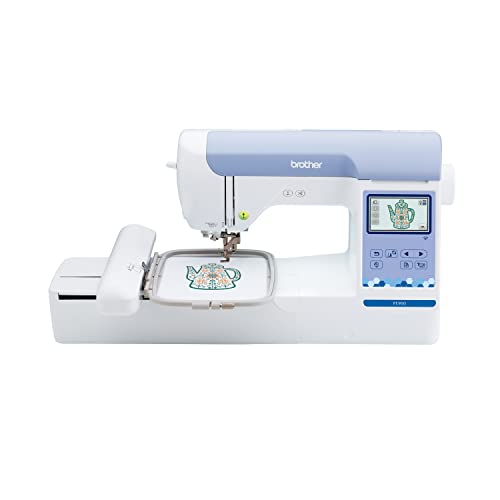
The PE900 takes the opposite organisational bet from its SE700 sibling: embroidery only, no sewing function competing for the machine’s attention or the buyer’s budget. Its listing title is unusually terse — it states the model, the embroidery-only purpose, and WLAN connectivity, and then stops. That terseness shapes this whole review, because several figures a buyer would normally compare are simply not in the title, and this guide will not invent them.
What can be said on the evidence is still meaningful. A dedicated embroidery machine earns its keep in a home that already sews: the sewing machine stays threaded for seams while the PE900 runs a forty-minute design, and neither craft waits on the other. WLAN in the title confirms designs move wirelessly, which places it in the same convenient transfer class as the SE700. Brother’s embroidery-only line exists precisely for this two-machine household rhythm, and the PE900 is its wireless representative in this pool.
The unstated figures matter enough to name them directly. The title gives no embroidery area, no design count, and no screen size, so anyone comparing the PE900 against the fully specified Poolin models below should open the listing and the manufacturer documentation and confirm those three numbers before deciding. That is not a dismissal — dedicated machines from this family are serious tools — but a comparison built on unstated numbers would be fiction, and fiction helps nobody choose.
- Function: embroidery only, per the listing title
- Transfer: WLAN wireless connectivity
- Embroidery area: not stated in the listing title — check the manufacturer documentation before comparing fields
- Built-in design count: not given in the listing title — verify with the manufacturer documentation
- Display size: the listing title is silent on this — confirm on the product page
- Where to buy: the Brother PE900, with pricing shown on its Amazon listing.
Strengths
- A dedicated embroidery station means designs run while the household sewing machine stays set up for seams.
- WLAN transfer keeps the design pipeline cable-free.
- Embroidery-only focus usually means the budget went into the embroidery mechanism rather than a second function.
Trade-offs
- The listing title leaves field size, design count, and screen size unstated, so homework is required before a fair comparison.
- It cannot sew a seam; a household with no sewing machine needs one of the combination picks instead.
- Wireless convenience depends on your home network behaving itself near the craft table.
Best for: two-machine craft rooms where embroidery deserves its own dedicated station. Not suited for: first-machine buyers who also need to sew.

Poolin EOC06 Large Hoop Embroidery Machine — The big-field step-up
The EOC06 is where this guide’s centre of gravity shifts. Its stated embroidery area — 11 x 7.9 inches — is nearly three times the width of the 4 x 4 class, and that single number rewrites the project list: sweatshirt fronts in one hooping, table runners worked in long passes, quilt blocks decorated at full size, and tote bags that take a design across the whole panel. Homes that outgrow small hoops usually do so within a year, and this machine is priced and specified for that moment.
Four hoops come in the box per the title, which matters more than it sounds. Multiple hoop sizes let small work stay small — a monogram in a little hoop wastes less stabiliser and handles better than the same monogram rattling in the largest frame. The 200 built-in designs double down on the theme of starting immediately, and the 7 inch touchscreen is the largest class of display among the home-scale picks here, which helps when you are nudging a big design into position across a wide field.
Transfer runs over Wi-Fi and USB both, a belt-and-braces arrangement that suits homes where the router lives two rooms away from the craft table. The title also frames the machine for home business and DIY projects, and that framing is credible at this field size: personalised sweatshirts and team hoodies are exactly the products a wide single-needle field can produce one at a time, patiently, at kitchen-table scale.
- Embroidery area: 11 x 7.9 inches, as stated in the listing title
- Built-in designs: 200
- Display: 7 inch touchscreen
- Hoops included: 4
- Transfer: Wi-Fi and USB
- Where to buy: the Poolin EOC06 listing — see the current price on Amazon.
Strengths
- The wide field ends the split-and-re-hoop workaround for most garment-front designs.
- Four included hoops keep small jobs economical with stabiliser and easier to handle.
- Dual Wi-Fi and USB transfer covers both networked and offline households.
Trade-offs
- A field this wide implies a bigger machine footprint; measure the table before ordering.
- It is embroidery-focused, so construction sewing still needs a separate machine.
- Large designs consume thread and stabiliser at a rate that surprises former 4 x 4 owners.
Best for: home embroiderers whose projects have visibly outgrown a small hoop. Not suited for: anyone whose embroidery begins and ends with monograms on towels.

Poolin EOC07 Embroidery Machine — The widest field here
If the EOC06 stretches the field, the EOC07 stretches it further in one direction: 15 x 7.9 inches, the broadest embroidery area in this guide. Fifteen inches of width is quilt-panel and jacket-back territory, the scale at which a design becomes the garment’s whole frontispiece rather than an accent on it. The title pairs that field with the same four-hoop package and 200 built-in designs as its sibling, plus a 7 inch touchscreen.
The distinguishing extra is the named Institch software in the title. Software companions matter for home embroidery because the machine is only half the workflow; resizing, combining, and lettering work happens on a screen, and a named package signals the maker expects you to do that work in their ecosystem. Designs move by Wi-Fi and USB, matching the EOC06’s flexibility.
Choosing between the two Poolins is therefore a single question: how wide do your designs honestly run? The extra four inches of the EOC07 earn their keep on wide, shallow work — borders, panels, banners, the long horizontal motifs that table linens and quilt sashing demand. For squarish designs the EOC06’s field already suffices, and the honest buyer measures their project list rather than buying width for its own sake.
- Embroidery area: 15 x 7.9 inches, the widest stated in this guide
- Built-in designs: 200
- Display: 7 inch touchscreen
- Hoops included: 4
- Software: Institch, named in the listing title
- Transfer: Wi-Fi and USB
- Where to buy: the Poolin EOC07 on Amazon — check price on Amazon before ordering.
Strengths
- Unmatched width for borders, panels, and long horizontal designs at home scale.
- Named companion software supports the design-preparation half of the workflow.
- Four hoops and a 200-design library mean the box starts work the day it arrives.
Trade-offs
- The field’s depth stays at 7.9 inches, so tall designs still need rotation or splitting.
- Wide-field machines are the largest furniture commitment in this guide.
- Buyers whose work is mostly small motifs pay for width they will rarely use.
Best for: quilters and linen workers whose designs run wide. Not suited for: compact craft corners with shallow tabletops.

Janome Memory Craft 500e Embroidery Machine — The editing workbench
The Memory Craft 500e argues that what happens before the first stitch matters as much as the stitching. Its title leads with 160 built-in designs and six monogramming fonts, then lands on the feature that defines it: on-screen editing. Being able to resize, rotate, combine, and reposition designs directly on the machine — without returning to a computer for every adjustment — changes the rhythm of home embroidery from batch processing to conversation. You hoop, you look, you nudge, you stitch.
The title describes the embroidery area only as “Large Area” without dimensions, and this guide reports that honestly rather than borrowing figures from other Janome models. What is stated is the supporting cast: high speed (again without a number in the title, so no speed figure is claimed here), USB connectivity for design transfer, and four included hoops. The four-hoop package matches the Poolin models and signals the same intent — varied project sizes from day one.
Janome’s Memory Craft line carries a particular reputation among home embroiderers for calm, precise stitching, and the 500e is the embroidery-only member of that family in this pool. It suits the maker who treats design adjustment as part of the craft rather than a chore before it: the person who kerns a monogram by eye and rotates a motif two degrees because the towel’s stripe demands it.
- Built-in designs: 160, with 6 monogramming fonts
- Editing: on-screen editing, stated in the listing title
- Embroidery area: described as large in the title; exact dimensions are not stated there — verify with the manufacturer documentation
- Speed: described as high speed in the title without a figure — no numeric claim is made here
- Hoops included: 4
- Transfer: USB connectivity
- Where to buy: the Janome Memory Craft 500e listing on Amazon, where its current price is shown.
Strengths
- On-screen editing keeps adjustments at the machine, where the hooped fabric is in front of you.
- Six monogramming fonts serve the personalisation work that dominates home embroidery.
- Four included hoops cover the realistic range of domestic project sizes.
Trade-offs
- USB is the stated transfer route; no wireless method appears in the title.
- The exact embroidery dimensions require a documentation check before comparison shopping concludes.
- Editing depth rewards makers who enjoy that stage; pure press-and-go users may underuse it.
Best for: detail-minded embroiderers who adjust designs at the machine. Not suited for: buyers who want wireless transfer as a hard requirement.

Brother Skitch Single-Needle Embroidery Machine — The app-driven mini
The Skitch is the strangest machine in this guide and, for a certain household, the most sensible. It is a single-needle embroidery machine with a 4 x 4 inch embroidery area, connected by Bluetooth, and powered — the title’s word — by the required Artspira mobile app. There is no meaningful onboard interface to speak of in the title’s telling; the phone in your pocket is the screen, the library, and the control panel.
That architecture makes the Skitch a genuinely small-footprint proposition. It suits a renter’s desk corner, a teenager’s bedroom, a dorm-adjacent craft habit — places where a traditional machine’s bulk and button forests feel like too much commitment. The 4 x 4 field keeps it in monogram and motif territory, the same honest territory as the SE700’s embroidery side, and within that territory a phone-driven workflow is arguably faster than any onboard menu.
The dependency deserves plain speech: the app is required, not optional. If your phone changes platforms, your data habits rebel against another account, or you simply dislike designing on a small screen, the Skitch’s whole proposition wobbles. Buyers who love their phones will find it liberating; buyers who embroider to escape their phones should choose any other pick on this page.
- Configuration: single-needle, as stated in the listing title
- Embroidery area: 4 x 4 inches
- Control: Artspira mobile app, required per the title
- Connection: Bluetooth
- Built-in design count: not stated in the listing title — the library lives in the app; verify with the manufacturer documentation
- Where to buy: the Brother Skitch — check its price on the Amazon listing.
Strengths
- The smallest commitment of space and ceremony in this guide — embroidery that fits a desk corner.
- Phone-based design handling feels native to younger makers and quick projects.
- Bluetooth connection keeps the setup free of cables and sticks.
Trade-offs
- The required app is a hard dependency; no app, no embroidery.
- The 4 x 4 field limits it to small motifs and lettering.
- Design work on a phone screen frustrates makers who think better on a large display.
Best for: small-space makers who live happily inside phone apps. Not suited for: anyone who wants the machine to work with the phone in another room — or off.
How the Six Compare on the Numbers Their Titles Actually State
| Machine | Stated field | Stated designs | Transfer stated | Character in one line |
|---|---|---|---|---|
| Brother SE700 | 4 x 4 in | 135 | Wireless LAN | Sewing and embroidery in one footprint |
| Brother PE900 | Not stated in title | Not stated in title | WLAN | Dedicated embroidery for existing sewing rooms |
| Poolin EOC06 | 11 x 7.9 in | 200 | Wi-Fi and USB | The wide-field all-rounder |
| Poolin EOC07 | 15 x 7.9 in | 200 | Wi-Fi and USB | Maximum width for panels and borders |
| Janome Memory Craft 500e | Described as large; dimensions not stated | 160 | USB | Editing depth and monogramming fonts |
| Brother Skitch | 4 x 4 in | Not stated in title | Bluetooth via app | Minimal footprint, phone-steered |
Read the table’s silences as carefully as its numbers. Two machines decline to state a design count in their titles, and one declines to state its field dimensions. Those gaps do not make them bad machines; they make them machines whose listings must be read one level deeper before money moves. The Poolin pair, by contrast, state nearly everything a comparison needs, which is itself a kind of confidence.
How Big Does a Home Embroidery Field Honestly Need to Be?
Field size is the spec that decides your project list, so it deserves a grounded tour. The 4 x 4 inch class — the SE700 and the Skitch here — covers the statistical bulk of home embroidery: monograms, names, small logos, bib and onesie motifs, pocket designs, and patches of modest size. If your mental Pinterest board is mostly lettering and little sprigs, a 4 x 4 field will not feel small for a long time.
The wide Poolin fields answer a different board: sweatshirt fronts, cushion panels, table runners, quilt blocks worked whole. Notice the shape, though — both are 7.9 inches deep. Width grew; depth did not. A tall design still rotates sideways or splits, and the maker who dreams in portrait orientation should study the dimensions rather than the headline area. Field shape, not just field size, is the honest metric.
Between those poles sits the Janome, whose title promises a large area without dimensions. Treat that as an invitation to verify, not a number to assume. And remember the hidden cost of every field: stabiliser is consumed by the hoopful, so a wide field used for small motifs burns backing material at a wide-field rate unless you keep a small hoop in rotation — one more reason the four-hoop packages in this guide matter.
What Should a Home Embroidery Corner Actually Contain?
The machine is perhaps sixty percent of a working embroidery corner. The rest is unglamorous and decisive: a table that does not wobble at stitching speed, light that lets you see thread colour truthfully, a bobbin supply wound before the project starts, and stabiliser in more than one weight because towels, tees, and denim each ask for different support. New buyers routinely budget for the machine and improvise the rest, then blame the machine for puckered fabric that was really a stabiliser shortage.
Storage shapes the corner too. Hoops want flat storage so they stay true; thread wants shade, because sunlight fades spools on a shelf faster than any project wears them out. And the room itself collects lint and thread ends at a pace that surprises people — the same household logic that puts Best Portable Carpet Cleaner Machines in a pet owner’s hallway applies here in miniature, because a craft room floor shows every dropped snippet, and a small cleaner kept nearby keeps the corner pleasant to work in.
Finally, plan the digital corner: a laptop or phone within reach, a labelled folder system for design files, and a backup. Design libraries evaporate with lost phones and dead drives, and the maker who has rebuilt a library once becomes a maker who backs up without being asked.
How Do Designs Travel From a Screen to a Hoop in Each System Here?
Four transfer philosophies appear in this guide, and each implies a different daily texture. Wireless LAN on the Brother machines sends designs from computer to machine across the home network — effortless when the network is healthy, baffling on the one evening it is not. Wi-Fi plus USB on the Poolin pair hedges that bet: the stick works when the router sulks. The Janome’s stated USB route is the oldest and most deterministic: the file is on the stick, the stick is in the machine, the design is there. And the Skitch’s Bluetooth-through-app model dissolves the file entirely into a phone library, which is either the future or a hostage situation depending on your feelings about apps.
File formats sit underneath all of this. Every ecosystem prefers its native formats and tolerates others to varying degrees, and the titles here do not enumerate format lists — another verify-with-documentation item, especially if you already own a design collection. A buyer with five hundred purchased files in one format should confirm compatibility before falling for any field size, because a library that will not load is a library that does not exist.
Lettering deserves its own sentence in this section. Monogramming fonts are stated for the Janome (six) and implied by the SE700’s design library, while the Poolin titles emphasise designs over fonts. If names and initials are your main craft, font counts and lettering tools deserve the same scrutiny as hoop dimensions.
Which Habits Keep Home Embroidery From Eating the Household Budget?
Embroidery’s running costs surprise people because they arrive in small, frequent parcels: stabiliser by the roll, needles by the pack, thread by the spool in colours no starter set quite covers. The discipline that keeps the hobby sane is boring and effective — test-stitch every new design on scrap with the same stabiliser stack as the real piece, because a ruined test square costs pennies and a ruined sweatshirt costs the sweatshirt.
Hooping is the other budget lever. Most home embroidery failures trace back to fabric that moved, sagged, or was stretched drum-tight and then relaxed into puckers. Floating a piece on adhesive stabiliser, using a hoop size close to the design, and resisting the urge to over-tighten the screw all save more money in a year than any thread sale. Machines do not ruin garments nearly as often as hurried hooping does.
Thread economy has its own quiet rules. Designs with heavy fill areas drink thread; outline and redwork styles sip it. When a project is decorative rather than precious, choosing lighter-density designs stretches a spool budget across a whole season of gifts. None of the six machines here changes that arithmetic — they only change how pleasantly you live inside it.
What Mistakes Do First-Time Home Embroiderers Make?
The classic opening error is buying for the largest imagined project instead of the median real one. A machine bought for a single jacket back spends its life doing monograms at three times the necessary footprint and cost. The second error is neglecting the sewing question: households without a sewing machine that buy embroidery-only models sometimes discover that finishing work — hemming the towel, constructing the tote — needs the machine they did not buy. That is exactly the gap the combination picks, and guides like Best Easy to Use Sewing Machines, exist to close for readers still assembling their first setup.
Skipping the test stitch ranks third, and ignoring stabiliser guidance fourth. A fifth, quieter mistake is treating the built-in library as the ceiling. Every machine here accepts outside designs through its transfer route; the library is a starting shelf, not a fence. The makers who thrive are the ones who learn their machine’s file habits in week one and spend the rest of the year making things instead of fighting formats.
How Does Stabiliser Decide Whether a Design Survives the Wash?
Ask experienced embroiderers what actually determines a result and most will say the unglamorous layer underneath. Stabiliser is the temporary skeleton that holds fabric still while thousands of needle penetrations try to drag it out of shape. Cut-away types stay in the garment permanently and suit stretchy knits that keep moving after the hoop comes off. Tear-away types leave with the project and suit stable wovens. Wash-away types vanish entirely and suit lace and freestanding work. None of the six machines in this guide changes those physics; they only stitch through whatever stack you hand them.
The home-scale consequence is that stabiliser belongs in the purchase budget from the start, in at least two weights, alongside a water-soluble topping for towels and fleece whose pile otherwise swallows stitches. New owners often spend their first month blaming thread tension for puckering that a correct backing would have prevented in one step. A test square on scrap fabric, stabilised exactly as the real piece will be, remains the cheapest education in the entire craft.
Hoop size interacts with backing economics too. A small motif stitched in the largest hoop wastes a large sheet of stabiliser; the same motif in a small hoop uses a fraction. This is the practical force behind the four-hoop packages stated for the Poolin models and the Janome: matching hoop to design is not tidiness, it is thrift repeated weekly.
What Does the First Month With a Home Machine Realistically Look Like?
Week one is almost always lettering. Names on towels, initials on shirt cuffs, a word on a tote — small, forgiving projects that teach hooping, thread changes, and the machine’s particular sounds. The SE700 and Skitch, with their 4 x 4 fields, are sized exactly for this curriculum, and the Poolin and Janome libraries give it variety. Expect one sacrificed tea towel. Everyone has one; it becomes the test cloth, and it earns its keep for years.
By week three the projects grow edges: a design placed wrong on a pocket, a sweatshirt front attempted slightly beyond the field, a first encounter with a purchased design file and the small diplomacy of formats and transfer routes. This is the week the transfer philosophy of your machine stops being a spec and becomes a habit — wireless owners glide, USB owners develop a stick that lives by the machine, Skitch owners discover which chair in the house has both Bluetooth range and good light.
The end of the first month usually brings the organising urge: thread sorted by colour family, designs filed by subject, a notebook of what stabiliser suited which fabric. Makers who build those small systems early spend later months producing; makers who skip them spend later months searching. The machine you choose sets the ceiling, but these habits set the pace.
When Does a Home Machine Become a Small-Business Machine?
The Poolin titles in this guide say “home business” outright, and the phrase deserves a sober reading. A single-needle home machine can absolutely produce sellable work — personalised sweatshirts, team towels, monogrammed linens — because the product is the design and the finish, not the production speed. What a single needle cannot do is hurry: every colour change is a manual rethread, and a twelve-colour design is twelve pauses. Home businesses thrive on that math when orders are counted in dozens per week, and strain against it when orders arrive in hundreds.
The honest signals that a home setup is becoming a business are operational, not emotional: a waiting list, repeat customers, designs you have stitched so often you could hoop them blindfolded. At that point the wide fields of the EOC06 and EOC07 stop being luxuries and become throughput, and the conversation about multi-needle machines — a different guide’s territory entirely — legitimately begins. Until those signals appear, the machines here are not a compromise; they are the correct scale.
One more business note belongs in a home guide: licensing. Built-in designs and purchased files carry terms, and selling items stitched from a design is not always permitted by the file’s licence. Home sellers should read the terms attached to their libraries before the first market stall, because the time to learn a design is personal-use-only is before it is on forty tote bags.
How Should Thread and Needles Be Chosen for Domestic Fabrics?
Embroidery thread is its own material world — glossy rayon-style finishes, matte options, metallics that test everyone’s patience — and home machines handle the mainstream of it happily with the correct needle. Embroidery needles differ from sewing needles in eye size and point behaviour, and using the sewing needle that happens to be installed is a quiet cause of frayed thread and skipped stitches. Keep a dedicated pack, change needles more often than feels necessary, and treat a needle as a consumable rather than a component.
Bobbin thread is the invisible half of every design: a lighter thread underneath keeps the top colours clean and the fabric stack thin. Homes that embroider on the SE700’s sewing side sometimes wind ordinary sewing thread into bobbins out of habit; dedicated bobbin fill gives flatter, tidier results on garments that will be seen from both sides, like towels and napkins.
Colour management finishes the topic. Thread on a screen lies; thread on a spool under your room’s light tells the truth. Makers who personalise gifts for a living — even a small living — learn to stitch a colour chart on neutral fabric and work from that. It is an afternoon’s effort that prevents years of almost-right reds.
Which of the Six Fits Which Kind of Household?
Consider the one-table household first: a flat, a small house, a craft practice that shares furniture with dinner. The SE700 was built for that address, because the sewing machine you already need and the embroidery machine you want become the same object on the same table. The Skitch fits an even tighter version of the same life — the desk corner, the shelf that must clear by morning — provided its owner genuinely enjoys steering a craft from a phone.
The two-machine household reads the list differently. Where a trusted sewing machine already lives, the PE900 adds a wireless embroidery station without duplicating a sewing function, and the Janome 500e adds the editing bench for the maker who adjusts everything. Both assume the household’s sewing needs are already met, and both reward that assumption with focus: while a design runs on the embroidery machine, seams can still be sewn across the room.
The project-led household — the one with a quilt show deadline, a stack of blank sweatshirts, a linen cupboard awaiting monograms at scale — should start its reading at the Poolin pair and work backwards. Field width is the constraint that cannot be negotiated after purchase, and the EOC06 and EOC07 state the two widest fields in this guide. If your project list is honestly that wide, smaller machines will not grow into it; if it is not, they remain the friendlier furniture.
There is also the gift-buying household, purchasing for someone else’s hobby. For them the deciding factors invert: library size and hoop count in the box matter more than transfer philosophy, because the recipient’s first month should be spent stitching rather than shopping for files and frames. On that logic the Poolin models and the SE700 — with 200 and 135 stated designs respectively — make the safest wrapped boxes in this guide.
What Should You Verify on the Listing Page Before Ordering?
Three verifications protect every buyer of every pick here. First, the unstated figures: the PE900’s field and design count, the Janome’s exact field dimensions, the Skitch’s library arrangements. The listings and manufacturer documents carry them; this guide declined to guess them, and your decision should not rest on a guess either. Write the three numbers down and compare like with like before the wide-field machines win by default simply because their titles speak in numbers.
Second, the consumables position. Confirm what arrives in the box beyond the machine — hoops are stated for several picks here, but needles, bobbins, stabiliser samples, and thread vary, and a machine that arrives Friday with no backing material is a sculpture until Monday. A modest starter bundle ordered alongside prevents the most deflating weekend in the hobby.
Third, the physical fit. Measure the table’s depth and the shelf or cupboard where the machine will live, and compare against the listing’s stated dimensions for the model you choose — wide-field machines especially. Add the hoop’s swing room: an embroidery arm travels, and a machine wedged against a wall will remind you of that fact mid-design. Ten minutes with a tape measure is the cheapest accessory in this entire guide.
Finally, confirm the transfer route against your own devices. A USB-only workflow needs a computer that still has the port or an adapter you trust; an app-driven workflow needs a phone you intend to keep; a wireless workflow needs the craft table within honest range of the router. The best machine on paper is the wrong machine if its design pipeline fights your household’s actual technology.
How Do Noise, Weight, and Upkeep Shape Life With These Machines?
Embroidery runs longer than sewing. A seam takes seconds; a dense design can stitch for the better part of an hour, with the machine’s rhythm as the room’s soundtrack. Households where the craft table shares space with a television, a sleeping baby, or a partner’s desk should treat noise as a real selection factor, and should be suspicious of any guide — this one included — that pretends a title can convey it. What can be said is structural: embroidery-only machines have one job’s worth of mechanism, combination machines carry two, and the Skitch’s minimal build makes it the easiest here to carry into another room when concentration matters.
Weight follows the same domestic logic. A machine that lives permanently on its table can be as heavy as it likes; a machine that must be lifted onto the table for each session and stored in a cupboard afterwards should be judged by its owner’s arms. Wide-field machines like the Poolin pair are, by the geometry of their fields, the largest objects in this guide, and their natural home is a dedicated surface. The 4 x 4 machines forgive transient arrangements far more readily.
Upkeep is the third quiet factor. Embroidery generates lint at the bobbin area faster than sewing does, because stabiliser fibres and thread ends accumulate with every design. A brush kept in the machine’s own drawer, a habit of clearing the bobbin area between projects, and a drop of attention to needle freshness prevent most of the stitch-quality mysteries beginners report. None of the six picks exempts its owner from that housekeeping; the ones with clear access and simple threading merely make it pleasanter.
Servicing deserves one honest paragraph. Home machines in this class are designed for years of domestic duty, and the realistic ownership pattern is cleaning at home, needles and bobbins as consumables, and a professional service when timing or tension genuinely drifts. Buyers far from any dealer should favour the machine whose everyday maintenance they can perform themselves with the manual open — which is to say, the one whose threading path and bobbin system they find intuitive in the first week, not the sixth month.
What Separates a Tidy Monogram From a Memorable One?
Since lettering is the work these machines will do most, it earns a craft section of its own. A tidy monogram begins before the hoop: with placement. The conventions are old and worth obeying — centre-chest on a shirt front, the corner of a napkin at a measured diagonal, a towel’s band centred with breathing room above and below. Measuring and marking with a removable guide takes two minutes and is the entire difference between personalised and merely decorated.
Letter style is the second decision, and the stated font counts in this guide — six monogramming fonts on the Janome, the libraries on the Brother and Poolin machines — are the palette. Formal serif lettering suits linen and wedding work; rounded casual lettering suits children’s clothes and kitchen textiles. Mixing the register — formal letters on a beach towel, playful letters on a christening gown — is the most common way good stitching produces a wrong-looking object.
Scale is the third decision and the one beginners most often overshoot. A monogram should be read at the distance the object is used: a cuff initial is whispered, a tote-bag letter is announced. Thread colour follows the same restraint — tone-on-tone lettering in a slightly deeper shade of the fabric’s own colour reads as luxury far more reliably than contrast chosen for visibility alone.
Finally, spacing. Letters crowded together look anxious; letters given air look deliberate. On-screen editing, the Janome’s stated strength, exists precisely for these micro-adjustments, but every machine here lets you preview before committing. The makers whose monograms get complimented are rarely the ones with the most fonts; they are the ones who previewed once more than everyone else.
Final Recommendation
For most homes, the Brother SE700 is the balanced answer: it sews, it embroiders, it transfers wirelessly, and its 4 x 4 field honestly matches the monogram-and-motif work that fills real households. Homes that have outgrown small hoops should step directly to the Poolin EOC06, or to the EOC07 when designs run genuinely wide. The Janome Memory Craft 500e rewards editors and monogrammers, the PE900 serves sewing rooms that want a dedicated wireless embroidery station, and the Skitch proves how little machine a phone-era beginner actually needs. Choose by the size of your typical design and the company the machine must keep — and let the towels of your house never go nameless again.
Frequently Asked Questions
Can one machine really sew and embroider well?
Combination machines like the SE700 do both jobs in one body, trading simultaneity for consolidation: you cannot sew a seam while a design stitches, because the same machine does each in turn. For homes short on space, that trade is usually worth it. For homes with two active makers, separate machines end the queue.
Is a 4 x 4 inch hoop too small to be useful?
No — it is the natural size for monograms, names, small motifs, baby items, and pocket work, which together make up most home embroidery. It becomes limiting only when designs grow to garment-front scale, at which point the wide-field Poolin models in this guide are the honest upgrade path.
What does on-screen editing actually change?
It moves resizing, rotating, combining, and repositioning onto the machine itself, so adjustments happen with the hooped fabric in front of you instead of back at a computer. The Janome 500e’s title calls the feature out by name; makers who tweak every design will feel the difference daily, while press-and-go users may rarely touch it.
Do I need Wi-Fi for home embroidery?
Not strictly. USB transfer, as stated for the Janome and both Poolin models, works without any network at all. Wireless routes — WLAN, Wi-Fi, and the Skitch’s Bluetooth app — trade that determinism for convenience. Households with unreliable routers should weight the USB-equipped picks more heavily.
Can these machines handle thick items like towels and sweatshirts?
Yes, with the right stack underneath. Plush towels want a water-soluble topping so stitches sit on the pile instead of sinking into it, and sweatshirt fleece wants cut-away backing to keep the design from distorting as the garment stretches in wear. The machine supplies the needlework; the stabiliser supplies the discipline, on thick items most of all.
How many hoops should come in the box?
More than one, ideally matched to your project range. The Poolin models and the Janome each state four included hoops, which lets small work use small hoops and saves stabiliser. Single-hoop packages can still serve, but expect to buy additional sizes as projects diversify.
Related Guides
Embroidery finds its favourite canvas in soft home textiles, and a personalised quilt is the classic first heirloom project. If stitched names on nursery quilts are where your machine is headed, Best Baby Quilts surveys the quilts most worth decorating — useful reading before the first hoop meets the first blanket.