What's inside
- Where to buy
- Quick Picks
- How these picks were chosen
- The six at a glance: power strategy and display
- How do you pick a clock that will not fail the big morning?
- What actually happens during an outage, model by model
- The battery talk every backup-clock buyer needs
- A short history of being woken on time
- Setting up for the morning that actually matters
- Clocks for households whose mornings differ
- Common mistakes
- Final recommendation
- FAQ
As an Amazon Associate I earn from qualifying purchases. This post may contain affiliate links at no extra cost to you.
As an Amazon Associate, cottageverdict.com earns from qualifying purchases.
An alarm clock earns its place on the nightstand on the worst morning of the year: the night the power failed at 3 a.m., the breaker tripped, or a storm took the street’s supply down until dawn. Most clocks handle that night badly — they blink, they reset, they wake you an hour late or not at all. The best power failure alarm clocks are the ones designed for exactly that failure, and they solve it by two completely different routes. Four of the six below are digital clocks with battery backup stated in their titles: mains power runs them day to day, and a battery carries the alarm through an outage. Two are wind-up mechanical clocks that need no electricity at all, ever, because a spring does the work.
Choosing between those routes is a genuine decision, not a formality. Battery backup preserves every digital convenience — large LED digits, dual alarms, USB charging, automatic daylight-saving changes — but depends on a battery you must remember to fit and replace. A keywound clock asks for a daily winding habit and repays it with total indifference to the grid. This guide keeps the two families clearly labelled in every review, reports display sizes and features exactly as the titles state them, and flags the one question backup titles rarely answer: whether the display stays lit during an outage or only the alarm survives it.
Where to buy
Four digital clocks with backup batteries, two mechanical clocks with springs. The orientations below sort them before the reviews begin.
The DreamSky opens with the fullest digital brief: auto set, battery backup, a 5 inch display with date, day of week and temperature, a USB port, auto DST and a brightness dimmer.
PPLEE’s clock pairs its battery backup with bold digits on a 7 in display, dual alarms, USB charger ports, a night light and a loud setting aimed at heavy sleepers.
The Westclox Keywound leaves electricity behind entirely — a manual wind-up analog clock with a loud bell, needing no batteries or power, sized 4.5 by 4.25 inches.
Equity’s 24014 is the other mechanical entry: a wind-up loud bell metal alarm clock, sold as a pack of 1, with the fewest stated features and the simplest promise in the set.
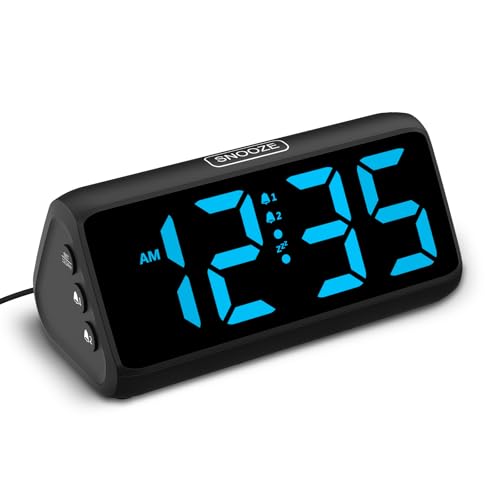
The generic 7.5-inch digital brings the largest display here, dual alarms, big LED numbers, adjustable volume for heavy sleepers, a dimmer and USB charging on a plug-in clock with battery backup.
Peakeep’s large display entry closes the six with date and day of week, a calendar presentation for desk or living room, five volume levels, a loud setting and auto DST on a dimmable plug-in clock with battery backup.
Quick Picks
| Pick | Best for | Standout from the title |
|---|---|---|
| DreamSky Auto Set Battery Backup 5 Inch | Set-and-forget digital accuracy | Auto set with auto DST and battery backup |
| PPLEE Alarm Clock Battery Backup | Heavy sleepers wanting a night light | Dual alarms, 7 in bold digits, USB ports |
| Westclox Keywound Analog Alarm Clock | Total independence from power | No batteries or electricity required |
| Equity 24014 Wind-Up Bell Alarm Clock | The simplest possible backup alarm | Wind-up loud bell, metal case |
| Generic 7.5-Inch Digital Alarm Battery Backup | Maximum display size | 7.5-inch display, dual alarms, USB charger |
| Peakeep Large Display Alarm Clock Battery Backup | Calendar-style date and day display | 5 volumes, auto DST, dimmable |
How these picks were chosen
The entry test was the premise of the keyword itself: the listing title had to state how the clock keeps its promise when mains power disappears. Digital clocks qualified only with battery backup named in the title — four did. Mechanical clocks qualified by needing no power at all, which the Westclox title states outright and the Equity’s wind-up design embodies. One category of impostor was excluded deliberately: devices that merely detect and announce a power failure are alarms about outages, not alarm clocks, and waking you for work is a different job from beeping about the grid.
Features were recorded only where titles state them. Display sizes are quoted in each title’s own inches. Volume claims — loud, five volumes, adjustable — are the listings’ words, kept as such. Auto DST, temperature and USB ports appear in this guide only for the models whose titles name them. Where a title is silent on a point buyers care about, such as whether a backup battery lights the display or only preserves the alarm, the review says the title is silent rather than guessing in the manufacturer’s favour.

DreamSky Auto Set Battery Backup 5 Inch
DreamSky’s clock is built around removing setup friction. Its title leads with auto set and battery backup, then lists a 5 inch large display showing date and day of week, a weekday function, temperature, a USB port, auto DST and a brightness dimmer. Read as a whole, that is a clock designed to be plugged in once and thereafter left alone: it sets itself, adjusts itself for daylight saving, tells you the day as well as the hour, and keeps its alarm alive on battery when the mains drops.
Listing-stated details — Display: 5 inch, with date and day of week. Power: plug-in with battery backup. Automation: auto set, auto DST. Extras: temperature display, USB port, brightness dimmer, weekday function.
Strengths
- Auto set plus auto DST removes the two occasions — first setup and the twice-yearly clock change — when bedside clocks most often end up wrong.
- Date and day of week on the display answer the half-awake question “is it a workday?” without reaching for a phone.
- A brightness dimmer matters at 2 a.m.; a 5 inch display that cannot dim is a night light you did not choose.
Trade-offs
- The title names a single display without mentioning dual alarms, so two different wake times are not part of its stated offer, unlike the PPLEE and the generic 7.5-inch.
- What the battery backup preserves — alarm only, or display too — is not stated in the title; confirm on the listing if a lit display during outages matters to you.
- At 5 inches its display is the smallest digital one here, a consideration for anyone reading the time from across a room.
The weekday function deserves a sentence of its own, because it solves a subtler failure than any outage: the alarm that rings on Saturday. A clock that knows the day of the week can treat weekdays differently, and for shift workers and school-run households that distinction is worth more than raw display size. Combined with the temperature readout — a small luxury that ends the morning debate about dressing for the weather — the DreamSky presents itself as a household information point that also wakes you, rather than a mere buzzer with digits.
Its backup philosophy is the mainstream one: the battery is insurance, not a power source. That insurance only pays out if a battery is actually fitted, which sounds obvious and is the single most common reason backup clocks fail in real homes — the battery was never installed, or the one from three years ago quietly died. Fit a fresh battery when the clock arrives, and replace it on a date you will remember; the clock change weekends, which this model handles automatically for its own display, make a natural reminder for its battery too.
Against the PPLEE, the DreamSky trades screen size and dual alarms for auto set and temperature. Against the Peakeep, it is the more automated and the less calendar-styled. It suits a buyer who wants the clock to administer itself.
Best for: a bedroom where auto set, auto DST and a weekday-aware alarm remove every recurring clock chore, with battery backup guarding the wake-up through an outage.
Not suited for: a buyer requiring two separate alarm times from one clock, since the title states no dual-alarm function.
PPLEE Alarm Clock Battery Backup
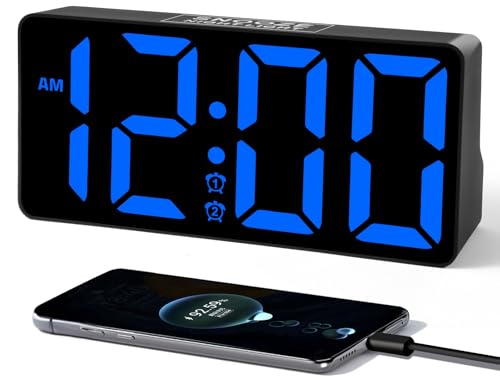
PPLEE’s clock is aimed at people who sleep through ordinary alarms. The title stacks a night light and bold digits on a 7 in digital display, dual alarms, USB charger ports, battery backup, adjustable brightness and volume, DST handling, and closes by calling itself a loud desk clock for heavy sleepers. Where the DreamSky optimises for automation, this one optimises for impact: bigger digits, two alarms, volume you can turn up, and light in the room when you need it.
Details from the listing title — Display: 7 in, bold digits. Alarms: dual. Power: battery backup. Light: night light. Charging: USB charger ports. Controls: adjustable brightness and volume, DST. Positioning as titled: loud, for heavy sleepers.
Strengths
- Dual alarms serve couples with different start times or a single sleeper who wants a warning alarm and a final one, without phone juggling.
- Adjustable volume plus a loud top end, as the title presents it, addresses the heavy sleeper directly rather than as an afterthought.
- USB charger ports plural keep a phone and a second device off separate wall adapters on a crowded nightstand.
Trade-offs
- A night light is a benefit only if it can be controlled; the title confirms its presence, not its dimming behaviour, so check the listing if you sleep in full darkness.
- No auto set or auto DST automation is claimed in the title beyond DST itself, so initial setup is a manual minute the DreamSky skips.
- Seven inches of bold display is a lot of clock for a small nightstand; measure the surface before ordering.
Heavy sleeping is usually a volume problem stacked on a habit problem. A single alarm at a fixed loudness becomes part of the dream’s furniture within a week; two alarms at adjustable volume let a household escalate — first call moderate, second call insistent — and the second alarm also rescues the morning when the first is dismissed in a half-sleep. The PPLEE’s title reads like it was written by someone who understood that pattern, and its backup battery extends the same seriousness to outage nights: a heavy sleeper is precisely the person who cannot afford a silent 6 a.m.
The night light reframes the clock as a small piece of bedroom infrastructure. For a household with children, an older relative, or anyone who crosses the room at night, a soft light at the nightstand prevents the phone-torch sweep that wakes a partner. Whether this unit’s light is warm, dimmable or switchable independently of the display is a listing-page question; the title establishes only that the light exists and that brightness overall is adjustable.
Compared with the generic 7.5-inch below, the PPLEE offers a slightly smaller display but adds the night light and the same dual-alarm, USB and backup architecture. Compared with the DreamSky, it is louder, larger and less automated.
Best for: a heavy sleeper needing dual alarms and adjustable, genuinely loud volume, with battery backup protecting the wake-up and a night light serving the room.
Not suited for: a small nightstand where a 7 in display crowds out books and a water glass, or a sleeper requiring total darkness without confirmed control over the light.

Westclox Keywound Analog Alarm Clock
The Westclox Keywound exits the entire backup conversation by never joining it. Its title describes a keywound analog alarm clock with a loud bell alarm, manual wind up, and states plainly: no batteries or electricity required. It is white, and sized 4.5 by 4.25 inches. A wound spring stores the energy; a bell spends it at the set hour. A power cut is, to this clock, a rumour about other appliances.
Stated in the title — Type: analog, keywound. Alarm: loud bell. Power: none — no batteries or electricity required. Winding: manual. Size: 4.5″ x 4.25″. Colour: white.
Strengths
- Immunity to outages is total rather than insured: there is no battery to forget, flatten or fit backwards, because there is no battery at all.
- A bell alarm is a physical sound with a rising insistence that electronic beeps rarely match for waking determined sleepers.
- Analog reading is glanceable and screen-free — no light in the room, no digits to interpret, nothing glowing at 3 a.m.
Trade-offs
- Winding is a daily or near-daily habit; forget it and the clock stops, which is the mechanical mirror of the digital clock’s forgotten battery.
- No date, day, temperature, USB or second alarm exists here — the title’s simplicity is the whole design, and its limit.
- Analog alarm setting is approximate compared with a digital clock’s exact minute; a 6:00 setting is a position on a dial, not a promise to the second.
There is a particular household this clock serves better than any digital entry: the one that has been failed by backup batteries before. Every battery-backed clock in this guide carries a maintenance dependency, and the Westclox carries a habit dependency instead. Habits, once formed, are remarkably reliable — winding a clock while you set the alarm becomes a single gesture, and the gesture itself is a confirmation that tomorrow’s wake-up is armed. Many owners describe that small ritual as the point, not the price.
The bell deserves its reputation honestly. A struck metal bell produces a complex, penetrating tone that carries through doors and through deep sleep in a way a piezo beeper at the same volume does not. It is also indiscriminate — it will wake the household, not just the sleeper — so flats with thin walls and partners on different shifts should weigh that. In a detached house, a farmhouse or a single-occupancy flat, the calculus reverses and the bell is pure advantage.
Size completes the picture: at roughly four and a half inches, this is a compact bedside or kitchen-shelf clock that asks little space and no socket. In a power cut that lasts days rather than hours — the storm scenario, the rural scenario — it is the only clock in this guide whose operation is entirely unaffected on day three.
Best for: a household that wants outage-proof waking with zero dependence on batteries or mains, and values a loud bell and a screen-free analog face.
Not suited for: a two-shift bedroom where a bell would wake a partner, or anyone unwilling to build the winding habit the mechanism runs on.
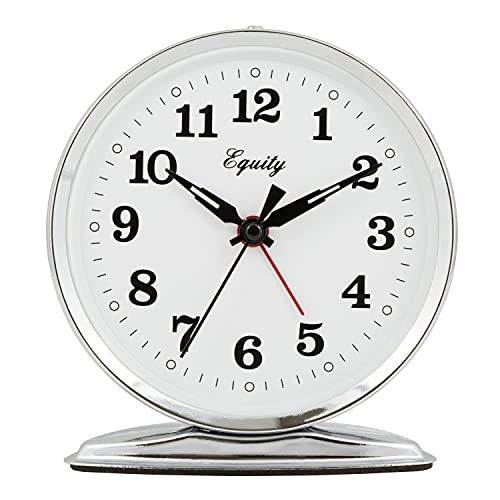
Equity 24014 Wind-Up Bell Alarm Clock
Equity’s 24014 is the minimalist of the mechanical pair: a wind-up loud bell metal alarm clock, pack of 1, model 24014. Its title is the shortest in this guide, and that brevity is informative — no display size, no dimensions, no feature list competes with the central proposition. You wind it, it rings. The metal construction is the one material claim the title makes, and for a clock that will be knocked off nightstands for decades, it is a meaningful one.
Title-stated specification — Type: wind-up analog. Alarm: loud bell. Case: metal. Model: 24014. Pack: 1. Dimensions and other features: not stated in the title.
Strengths
- The same total outage immunity as the Westclox, delivered with even fewer parts and systems to understand or maintain.
- A metal case tolerates the drops, knocks and house moves that crack plastic clock housings over a long life.
- Its simplicity makes it the natural dedicated backup: wind it before a storm or a crucial early start, and it asks nothing else of you.
Trade-offs
- The title states no dimensions, so nightstand fit must be confirmed on the listing rather than assumed from the Westclox’s figures.
- Everything digital is absent by design — no date, no snooze electronics, no USB, no second alarm setting of the digital kind.
- Like every wind-up, it stops if unwound; its reliability is a habit, renewed daily.
Consider the role of a second clock. Many households reading this guide already own a digital clock they like; what they lack is a failure mode that does not share the first clock’s weaknesses. A wind-up bell clock is the classic answer, because its failure modes — forgetting to wind, mis-setting the dial — are human and visible, while a digital clock’s failure modes are silent and electrical. Setting the Equity on the dresser as the storm-night and big-morning insurance, while the digital clock handles ordinary days, is a division of labour that costs little and covers almost everything.
The metal case also suits rougher postings than a bedroom: a workshop shelf, a cabin, a garage where a clock gets knocked by tools and timber. Nothing in the title promises water or dust resistance, so do not invent duties for it — but a metal wind-up tolerates the ordinary violence of utility spaces better than a glossy digital unit with a charging port.
Between the two mechanical entries, the choice is information versus austerity. The Westclox title tells you its size and colour and promises its no-power nature in words. The Equity title tells you its material and its bell and trusts you to know the genre. Either wakes you through a blackout; the Equity does it with the least explanation and, for many buyers, that is the charm.
Best for: a dedicated backup alarm in metal that can live on a dresser, cabin shelf or workshop bench, wound on the nights that matter most.
Not suited for: a buyer requiring dimensions or any digital feature confirmed by the title before purchase, since this listing states neither.

Generic 7.5-Inch Digital Alarm Battery Backup
This unbranded digital entry competes on size and a complete checklist. Its title states a 7.5-inch large display — the biggest in this guide — with dual alarms, big LED numbers, adjustable alarm volume for heavy sleepers, a dimmer, a USB charger, and a plug-in bedside design with battery backup. No model name or automation claims distract from that list; it is the straightforward large-screen option for buyers who read the time from across the room.
From the listing title — Display: 7.5-inch, big LED numbers. Alarms: dual. Volume: adjustable, aimed at heavy sleepers. Power: plug-in with battery backup. Extras: dimmer, USB charger. Brand: not named in the title.
Strengths
- The largest display here serves weak eyes, glasses-off reading and across-the-room visibility better than any rival in the set.
- Dual alarms plus adjustable volume covers the heavy-sleeper pattern without needing a phone as the second alarm.
- A dimmer is present, which is essential — a 7.5-inch LED display without one would light the whole bedroom.
Trade-offs
- An unnamed brand means the listing itself carries the whole burden of trust; documentation and support expectations should be set accordingly.
- No auto set, auto DST, date or temperature appears in the title, so this clock asks for manual setup the DreamSky automates away.
- The largest display is also the largest nightstand footprint in the guide; small surfaces need not apply.
Display size is an accessibility feature before it is a luxury. For anyone who removes glasses or contact lenses at night, a mid-size clock’s digits dissolve into a glow, and the choice becomes squinting, reaching for spectacles, or reaching for a phone with its attendant 3 a.m. distractions. Big LED numbers at 7.5 inches stay legible at pillow distance without optical help, and that single fact justifies this clock’s existence in the set. The dimmer then performs the equally necessary opposite trick at bedtime, taking the same panel down to a murmur.
The dual-alarm and volume provisions repeat the PPLEE’s heavy-sleeper logic in a plainer package: two chances to wake, at a volume you set. What this entry omits is the night light and the brand story; what it adds is half an inch of screen. Households choosing between them are really choosing which bedside problem is bigger — darkness or legibility.
Its battery backup follows the category pattern: the alarm is insured against outages provided a battery is fitted and fresh. As with the DreamSky, the title does not state whether the big display stays lit on battery power, and on a panel this size that question matters for anyone who wants to read the time during a blackout rather than merely be woken after one. Ask it of the listing before purchase.
Best for: a sleeper who removes glasses at night and needs the largest, dimmable LED digits in this set, with dual alarms and battery backup behind them.
Not suited for: a buyer seeking auto set, auto DST or a named manufacturer’s support, none of which this title offers.

Peakeep Large Display Alarm Clock Battery Backup
Peakeep’s entry styles itself a calendar clock as much as an alarm. The title promises a large display digital alarm clock for the bedroom with date and day of week, describes calendar desk table clocks for living room or office, and lists a dimmable plug-in electric design with battery backup, five volumes, a loud setting and auto DST. That living-room framing is distinctive: this is the clock in the set most at home on a mantel or office desk, where its date-forward display serves the room all day, and its alarm serves whoever naps, works or rises nearby.
Stated by the title — Display: large, with date and day of week; exact inches not given in the title. Volume: 5 volumes, loud setting. Power: plug-in with battery backup. Automation: auto DST. Dimming: dimmable. Settings named: bedroom, living room, office.
Strengths
- Date and day of week presented prominently serve older relatives, home offices and anyone whose schedule varies by day — the calendar function is the design’s centre.
- Five discrete volume levels give finer control than a simple loud/quiet switch, letting the alarm be set for the sleeper rather than the street.
- Auto DST removes the twice-yearly error window, pairing with the backup battery to cover both scheduled and unscheduled time disruptions.
Trade-offs
- The title calls the display large without stating inches, so size comparisons against the 5, 7 and 7.5 inch rivals must be confirmed on the listing.
- No USB charging or temperature appears in the title, so nightstand charging stays with a separate adapter.
- Dual alarms are not stated; households needing two wake times should verify before assuming.
The calendar-clock genre exists because the day of the week becomes genuinely uncertain in retirement, in shift work and in long home-working stretches, and a clock that answers it at a glance prevents a category of small daily frictions — the bin put out on the wrong morning, the call made on a Sunday. Peakeep’s title leans into that genre while keeping an alarm loud enough, across five volumes, to serve as a genuine wake-up device rather than a passive display. That dual identity is its distinction in this set.
Auto DST plus battery backup is a quietly complete resilience pairing: the backup covers the grid’s failures, the automation covers the calendar’s. The remaining dependency is the same one every digital entry here shares — a fitted, fresh battery — and the same twice-yearly clock change that this clock performs automatically makes a sensible battery-check reminder for the household.
Against the DreamSky, the Peakeep trades auto set and temperature for the calendar presentation and finer volume steps. Against the two big-screen rivals, it trades stated inches for stated day-and-date emphasis. It is the set’s choice for a room that wants information all day and an alarm when needed.
Best for: a living room, office or bedroom where a date-and-day calendar display earns its place daily, with five volume levels, auto DST and battery backup behind the alarm.
Not suited for: a buyer requiring an exact display size from the title, or USB charging at the clock, since the title offers neither.
The six at a glance: power strategy and display
| Model | Outage strategy | Display as titled | Alarms as titled | Notable extras as titled |
|---|---|---|---|---|
| DreamSky Auto Set Battery Backup 5 Inch | Battery backup | 5 inch, date, day, temperature | Single implied; weekday function | Auto set, auto DST, USB port, dimmer |
| PPLEE Alarm Clock Battery Backup | Battery backup | 7 in, bold digits | Dual | Night light, USB ports, adjustable volume |
| Westclox Keywound Analog Alarm Clock | None needed — wind-up | Analog dial, 4.5″ x 4.25″ | Single bell setting | No batteries or electricity required |
| Equity 24014 Wind-Up Bell Alarm Clock | None needed — wind-up | Analog dial, size not stated | Single bell setting | Metal case |
| Generic 7.5-Inch Digital Alarm Battery Backup | Battery backup | 7.5-inch, big LED numbers | Dual | Dimmer, USB charger |
| Peakeep Large Display Alarm Clock Battery Backup | Battery backup | Large, date and day; inches not stated | Not stated | 5 volumes, auto DST, dimmable |
The outage strategy column decides the family; everything else is refinement. Decide first whether your resilience will be a battery you maintain or a spring you wind, then shop within that family on display and features.
How do you pick a clock that will not fail the big morning?
Battery discipline or winding habit — which will you actually keep?
Both families fail by neglect, just on different schedules. A backup battery dies silently over years; a spring runs down audibly over a day or two. If your household keeps a calendar of small maintenance — filters, batteries, backups — the digital four reward you with automation and information. If your household runs on ritual, the wind-up pair turns the ritual itself into the guarantee. Readers who like their resilience mechanical in other categories may also enjoy Best Duo Coffee Makers, where the morning after the alarm has its own two-route choices to make.
Who else sleeps within earshot?
A bell wakes a house; a volume-controlled digital alarm can be aimed at one sleeper. Couples on different shifts, parents of infants and flatmates behind thin walls should weight the PPLEE’s or Peakeep’s graded volumes heavily, and treat the mechanical pair’s glorious loudness as the liability it becomes in shared space.
What must the clock tell you besides the time?
Day of week appears on the DreamSky and Peakeep; temperature only on the DreamSky; a second alarm time on the PPLEE and the generic big screen. List your household’s actual glances — most people check the same two facts every morning — and let that list, not a feature count, rank the digital four.
Will the display help or haunt at night?
Every digital entry here except where unconfirmed offers dimming in its title — the DreamSky, PPLEE, generic and Peakeep all name a dimmer or adjustable brightness. The analog pair sidestep the question entirely by glowing not at all. Light sleepers should decide this before display size, because a clock you unplug for darkness has a perfect outage record of the wrong kind.
What actually happens during an outage, model by model
Picture the same event six ways: the street’s power drops at 2 a.m. and returns at 5. The DreamSky rides it on its backup battery and, its auto set having kept it honest before the cut, rings as programmed — provided its battery was fitted. The PPLEE does the same with its dual settings intact, so both the early alarm and the final alarm survive the night. The generic 7.5-inch likewise preserves its programmed wake-up on backup. The Peakeep’s alarm and its auto-DST-corrected time both persist on battery.
The two mechanical clocks experience the outage as a non-event so complete it is hard to dramatise: the Westclox’s spring does not know the grid exists, and the Equity’s does not either. Their risk window is different — it is the previous evening, when a forgotten winding leaves the spring short. That asymmetry is the whole comparison in one scene: digital risk concentrates in a battery’s invisible state, mechanical risk in a habit’s visible one.
When power returns, digital clocks with auto set restore themselves gracefully; others may need their time checked, depending on how their backup behaved — another listing-level detail worth confirming for the model you choose. The mechanical pair, of course, simply kept time throughout, indifferent to the drama.
The battery talk every backup-clock buyer needs
Fit the battery the day the clock arrives. Test the backup once, deliberately: set an alarm five minutes ahead, pull the plug, and listen. That single rehearsal verifies the battery, the alarm path and your own understanding of the clock’s behaviour, and it converts an assumed resilience into a known one. Then write the battery’s fitting date on a label under the clock, and replace it on a household rhythm — annually is a sane default for a device whose whole purpose is one critical morning.
Keep a spare battery in the nightstand drawer, not in a kitchen cupboard two rooms away at 5 a.m. And remember that backup batteries in this category insure the alarm function as the titles frame it; whether a given model also lights its display from the battery is a per-model fact to confirm on its listing, as the reviews above flag where titles stay silent.
A short history of being woken on time
The wind-up pair in this guide are not nostalgia pieces; they are the current form of a technology that solved this problem before mains electricity existed to fail. The knocker-up of industrial Britain was a human being paid to tap windows with a long pole, because workers could not yet own a reliable alarm. The spring-driven bell clock ended that trade by putting stored energy on the nightstand — wind it at night, and the morning is guaranteed by mechanics rather than by a neighbour’s rounds. When the Westclox title says no batteries or electricity required, it is describing the original resilience technology, still manufactured because its failure modes remain the most legible of any in this guide.
Digital clocks inverted the arrangement. Mains power made displays bright, alarms programmable and features cheap, at the cost of making the grid a silent partner in every wake-up. Battery backup was the industry’s patch, and auto set — the DreamSky’s headline — arrived later still, using received time signals or stored settings to heal the clock after disruptions. Reading the six titles in this guide in order is almost a museum walk: spring, spring, then four successive negotiations between convenience and dependence, each adding automation to compensate for the fragility that electricity introduced.
Neither era wins outright, which is why both remain on sale. The spring asks a daily gesture and forgives everything else. The microchip asks a battery a year and forgives every gesture. Households contain both temperaments, often in the same person at different ages — the student who needs five volumes and two alarms becomes the retiree who wants the day of the week in large, calm digits and a clock that tends itself.
Setting up for the morning that actually matters
Identify, once a year, the mornings that cannot slip: the early flight, the exam, the hospital appointment, the first day of a new job. Those mornings deserve a protocol rather than a hope. The night before, set two independent alarms from two independent power stories — the digital clock on its mains-plus-battery, and the wind-up on its spring, set ten minutes apart. Independence is the operative word: two digital clocks share the grid and often the same forgotten-battery failure, while a spring and a battery share nothing at all.
Rehearse the protocol once in daylight. Wind the mechanical clock fully, set it, and let it ring at the kitchen table so the household learns its voice and its volume in context. Pull the digital clock’s plug with a test alarm set, as the battery section above recommends, and watch what its display does — that observation, made calmly in the afternoon, is worth more than any title’s promise at 5 a.m. in the dark.
Then place the clocks where the protocol assumes they are. A backup clock stored in a drawer is a story you tell yourself; the Equity on the dresser, wound on the nights that matter, is a system. Distance helps too: an alarm across the room requires standing, and standing sleepers rarely re-sleep through a second, independent alarm sounding behind them.
Clocks for households whose mornings differ
Shift work scrambles every assumption in this category. The alarm must ring at 4 p.m. as reliably as at 4 a.m., the display must be readable in a blackout-curtained room at noon, and the sleeper’s partner keeps opposite hours in the same bed. Graded volume — the Peakeep’s five levels, the PPLEE’s adjustable loudness — stops being a luxury in that household and becomes the feature that lets one person rise without detonating the other’s sleep. The mechanical bells, glorious in a farmhouse, are simply disqualified here by their indiscriminate joy.
Children’s mornings argue the opposite direction. A school-age child learning to self-wake benefits from a single, simple, unmissable signal and a clock with nothing to fiddle with — the wind-up pair again, or a digital clock with its second alarm disabled and its dimmer set by a parent. Students in shared houses split the difference: loud enough to penetrate a pillow over the ears, cheap enough to survive being knocked off a desk weekly, and backed up against the ancient wiring of student buildings, which fails more creatively than any other kind.
Older relatives complete the survey. For them the Peakeep’s calendar display and the generic’s 7.5-inch digits address the real risks — day confusion and illegibility — while auto DST removes a twice-yearly error that reliably produces one missed appointment per household per decade. In that setting the backup battery is not about storms; it is about the cleaner unplugging the clock to vacuum and forgetting to mention it, which is the most common power failure in domestic life.
Travel exposes another edge of the category. Hotel wake-up calls fail, phones die in the night, and a small wind-up clock in a wash bag answers to none of those systems. The Equity and Westclox both travel without chargers, adapters or voltage anxiety, which is why mechanical alarm clocks persist in the luggage of people who fly for a living. Their one travel rule is the home rule with higher stakes: wind before sleep, and set the alarm while fully awake, because a dial misread by one hour in a strange room is the genre’s classic own goal.
At home, the socket itself deserves a thought. A backup clock plugged into a switched outlet — one controlled by a wall switch near the door — lives one careless flick away from running on its battery every night, draining its insurance in silence. Plug bedside clocks into unswitched sockets, and if the room offers only switched ones, tape the switch or move the clock. Similarly, a clock sharing a power strip with a switch invites a partner’s tidying hand to disarm the morning. These are mundane failures, and mundane failures are precisely the ones that happen.
Finally, respect the snooze for what it does to resilience planning. Every digital clock here that offers snooze offers it equally in an outage, and a backup battery faithfully preserves your ability to snooze through the rescheduled start of your day. Households serious about one critical morning should agree the protocol in advance: on that morning, the first alarm is the alarm, and the second independent clock is the net. Technology in this category is solved; what remains is choreography.
Daylight saving deserves its own grumble in any clock guide, because it manufactures more late mornings than storms do. Twice a year, every manual clock in a house is wrong by an hour until somebody walks the rounds, and the bedside clock is the one whose wrongness has consequences. The DreamSky’s auto set with auto DST and the Peakeep’s auto DST exist to delete that chore from the two hardest weekends of the year. The PPLEE and the generic big screen name DST in their titles without the word “auto” in front of it, so their listings should be checked for whether the adjustment is automatic or a button press — a small distinction that decides whether you wake correctly on the first Monday of November.
The mechanical pair stand outside the whole question, serenely wrong by an hour until wound and reset by hand, and their owners tend to treat the ritual as part of the clock-change weekend rather than a defect. Either way, the household that thinks about DST in October, while buying, never has to think about it at midnight in March.
One more placement truth applies to every entry in this guide: an alarm clock wakes the person who can hear it from where it stands, and sound falls off with distance and doors. A clock bought for a teenager and installed in the parents’ room as a household conscience will fail at its actual job. Put the loud clock in the heavy sleeper’s room, the calendar clock where the calendar is consulted, and the backup clock where the critical sleeper sleeps. It sounds too obvious to write down, yet a remarkable share of “unreliable alarm” complaints trace back to a perfectly good clock standing in the wrong room, doing its job faithfully to an empty bed.
Volume, similarly, should be tested at the distance of use rather than at the shop shelf of the imagination. Set the PPLEE or the Peakeep to its middle setting for the first week and adjust from evidence; households routinely discover that the second-lowest of five volumes wakes them cleanly, and that the loudest setting was purchased for a sleeper they no longer are. The bells offer no such graduation, which is their honesty and their limit in a single trait.
There is also the question of what wakes you besides sound, and the PPLEE’s night light hints at it: light is the other channel. A clock whose display brightens, or a night light beside one, can lift a light sleeper most of the way before the alarm sounds, making the household’s mornings gentler at the same volume. None of the other five titles claims a light-based wake function, so treat the PPLEE’s lamp as illumination rather than a sunrise simulator — but even plain light, switched on by a partner or a timer plug, changes how a loud alarm feels when it lands.
And a word for the humble weekday function on the DreamSky, which prevents a category of error no outage can cause: the alarm faithfully ringing at 6 a.m. on a public holiday. Reliability is not only about surviving failures; it is about not manufacturing false alarms that train a household to distrust and disable the real ones. A clock that knows what day it is protects its own credibility, and credibility, in the end, is what every product in this guide is selling.
Gift-giving follows the same logic as buying, with one twist: give the clock whose upkeep matches the recipient’s habits, not your own. A wind-up Westclox delights a grandparent who winds clocks by reflex and frustrates a teenager who has never owned a mechanical object. A DreamSky suits the new homeowner setting up a guest room; a Peakeep suits the relative whose day-of-week confusion you have quietly noticed. The backup battery, in every digital case, should be fitted by the giver before wrapping — an insurance policy that arrives uninstalled is a chore disguised as a present.
Keep the instructions, too. Every household eventually faces the visitor, the babysitter or the returning student who must set the clock without its owner present, and a folded manual in the nightstand drawer converts that small crisis into a two-minute task.
Common mistakes
Never fitting the backup battery. The most common failure in this category is a clock whose insurance was never installed. Fit it on day one and test it by pulling the plug.
Confusing an outage detector with an alarm clock. A device that announces a power failure does not wake you for work. This guide excluded that class deliberately; do not let a search result re-add it.
Buying a bell clock for a two-shift household. A wind-up bell is gloriously loud and entirely unselective. Shared walls and staggered shifts call for graded digital volume instead.
Forgetting to wind before the crucial night. The mechanical pair fail only one way, and it happens the evening before the interview, the flight or the exam. Wind when you set, every time.
Ignoring the display at night. A large LED panel without its dimmer in use will redecorate your bedroom’s darkness. Set the dimmer the first evening, not the fifth sleepless one.
Assuming the display runs on battery. Titles here promise backup, not its scope. If reading the time mid-outage matters, confirm the display behaviour on the listing — the same care with stated versus unstated facts that guides our coverage of Best Washable Lifetime Furnace Ac Air Filters, where “lifetime” is likewise a word to read carefully.
Final recommendation
For most bedrooms, the DreamSky is the balanced answer: auto set, auto DST, day and temperature on a dimmable 5 inch display, and battery backup standing behind all of it. Heavy sleepers should step to the PPLEE for its dual alarms, night light and adjustable loud volume, or to the generic 7.5-inch if across-the-room legibility without glasses is the deciding need. The Peakeep suits the household that wants a calendar on the wall of its day — date and day prominent, five volumes deep, at home in a living room as much as a bedroom.
And for the household that has been betrayed by batteries, or simply prefers its resilience wound by hand, the Westclox and the Equity remain the purest answer in the category: a spring, a bell, and a wake-up that no grid failure can reach. Whichever family you choose, the related question of what the kitchen does after you rise is covered in Best Electric Cooktops With Downdraft Ventilation for readers planning a fuller morning-proof home.
FAQ
Does battery backup mean the display stays on during an outage? Not necessarily, and the titles here do not specify it model by model. Backup guarantees the clock’s timekeeping and alarm as the listing frames them; confirm display behaviour on the specific listing if it matters to you.
How long will a wind-up clock run on one winding? The titles do not state a running duration for either mechanical clock. Daily winding is the safe habit the genre assumes; check the listing for the stated reserve of the model you choose.
Which is loudest? The mechanical bells are famous for penetration, while the PPLEE titles itself loud for heavy sleepers and the Peakeep offers five volume levels with a loud setting. “Loudest” depends on the room and the sleeper; graded volume is the more flexible property.
Do any of these set themselves? The DreamSky titles auto set and auto DST; the Peakeep titles auto DST. The others should be assumed manual until their listings say otherwise.
Can one clock serve two people’s different alarms? The PPLEE and the generic 7.5-inch state dual alarms in their titles. The other titles do not claim a second alarm.
Fit the battery or wind the spring tonight, and tomorrow’s alarm stops depending on the grid’s good behaviour.