What's inside
- Key Takeaways
- Quick Picks
- How Did We Choose Chairs for Eight-Hour Computer Days?
- What Actually Makes a Chair Comfortable for a Full Day at a Screen?
- The Six Picks in Detail
- How Do the Six Picks Compare at a Glance?
- How Should You Set Up Your Desk and Chair for a Long Day?
- Which Floor and Caster Details Should You Check Before Ordering?
- How Does a Chair for Computer Work Differ from a Gaming Chair or a Dining Chair?
- When Is It Time to Replace the Chair You Already Have?
- What Should Tall and Petite Workers Check That Average Buyers Can Skip?
- How Should You Care for a Mesh Office Chair So It Lasts?
- What Mistakes Do People Make When Buying a Chair for All-Day Computer Work?
- Final Recommendation
- Frequently Asked Questions
- Related Guides
As an Amazon Associate I earn from qualifying purchases. This post may contain affiliate links at no extra cost to you.
cottageverdict.com is reader-supported. When you buy through links on our site, we may earn an affiliate commission.
Where to buy: each chair below links to its Amazon listing, where you can check price on Amazon and confirm seat dimensions, adjustment ranges and assembly requirements against your own desk and your own body. Office chairs are the most returned furniture category in online shopping, and nearly every return begins with a measurement somebody skipped, so measure first and order second.
The search for the best chairs for all-day computer work starts at about half past three in the afternoon. That is when a mediocre chair stops being furniture and becomes a presence — when you notice you have been shifting your weight from one side to the other, that your shoulders have crept up toward your ears, that the last hour of work happened at half speed because part of your attention was busy being uncomfortable. A chair for eight-plus hours of daily computing is not really competing on looks or even on features. It is competing on whether you still feel like yourself at the end of the working day.
This guide approaches that problem the way a long working week teaches you to. Seat cushion behaviour comes first, because foam that feels glorious for twenty minutes can pack down into a board by month three. The backrest comes second — mesh that breathes through a summer afternoon versus padding that feels plush in winter — and lumbar support that adjusts to your spine rather than asking your spine to adjust to it. Armrests, tilt, headrests and casters all matter, but they matter in that order, and the six chairs below were chosen and ranked with a full working day, not a showroom sit, in mind. Everything here is discussed in terms of everyday comfort and ordinary ergonomics; a chair is furniture, not treatment, and anyone with persistent pain should talk to a qualified professional rather than a product listing.
Key Takeaways
- All six picks are mesh-back ergonomic chairs built for full working days, differing mainly in cushion style, armrest design and body size covered.
- The Marsail leads on adjustment density, with adjustable lumbar support, 3D armrests and a headrest in one package.
- Flip-up arms on the GABRYLLY and TRALT suit desks in tight rooms where a chair must tuck fully underneath.
- The MOLENTS carries a BIFMA X5.1 certification and a wide seat for buyers who want tested standards.
- Cushion thickness is a genuine dividing line: the Fizzin’s thickened cushion favours padded comfort over mesh minimalism.
- Your desk height, floor surface and own measurements decide more than any badge — measure before ordering.
Quick Picks
| Pick | Badge | Why it earned its place |
|---|---|---|
| Marsail Ergonomic Office Chair | Best Overall Adjustability | High-back mesh, adjustable lumbar support, 3D armrests and a headrest cover the full checklist for varied all-day work. |
| GABRYLLY Ergonomic Office Chair | Best for Bigger Frames | A wide cushion, big-and-tall intent, flip-up arms and a locking tilt range built for larger workers in shared spaces. |
| TRALT Ergonomic Desk Chair | Best Sturdy All-Rounder | A 330 lb capacity listing with headrest and flip-up armrests that balances reading, typing and calls without fuss. |
| BestOffice Ergonomic Office Chair | Best Simple Mid-Back | A mid-back swivel chair with a sponge seat for workers who want support without a tall chair dominating the room. |
| MOLENTS Ergonomic Mesh Office Chair | Best Certified Build | BIFMA X5.1 certification, adjustable lumbar support, 3D arms and a wide seat for standards-minded buyers. |
| Fizzin Mesh Office Chair | Best Cushioned Seat | A thickened seat cushion under a mesh back, for workers who find full-mesh seats too firm by late afternoon. |
How Did We Choose Chairs for Eight-Hour Computer Days?
Our first filter was time. Plenty of chairs are perfectly pleasant for an hour of email; the brief here was a chair that remains pleasant through a morning of deep work, a run of video calls, an afternoon slump and the final hour when posture discipline evaporates. That meant prioritising the components that degrade gracefully — cushions that support rather than swallow, mesh that keeps its tension, lumbar mechanisms that stay where you set them — over features that merely photograph well.
Second, we favoured adjustability that a normal person will actually use. A chair with nine adjustments, six of which require an Allen key and a free Saturday, effectively has three adjustments. Levers and knobs reachable from the seated position, armrests that move without tools, and lumbar supports that can be nudged mid-afternoon all counted heavily, because comfort across a working week is a series of small corrections, not a single perfect setup achieved once in January.
We also deliberately included variety in format, because all-day workers are not one tribe. The guide holds a mid-back minimalist chair beside high-backed full-featured ones, a certified wide-seat model beside a thick-cushioned hybrid, so that readers with different rooms, bodies and budgets can see their own working life somewhere in the six. A guide that only lists variations of one chair has answered a question nobody asked; the real question is always which kind of chair, and only then which example of it.
Third, we weighed the unglamorous evidence of build intent: stated weight capacities, recognised test standards where a listing offers them, wheel and base design, and whether the maker describes the chair in the language of daily work rather than occasional use. Chairs aimed at all-day computing should sound like it, and the six below do.
What Actually Makes a Chair Comfortable for a Full Day at a Screen?
Start with the seat, because it carries you longest. A good all-day cushion supports the thighs without pressing behind the knees, and its front edge should fall away — the so-called waterfall shape — rather than cutting across circulation during long sits. Foam density matters more than foam thickness: a very thick, very soft cushion can let you sink until your weight rests on the seat pan itself, while a firmer cushion of moderate depth keeps distributing load hour after hour. Workers who run warm should also consider how much heat a deep padded seat holds by mid-afternoon compared with a suspended mesh seat.
The backrest’s job is different: it should meet your back rather than the average back drawn in a catalogue. Lumbar support earns its keep when it can move — up and down at minimum, ideally in depth as well — because the curve of a spine is personal geography. Mesh backs have a real advantage here beyond breathability: a tensioned mesh flexes with you when you shift, reach for a notebook, or lean into a call, then returns. Padded backs feel kinder in the first minute and warmer in the fourth hour, which is why this category has largely standardised on mesh for the back and kept the argument going about the seat.
Tilt behaviour is the third pillar, and the one buyers test least. A chair that reclines against gentle, adjustable resistance encourages the small postural changes that keep a long day varied; a chair locked bolt upright all day asks your muscles to hold one position for eight hours, which no back enjoys. Look for tilt tension you can tune to your body weight and a lock that offers more than a single upright position, then develop the habit of actually changing position — upright for typing, eased back for reading and calls.
Headrests sit at the end of most buyers’ lists, yet they change the texture of the non-typing hours. Reading, calls, webinars and thinking all invite a slight recline, and a headrest placed at the right height lets the neck rest during those stretches instead of holding the head’s considerable weight unaided. The catch is placement: a headrest that cannot adjust to your height either pushes your head forward or misses it entirely, so treat an adjustable headrest as a feature and a fixed one as a coin toss — and if you are tall, verify the backrest is long enough for the headrest to reach you at all.
Armrests, finally, should be treated as elbow furniture, not body furniture. Their job is to hold your forearms at a height where shoulders stay dropped while you type, and to get out of the way — down, back, sideways or flipped up entirely — when you move closer to the desk or stand. Armrests that force your elbows outward or shrug your shoulders upward are worse than none, which is why adjustability in this price class has become the difference between a chair that fits a worker and a chair a worker fits around.
The Six Picks in Detail

Marsail Ergonomic Office Chair — Best Overall Adjustability
The Marsail is the chair in this guide for the worker who intends to set up once, properly, and then make small refinements for years. Its specification reads like the checklist from the section above worked through in order: a high-back mesh that keeps air moving across a long afternoon, lumbar support that adjusts rather than merely exists, 3D armrests that move in height, width and angle, and a headrest for the moments when a call lets you lean back and think. None of those features is unique in isolation; the value is finding them together, in one chair, at the sensible end of the market.
Living with it is a story of small mercies. The mesh back means a south-facing home office in July stays bearable without a fan pointed at your spine. The armrests can be angled inward for keyboard work and squared away for a graphics tablet, a change that takes seconds and no tools. The headrest, often dismissed as a gaming accessory, earns its place during reading and video calls, when the work is listening and the posture can soften. Workers who split their day between intense typing and long stretches of review will feel this chair adapting to both halves rather than specialising in one.
It is also the pick we would hand to a household buying one chair for two people of different sizes, because its adjustment range does the diplomatic work. Set the lumbar height and armrest positions per person and the chair stops being a compromise. The trade-off for all this adjustability is a slightly more involved assembly and a first week spent experimenting — budget an evening to dial it in, and resist judging it by the first sit.
There is a discipline the Marsail rewards, and it is worth naming: adjust it in layers. Seat height first, then lumbar position, then armrests, then tilt tension, one change per day across your first week. Workers who twiddle everything at once never learn which adjustment did the good, and end up with a chair that is merely complicated. Adjusted patiently, this one becomes close to invisible — which, for a thing you sit in for a third of your life, is the entire point.
- Back: high-back mesh with adjustable lumbar support
- Armrests: 3D adjustable
- Extras: headrest included
- Movement: rolling swivel task chair format
- Work style: mixed typing, calls and reading across long days
Strengths
- Most complete adjustment set in this guide.
- Breathable mesh back suits warm rooms and long afternoons.
- Headrest supports reading and call postures, not just typing.
Trade-offs
- Setup takes longer than simpler chairs — expect a dialling-in period.
- Mesh seat feel will not suit workers who prefer deep padding.
- High back dominates a small room visually.
Best for: full-time remote workers who want one chair tuned precisely to them. Not suited for: buyers who want to unbox, sit, and never touch an adjustment again.

GABRYLLY Ergonomic Office Chair — Best for Bigger Frames
GABRYLLY built this chair around a complaint larger workers know well: standard office chairs are designed for a statistical person who is narrower and lighter than many real ones. The response here is a wide cushion, a high back with headrest, and a big-and-tall intent stated plainly in the listing rather than implied. If you have ever sat in a chair whose armrests pressed your hips or whose cushion ended mid-thigh, the difference a genuinely wide seat makes across an eight-hour day is not subtle — it is the difference between a chair you use and a chair you endure.
The flip-up arms are the second half of its personality. Raised, they support forearms during typing; flipped away, the chair slides fully under the desk, which matters in spare bedrooms and studio flats where the office must vanish at six o’clock. The tilt range locks between upright and a relaxed recline, enough for the posture variety a long day needs without turning the chair into a lounger. The mesh back keeps the big-chair format from becoming a warm one, a detail larger workers — who are often told to choose between size and breathability — will appreciate.
Choose this chair if your body has been the afterthought of previous purchases. Its honest limitation is the mirror image of its strength: smaller workers may find the wide cushion and tall back leave them swimming, with armrests spaced for broader shoulders. Furniture sized generously is a blessing to those it fits and a poor bargain to those it does not, so check the seat width against your own hips before ordering, the way you would check a shoe size rather than a colour.
Shared-household buyers should note a subtler strength. A chair sized generously and built with a stated big-and-tall purpose tends to be over-engineered for average users, which means a household where one partner is large and the other is not can still share it more happily than a standard chair shared the other way round. The smaller partner sits in a chair that feels roomy; the larger partner sits in a chair that actually fits. Of the compromises available to two-body households, that is the kindest direction for the compromise to lean.
- Seat: wide cushion, big-and-tall intent
- Back: high-back mesh with headrest
- Armrests: flip-up design
- Tilt: locking range from upright to relaxed recline
- Colour verified: black
Strengths
- Wide seat genuinely accommodates larger frames.
- Flip-up arms let the chair tuck fully under a desk.
- Mesh back keeps a big chair breathable.
Trade-offs
- Petite workers may find the proportions too generous.
- Armrest adjustment is flip-up rather than multi-directional.
- Large footprint needs a room that can take it.
Best for: big and tall workers and anyone sharing a chair in a tight room. Not suited for: smaller-framed buyers wanting a close, compact fit.

TRALT Ergonomic Desk Chair — Best Sturdy All-Rounder
The TRALT makes its case with a number and a temperament. The number is the 330 lb capacity in its listing — not the highest figure in office chairs, but a clear signal of a frame and base built with margin rather than optimism. The temperament is that of the unshowy all-rounder: headrest up top, flip-up armrests at the sides, lumbar support in the back, and a general willingness to be a reading chair at ten, a typing chair at eleven, and a call chair at two without any of those roles feeling like a misuse.
That versatility suits the way home working actually unfolds. Few people type for eight unbroken hours; the day is a braid of writing, reading, calls, and the occasional lean-back to think through a problem. A chair that handles the braid gracefully — arms up for close desk work, arms down for calls, tilt eased for reading — disappears into the day, which is the highest praise working furniture can earn. TRALT markets it for home office use in exactly those terms, and the description matches the object.
Its compromises are the all-rounder’s usual ones. The armrests flip rather than gliding in three dimensions, and workers who already know they fuss over exact elbow angles should look at the Marsail or MOLENTS instead. But for the majority of buyers — one chair, one desk, a long day of mixed computer work — the TRALT’s blend of capacity, headrest and tidy footprint is a very easy recommendation to live with.
Think of the TRALT as the chair you would buy for a spare-room office that hosts different people across a week — you on weekdays, a teenager gaming at weekends, a visiting relative catching up on email. Nothing about it demands a personal fitting ceremony; the headrest, the flip-up arms and the supportive back accommodate a range of bodies at a good-enough level that, in practice, most households value more than a perfect fit for exactly one person. Good-enough for everyone is a legitimate specification, and this chair meets it with unusual honesty.
- Capacity: 330 lb per the listing
- Back: ergonomic back with lumbar support and headrest
- Armrests: flip-up
- Roles: desk work, reading and calls
- Colour verified: black
Strengths
- Stated capacity gives a reassuring build margin.
- Headrest included at an all-rounder level.
- Flip-up arms keep a small desk area workable.
Trade-offs
- Armrests lack the fine adjustment of 3D rivals.
- Less specialised for very tall or very petite users.
- Styling is functional rather than decorative.
Best for: mixed-role home workers wanting sturdy, simple versatility. Not suited for: precision adjusters who tune armrests in three directions.

BestOffice Ergonomic Office Chair — Best Simple Mid-Back
Not every home office wants a high-backed command chair, and the BestOffice model is the reminder that a mid-back design still has a constituency. Its backrest ends around the shoulder blades rather than continuing to a headrest, which leaves the upper back and shoulders freer — a feel some workers, especially those who move around, take notes by hand, or simply dislike being enclosed, actively prefer. The sponge seat gives a padded sit rather than a suspended mesh one, and the whole chair keeps a lower visual profile in a room that must also be a bedroom or a dining room by evening.
The specification is honest about its scope: lumbar support is present, height adjusts, the backrest breathes, and the chair rolls and swivels as a task chair should. What you give up against the Marsail class is granularity — fewer armrest directions, no headrest, a back that will not cradle a full lean-back think. What you gain is simplicity and a chair that a second person in the household can sit in without a tutorial. For hybrid workers doing three long days a week rather than five, or for a study desk that hosts homework after office hours, that trade can be exactly right.
One caution belongs here: mid-back chairs reward workers whose posture habits are already decent, because there is less chair doing the reminding. If you know you slump by mid-afternoon and want the furniture to argue back, choose a high back with an adjustable lumbar from elsewhere in this list. If you sit reasonably well and want a tidy, breathable, padded chair that does not annex the room, this is your pick.
Students and first-jobbers furnish a large share of this chair’s natural audience, and for them its virtues compound: it assembles without drama, it does not require a manual’s worth of tuning, and it can follow its owner from a dorm room to a first flat to a starter job without looking wrong in any of them. Furniture that survives life stages is worth more than its specification suggests, because the true cost of a chair is the purchase price divided by the years it remains welcome.
- Back: mid-back, breathable, with lumbar support
- Seat: sponge padded seat
- Movement: swivel with rolling wheels
- Profile: lower visual footprint than high-back rivals
- Colour verified: dark black
Strengths
- Mid-back freedom suits active, mobile sitters.
- Padded sponge seat for those who dislike mesh seats.
- Compact presence in multi-use rooms.
Trade-offs
- No headrest for reclined reading or calls.
- Less lumbar and armrest adjustability than the guide’s leaders.
- Mid-back support assumes reasonable posture habits.
Best for: hybrid workers and multi-use rooms wanting a simple, tidy chair. Not suited for: workers wanting maximum support hardware for five full days a week.

MOLENTS Ergonomic Mesh Office Chair — Best Certified Build
The MOLENTS chair leads its listing with something most rivals cannot offer: a named test standard. Its BIFMA X5.1 certification means the chair has been put through a recognised battery of office-chair tests rather than merely described with reassuring adjectives, and for buyers who have been burned by a chair that loosened, sank or shed a caster inside a year, that paperwork is a rational thing to value. Around that foundation it assembles a wide seat, adjustable lumbar support, 3D armrests and a tilt back — the full ergonomic toolkit, presented without drama.
In use, the wide seat is the feature you notice daily. It allows the small position changes — one leg crossed, then the other, then feet flat again — that keep a long sitting day varied, and the mesh construction keeps the chair feeling cool and unobtrusive. The 3D armrests give elbow support that can be tuned rather than accepted, and the lumbar adjustment lets you place support where your back actually curves. This is a chair for the worker who reads specifications, compares standards, and intends to keep the purchase for years; it rewards that temperament.
The corresponding caution is that certification speaks to durability and safety testing, not to whether this particular chair’s geometry suits your particular spine. A certified chair can still be the wrong shape for you, so treat the standard as a quality floor rather than a comfort guarantee, and use the adjustment range in your first week to make the fit personal.
Employers buying for a small office, incidentally, should look at this chair twice. When chairs are bought in batches for people you cannot individually fit, a tested standard is the closest thing to due diligence the furniture world offers, and the MOLENTS’ combination of certification, wide seat and broad adjustment is precisely the profile that survives a mixed workforce. Home buyers benefit from the same logic in miniature: a chair designed to satisfy a standard tends to satisfy a household.
- Certification: BIFMA X5.1 per the listing
- Seat: wide mesh-work seat
- Lumbar: adjustable support
- Armrests: 3D adjustable
- Colour verified: obsidian black
Strengths
- Recognised BIFMA testing backs the build quality.
- Wide seat encourages healthy position changes.
- Full adjustment set: lumbar, 3D arms, tilt.
Trade-offs
- Certification assures durability, not personal fit.
- Specification-led buyers get more from it than casual sitters.
- Wide seat may feel oversized to petite workers.
Best for: standards-minded buyers keeping a chair for years of daily use. Not suited for: buyers wanting the plushest padded seat in the guide.
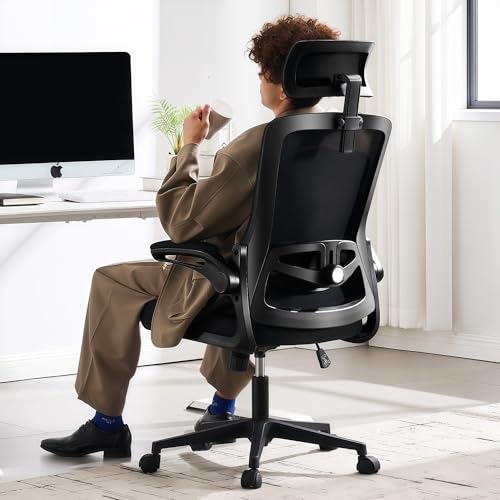
Fizzin Mesh Office Chair — Best Cushioned Seat
The Fizzin exists for a specific and common dissatisfaction: the worker who tried a full-mesh chair, admired its breathability, and quietly hated the seat by the second week. Its answer is a hybrid — mesh across the back where airflow matters most, and a thickened cushion under the seat where pressure concentrates. That combination maps surprisingly well onto how a body actually experiences a chair: backs overheat, seats compress, and a design that treats the two zones differently is not a compromise but a diagnosis.
Adjustable lumbar support and a headrest complete a package aimed squarely at long home-office days, and Fizzin says as much, positioning the chair for computer work and even gaming sessions. The cushion is the headline, though, and it changes the chair’s character across a day: the morning sit feels padded rather than perched, and the late-afternoon hours, when a thin seat starts to announce every sit bone, stay comparatively kind. Workers transitioning from a padded dining chair to their first ergonomic chair often find this hybrid the easiest landing.
Foam, of course, has its own physics. A thickened cushion holds more warmth than mesh and will, over years, compress in a way suspended mesh does not, so this pick favours buyers who prioritise present comfort and accept that a seat cushion is a wear item. If your room runs hot and your days run longest in summer, weigh the Marsail’s full-mesh coolness; if your complaint with previous chairs was always the seat, the Fizzin was designed around you.
The Fizzin also makes a fair secondary chair argument. In households where the main office chair is a full-mesh model and a second desk — a partner’s corner, a teenager’s study spot — needs seating that feels welcoming rather than technical, a thickened cushion reads as hospitality. Not every seat in a house has to be an ergonomic instrument; some should simply be pleasant to land in for two hours of homework or admin, and pleasantness is this chair’s native language.
- Seat: thickened cushion
- Back: mesh with adjustable lumbar support
- Extras: headrest included
- Positioning: home office and long computer sessions
- Colour verified: black
Strengths
- Hybrid build pairs a cool back with a kind seat.
- Thick cushion suits workers who dislike mesh seats.
- Headrest and adjustable lumbar included.
Trade-offs
- Padded seat holds more warmth than full mesh.
- Foam will compress over years of daily use.
- Less adjustment depth than the Marsail overall.
Best for: workers whose previous chairs failed them at the seat cushion. Not suited for: hot rooms where maximum airflow is the first priority.
How Do the Six Picks Compare at a Glance?
| Pick | Back style | Armrests | Standout trait |
|---|---|---|---|
| Marsail Ergonomic Office Chair | High-back mesh | 3D | Fullest adjustment set with headrest |
| GABRYLLY Ergonomic Office Chair | High-back mesh | Flip-up | Wide cushion for bigger frames |
| TRALT Ergonomic Desk Chair | Ergonomic with headrest | Flip-up | 330 lb capacity, all-round manners |
| BestOffice Ergonomic Office Chair | Mid-back | Standard | Sponge seat, compact profile |
| MOLENTS Ergonomic Mesh Office Chair | Mesh | 3D | BIFMA X5.1 certification, wide seat |
| Fizzin Mesh Office Chair | Mesh | Standard | Thickened seat cushion |
One row of that table deserves emphasis for buyers in warm climates: every back here is mesh, and that unanimity is the market having learned something. A decade ago padded backs were the default at this level; long home-working days in ordinary houses, few of them air-conditioned to office standards, taught makers that breathability is not a seasonal extra but a core requirement. If your working room is a conservatory, a loft or a sun-trap spare bedroom, treat that mesh column as the most important one on the page.
The pattern in the table is the pattern of the whole category: every chair here breathes through its back, and they separate on the seat — mesh, wide, or thickly padded — and on how much say you get over the armrests. Decide those two questions honestly and the table narrows itself to a chair or two, after which the headrest and tilt details can settle the tie.
How Should You Set Up Your Desk and Chair for a Long Day?
Begin with the chair on the floor and your feet flat, knees at roughly a right angle, then set the seat height so your thighs rest level without the seat edge pressing behind your knees. Raise or lower the desk — or accept its height and adjust the chair, adding a footrest if your feet dangle — until your elbows sit near ninety degrees with shoulders dropped, forearms resting lightly on the armrests or the desk surface. The screen comes last: its top around eye level, roughly an arm’s length away, so your head balances over your spine instead of craning toward the work.
Lighting and screen glare belong in this conversation more than chair guides usually admit. A worker squinting against a bright window leans forward out of any chair, however good, and a screen set too low pulls the head down with it. Position the desk so daylight comes from the side, tilt the screen to kill reflections, and the chair’s backrest suddenly gets to do its job instead of fighting your environment. Ergonomics is a system — chair, desk, screen, light — and the chair is simply the component you sit on while the rest either help or hinder.
Then work on the day itself, because setup is only the opening position. Change posture deliberately: upright for typing, eased back for reading, standing for calls when you can. Keep water within reach so getting up is not the only reason to move, and let the tilt mechanism do its job rather than locking the chair into a single virtuous angle for eight hours. Comfort across a working week is a rhythm, not a pose, and the best chair is the one that makes the rhythm easy to keep.
Which Floor and Caster Details Should You Check Before Ordering?
While you are looking at the floor, look at the base above it. A five-point base is the settled standard for stability in every direction you might lean, and its material — nylon, steel or aluminium — trades weight against rigidity in ways that matter more as the sitter gets larger. Workers near a chair’s stated capacity should favour the chairs whose listings are frank about that capacity, like the TRALT’s, because a base and lift chosen with margin behave quietly for years, while components at their limit announce themselves early and often.
The finest chair in this guide can still be undermined by what rolls beneath it. Standard casters are designed for carpet or chair mats; on hardwood, laminate or tile they can skate, squeak and slowly mark the surface, while on deep carpet a small wheel ploughs and makes every position change an effort. Check what your listing’s wheels are intended for, consider a chair mat as part of the purchase rather than an afterthought, and remember that a mat also defines your working territory in an open-plan room — a small thing that home workers consistently report valuing more than expected.
How Does a Chair for Computer Work Differ from a Gaming Chair or a Dining Chair?
Readers cross-shopping categories deserve a plain answer, because the chairs genuinely differ in intent. A dining chair assumes ninety minutes of upright social sitting and optimises for looks around a table; press one into eight hours of keyboard work and its fixed back and absent adjustments will make the mismatch known by Wednesday. A gaming chair assumes long sessions too, but its posture story leans reclined — deep buckets, racing styling, pillows rather than mechanisms — serving players who lean back with a controller more than typists who lean in toward a screen. Neither is a failed office chair; both are successful chairs for other lives.
The office chairs in this guide are built around a different centre of gravity: upright and near-upright work, varied through the day, with support delivered by adjustable mechanisms rather than by fixed sculpted foam. If your computer use is genuinely mixed — documents in the morning, games in the evening — the honest answer is that an ergonomic office chair handles the gaming hours more gracefully than a gaming chair handles the document hours, because typing posture is the less forgiving of the two. Buy for the stricter task and let the relaxed one adapt.
When Is It Time to Replace the Chair You Already Have?
Chairs rarely die dramatically; they fade. The signs arrive in a predictable order. First the cushion changes — you become aware of the seat pan through it, or you start folding a jumper to sit on by mid-afternoon. Then the lift begins its slow betrayal, dropping a centimetre an hour until you are re-pumping it during calls. Casters develop a flat spot or a wobble, the tilt develops a lean toward one side, and one morning you realise you have been compensating for the chair in four separate ways, each too small to act on alone. That accumulation is the signal: a chair you compensate for is a chair taxing every working hour.
There is a simple arithmetic worth doing before sentiment gets a vote. Add up the hours you sit in a year — for a full-time home worker it is comfortably into four figures — and set the cost of a replacement against that figure rather than against other furniture. Spread across its working life, even a considered purchase like the Marsail or MOLENTS costs very little per seated hour, while the chair you endure charges you in attention and energy every single day. Few household purchases are used as hard as an office chair, and few repay being chosen well as reliably.
When the new chair arrives, give the old one an honest exit. A faded chair still serves a spare room, a teenager’s desk or a workshop; a structurally tired one should be recycled rather than passed on, since handing someone a chair with a cracked frame is a gift of a problem. And keep your notes — which dimensions fitted you, which features you actually used — because that small record turns your next purchase, years from now, into a ten-minute decision instead of another research project.
What Should Tall and Petite Workers Check That Average Buyers Can Skip?
Chair dimensions are published for a middle band of humanity, and workers outside that band learn to read listings like contracts. Tall workers should interrogate seat depth first: a seat that ends well short of the knee leaves a long thigh unsupported, and across eight hours that gap becomes the day’s defining discomfort. Backrest height matters in the same direction — a headrest that lands at the shoulder blades is worse than none — and the Marsail and GABRYLLY, both high-backed, are the natural starting points in this guide for longer frames. Check the maximum seat height too, because longer legs need the chair to rise high enough for knees to sit at a comfortable angle rather than jack-knifed under a standard desk.
Petite workers face the mirror-image traps. A seat too deep pushes you forward onto its edge, abandoning the backrest entirely; a seat whose lowest height still leaves feet dangling quietly wrecks the whole ergonomic chain the chair was bought to build. The remedies are a shallower seat, a lower minimum height, or a footrest adopted without embarrassment as part of the setup. Armrest width deserves a check as well — arms spaced for broad shoulders force smaller workers to reach outward, undoing the shoulder relaxation the armrests exist to provide. None of the six chairs here is a specialist petite model, so smaller buyers should measure with extra care and lean on the adjustment ranges rather than the marketing.
Both groups share one piece of advice: distrust any chair whose listing hides its dimensions. Makers of honestly sized chairs publish seat width, depth and height ranges because those numbers sell the chair to the people it fits. Vague listings are usually vague because the truth is unremarkable, and unremarkable dimensions are exactly what out-of-band bodies cannot afford.
How Should You Care for a Mesh Office Chair So It Lasts?
Mesh asks for little and repays it. Dust settles into the weave over months, dulling both the look and some of the airflow, and a soft brush attachment on a vacuum restores it in minutes; do this when you clean the desk and it never becomes a project. Keep mesh out of prolonged direct sun where you can, since ultraviolet light ages every fabric eventually, and avoid leaning the chair back against radiator heat for the same reason. The moving parts want an occasional check rather than a service schedule: casters pick up hair and thread that a quick pick-out removes, and any bolt you can reach during assembly deserves a confirmatory tighten at the six-month mark, when the chair has fully settled into its working life.
Cushioned seats, like the Fizzin’s and the BestOffice’s sponge seat, benefit from rotation of habits rather than of the cushion itself — vary where and how you sit, and the foam wears evenly instead of developing a single deep hollow. Spills should be blotted promptly with a cloth and mild cleaner suited to the upholstery, never soaked. None of this is elaborate, and that is the point: an office chair is maintained in the margins of other routines, and the chairs in this guide were chosen partly because none of them demands more than that.
What Mistakes Do People Make When Buying a Chair for All-Day Computer Work?
The classic error is buying by the first sit. Showroom comfort — or the first evening at home — rewards softness, while an eight-hour day rewards support, and the two diverge by about hour three. A related mistake is ignoring your own measurements: seat depth that is wrong for your thigh length cannot be adjusted away, and no lumbar mechanism compensates for a backrest whose curve lands in the wrong county. Measure your popliteal height, your hip width and your desk height, and compare them with the listing’s dimensions before the box is opened, not after.
There is also the matter of the room. Buyers measure the desk, the doorway and sometimes the ceiling, then discover the chair’s recline needs a clear metre behind it that the room does not have, or that its wide base crowds a second desk in a shared study. Sketch the working footprint — chair at the desk, chair pushed back, chair reclined — before ordering, especially with the larger models in this guide. A chair that fits its owner but not its room will be resented daily for reasons that never appear in its reviews.
Buyers also over-value features they will never touch and under-value the warranty-and-wear parts — gas lifts, caster quality, mesh tension — that decide whether a chair feels the same in year three. And the quietest mistake of all is keeping a bad chair too long out of sunk-cost loyalty. A chair you spend two thousand hours a year in is not a purchase to endure out of politeness; if it is wrong after a fair adjustment period, it is wrong.
Final Recommendation
One closing thought for readers torn between two finalists, because it settles more purchases than any specification: choose by your worst hour, not your best. Every chair in this guide is pleasant at nine in the morning. The one you want is the one whose seat, back and armrests still make sense at the end of a hot, badly slept, deadline-heavy Thursday, when your posture discipline is gone and the furniture has to do all the work alone. Run that mental test on your shortlist — picture the Thursday, not the showroom — and the right chair usually identifies itself without further argument.
For most full-time computer workers, the Marsail is the safest pair of hands in this guide: the fullest adjustment set, a breathable high back and a headrest cover the widest range of bodies and working styles. Standards-minded buyers should take the MOLENTS and its certified build, bigger workers the GABRYLLY, and anyone whose past chairs failed at the seat should start with the Fizzin’s thickened cushion. The TRALT and BestOffice serve the all-rounder and the minimalist respectively, and serve them well. Whichever you choose, set it up slowly, adjust it across your first week, and judge it at half past three on a Friday — that is the only review that counts.
Frequently Asked Questions
How long should a good office chair last with daily use?
With full-time use, expect the moving and soft parts to age first: cushions compress, gas lifts can soften, and casters wear. A well-built chair of the class in this guide should give several years of daily service before any of that becomes noticeable, and choosing a model with recognised testing behind it, like the MOLENTS, is one way to buy that longevity deliberately rather than hopefully.
Is mesh or padding better for eight hours of sitting?
They solve different problems. Mesh breathes and flexes, which suits warm rooms and workers who shift position often; padding feels kinder on contact and suits workers who find suspended seats too firm. Many people land happiest on the hybrid pattern — mesh back, cushioned seat — which is why the Fizzin exists in this guide. Your room temperature and your own history with chairs are better guides than any universal verdict.
Do I really need adjustable lumbar support?
Fixed lumbar shaping is built for an average spine, and most spines are not average in the relevant way. Adjustable support lets you place the pressure where your back curves, and lower it or soften it on days when you sit differently. If you share the chair with another person, adjustability stops being a luxury entirely — it is the mechanism by which one chair fits two bodies.
What seat height works with a standard desk?
Most desks sit at a height that pairs with a seat adjusted so your feet rest flat and your elbows bend near a right angle at the keyboard. If your desk is a fixed antique or a kitchen table pressed into service, the chair and a footrest between them must absorb the whole mismatch, which is one more reason to choose a chair with a generous height range. Adjustable desks dissolve the problem, but they are a larger purchase than any chair here, and a well-chosen chair plus a modest footrest gets most workers to the same posture for a fraction of the commitment. If setting the chair for your elbows leaves your feet dangling, the answer is a footrest, not a lower chair — dropping the seat to reach the floor bends the whole posture out of shape. Check the chair’s height range against your desk before ordering.
Should I replace a chair that has started to sink or wobble?
A gas lift that slowly sinks is usually a replaceable part rather than a dead chair, and casters and armrest pads can often be renewed the same way. Wobble is worth diagnosing before spending: a loose base bolt asks for a wrench, while a cracked frame asks for a new chair and no further debate. As a rule, repair the chair when the frame, mesh and cushion remain sound, because those are the expensive virtues; replace it when the structure itself has gone, however fond of it you have become.
Are flip-up armrests worse than adjustable ones?
They do a different job. Flip-up arms, as on the GABRYLLY and TRALT, prioritise space: the chair tucks under the desk and the arms vanish when you want to sit close or sideways. Multi-directional arms, as on the Marsail and MOLENTS, prioritise precise elbow support during long typing stretches. Choose by your room and your habits, not by an assumption that more adjustment is always better.
Related Guides
Comfort at a desk connects to comfort everywhere else in the house. Readers setting up a full workspace may also want Best Barber Chairs for a look at heavy-duty hydraulic seating in another trade, Best Chairs for Playing Guitar for the armless end of the seating world, and Best Living Room Chairs for the hours after work. And when your current chair’s wheels start carving up the carpet, Best Casters for Office Chairs on Carpet is the guide that saves the floor.

[…] stop at one room or one job. Readers comparing long desk days with treatment work may also enjoy Best Chairs for All-Day Computer Work, while those furnishing a calm corner at home can browse Best Floor Chairs and Best Chairs for a […]