What's inside
- Key Takeaways
- Quick Picks
- How We Chose These Picks
- How Do the Six Machines Compare Side by Side?
- Should You Choose a Manual Press or an Electronic Cutter?
- What Does the Six-Inch Opening Actually Limit?
- How Do You Build a Die Sandwich Without Wrecking Your Plates?
- Which Extras Should a Beginner Budget for First?
- What Paper Weights Suit Each Workflow Best?
- How Do You Look After Dies, Plates, Blades and Mats?
- How Should You Organise a Card-Making Corner Around the Machine?
- Which Machine Suits Wedding and Event Stationery?
- How Do You Fix a Cut That Almost Worked?
- How Much Will the First Year Really Cost Beyond the Machine?
- What Should Left-Handed Makers and Younger Crafters Know?
- How Do You Store Finished Cards and Half-Finished Projects?
- When Does Owning a Second Machine Make Sense?
- How Do You Get Cleaner Results on Intricate Designs?
- What Should You Check on the Listing Before You Order?
- How Does Card Making Change Once the Machine Settles In?
- How Should You Plan a Batch Session From Start to Finish?
- What Mistakes Do New Card Machine Owners Make Most Often?
- Final Recommendation
- Frequently Asked Questions
- Related Guides
As an Amazon Associate I earn from qualifying purchases. This post may contain affiliate links at no extra cost to you.
cottageverdict.com is reader-supported. When you buy through links on our site, we may earn an affiliate commission.
Where to buy: each machine below is sold through Amazon, and the names in the Quick Picks table, the detailed reviews and the comparison table all link to the matching listing, where you can check price on Amazon and confirm exactly which dies, plates or materials ship in the box. The best card making machines split cleanly into two families that work in completely different ways, and choosing between those families matters more than choosing between brands. Four picks here are manual die-cutting presses: you sandwich cardstock, a metal die and cutting plates, then turn a handle and let pressure do the cutting. Two picks are electronic cutters from Cricut: a small blade follows a digital design you build on a screen, with no dies to buy or store.
That split decides almost everything that follows. A manual press repeats one shape beautifully for years, costs nothing to run beyond paper and replacement plates, and never asks for software, accounts or updates. An electronic cutter can draw, score and slice a different design every single time, but it ties you to an app, a library of digital files and blades that wear down. Card makers who batch fifty identical wedding invitations often love the press; card makers who personalise every birthday card with a name usually love the plotter-style cutter.
Width is the second dividing line. Every manual press in this guide opens six inches wide, which swallows standard card blanks, most embossing folders and the dies sold for greeting-card work, while ruling out the largest scrapbook dies. The Cricut Joy Xtra cuts smart materials a little under nine inches wide, and the Explore 5 in its bundle opens the door to twelve-inch material and a far bigger project ceiling. None of these machines prints, so colour still comes from your paper, ink and stamps.
Everything that follows is organised around honest workflow questions: how a shape gets cut, what you keep buying afterwards, how much desk the machine claims, and how the results look after the fiftieth card rather than the first. Read the two Cricut sections with different eyes from the four press sections, because comparing them feature-for-feature misses the point entirely. One last framing note before the picks: none of these machines is a printer, a laminator or a shortcut around design. They cut and texture what you feed them — paper, patience and an idea — and the guides after the reviews concentrate on exactly those inputs, because the happiest owners are the ones who bought the workflow, not the gadget.
Key Takeaways
- Manual presses and electronic cutters are separate workflows: dies and a hand crank on one side, software and a moving blade on the other.
- All four manual picks share a six-inch opening, wide enough for standard cards and most embossing folders.
- The Sizzix Big Shot remains the reference manual machine; its starter-kit version simply removes the first accessory shopping trip.
- Cricut Joy Xtra suits personalised cards in small batches, while the Explore 5 bundle targets makers ready for larger, varied projects.
- Running costs differ sharply: presses consume plates and dies, electronic cutters consume blades, mats and digital designs.
- Storage shapes the shortlist too, because the foldable Scrapblooms press disappears into a drawer between sessions.
Quick Picks
| Pick | Badge | Why it earns its place |
|---|---|---|
| Sizzix Big Shot Die-Cutting and Embossing Machine | Best Manual Benchmark | The established six-inch hand-crank press against which every other manual machine in this guide is measured. |
| Sizzix Big Shot Machine with Starter Kit | Best Manual Starter Bundle | The same Big Shot press with dies and an embossing folder included, so the first cards happen on day one. |
| Manual Die Cutting Machine for Card Making 6 Inch | Best Budget Manual Press | A straightforward six-inch crank press built specifically around card making rather than general craft claims. |
| Scrapblooms Die Cutting Machine for Card Making Foldable | Best Space-Saving Manual | A foldable embossing and die-cutting press for makers whose craft table is also the kitchen table. |
| Cricut Joy Xtra Smart Cutting Machine | Best Compact Electronic Cutter | A small connected cutter that writes, scores and cuts personalised card designs without any physical dies. |
| Cricut Explore 5 Essential Bundle | Best Full Electronic Bundle | The widest electronic option here, bundled with supplies the listing counts toward sixty-five projects. |
How We Chose These Picks
We started by separating the category into its two real workflows instead of pretending one ranking could serve both. Manual die cutting rewards pressure consistency, plate quality and a feed opening matched to card sizes. Electronic cutting rewards software depth, material range and the accuracy of a small blade over hundreds of tiny movements. A machine can excel in one world and be irrelevant in the other, so each pick below is judged inside its own workflow first and against the shared goal — finished cards you would actually post — second.
For the presses, we weighted the six-inch opening, the reputation of the platform behind the machine, and what arrives in the box. Dies and embossing folders are the real library of a manual system, so a starter kit that includes them changes the first month of ownership, not just the first afternoon. For the foldable and budget presses, the questions were narrower: does the design solve a genuine storage or spending problem without giving up the standard opening?
For the Cricut pair, we looked at cutting width, the bundled digital content and how much extra shopping the box removes. Both listings include digital content through the Design Space app, and the Explore 5 bundle adds physical supplies for dozens of projects. We also kept one eye on the costs nobody advertises: replacement cutting plates for presses, fresh blades and mats for electronic cutters, and the cardstock habit both workflows encourage.
Sizzix Big Shot Die-Cutting and Embossing Machine — Best Manual Benchmark
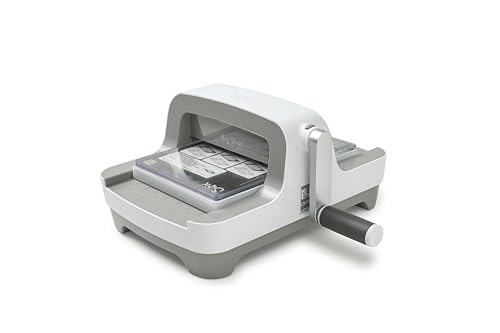
This is a manual machine in the purest sense: no motor, no app, no firmware, just a steel-roller press you feed by hand. You build a sandwich of cutting plates, cardstock and a wafer-thin metal die, lay it on the platform and turn the handle. The rollers squeeze the die through the paper as the sandwich travels, and the shape drops out with edges cleaner than scissors or a craft knife could manage on the same design twice. Embossing folders run through the same path, pressing a raised pattern into cardstock instead of cutting it.
The six-inch opening defines what the Big Shot can swallow. Standard card blanks, A2 and A6 layers, most sentiment dies and the embossing folders sold for card making all pass comfortably. Because the platform is an established one, the second-hand and third-party die market around it is enormous, which matters more than any single specification: a manual press is only as versatile as the dies you can find for it, and this machine accepts the widest library in the guide.
Daily use has a rhythm owners either love or tolerate. Each pass takes seconds, the crank effort is modest on ordinary cardstock, and repeating the same shape forty times for a batch of invitations is oddly satisfying rather than tedious. There is nothing to charge, pair or update, so the machine works identically in a craft room, at a church-hall crop or on a holiday-let table. The honest costs are consumable ones: cutting plates gradually bow and scar with use and eventually need replacing, and intricate dies occasionally need a shim or a second pass on heavy stock.
- Workflow type: manual hand-crank die cutting and embossing
- Feed opening: 6 inches, matched to standard card sizes
- Power source: none, works anywhere a table exists
- Consumables: cutting plates and physical dies or folders
- Box contents: machine only, plates and dies bought separately
Strengths
- Proven platform with the deepest pool of compatible dies
- Repeat cuts stay identical across very long batches
- Zero software, accounts or charging to manage
Trade-offs
- Machine-only box means an extra purchase before card one
- Every new shape requires buying another physical die
- Six-inch ceiling excludes the largest scrapbook dies
Best for: card makers who batch designs and want the reference manual press. Not suited for: anyone who wants a new shape on screen cut five minutes later.

Sizzix Big Shot Machine with Starter Kit — Best Manual Starter Bundle
Under the handle this is the same manual Big Shot workflow as the machine-only listing above: hand-fed plates, a crank, pressure doing the cutting. The difference is entirely about what surrounds the press. This version arrives as a starter kit with cutting dies and an embossing folder included, which converts the purchase from equipment into a first project. A new card maker can cut and emboss on the day the box opens instead of beginning ownership with a second shopping list.
That matters more than it sounds, because the manual workflow hides its real entry cost in accessories. Plates come with the machine either way, yet dies are the vocabulary of the whole system, and a beginner who owns none owns a press that can only emboss blank texture. The bundled dies give immediate shapes to learn feeding, pressure and release on, and the folder teaches the gentler sandwich embossing needs. Mistakes made on included dies feel like practice; mistakes made while waiting for separately ordered dies feel like delay.
Long term, this pick converges with the machine-only Big Shot: same six-inch opening, same compatibility with the wider die library, same plate replacements down the line. The choice between them is therefore a timing question. Buyers who already own dies from an earlier machine gain nothing here. Buyers starting from an empty craft drawer get a shorter path to finished cards, and the kit also makes the more sensible gift, since the recipient can make something before spending anything further.
- Workflow type: manual hand-crank die cutting and embossing
- Feed opening: 6 inches, standard card and folder sizes
- Included extras: cutting dies and an embossing folder
- Power source: none, fully hand operated
- Consumables: replacement plates plus any dies you add later
Strengths
- Finished cards possible on the first day of ownership
- Included dies teach the workflow without extra orders
- Identical long-term platform to the machine-only Big Shot
Trade-offs
- Bundled die designs may not match your personal style
- Owners with existing die collections pay for duplicates
- Still capped at the same six-inch feed width
Best for: first-time manual buyers and gift purchases that should work immediately. Not suited for: experienced die collectors who only need the press itself.

Manual Die Cutting Machine for Card Making 6 Inch — Best Budget Manual Press
The name tells the whole design brief: a manual die cutting machine, sized at six inches, aimed squarely at card making. It works the way every press in this half of the guide works — a hand crank pulls a plate-and-die sandwich through rollers, and pressure cuts or embosses the sheet inside. Nothing about the workflow is electronic, assisted or app-connected, and for a large group of card makers that plainness is the attraction rather than a missing feature.
Where this pick earns its place is focus. Rather than posing as an all-craft platform, it presents itself as a card tool, and the six-inch opening matches the blanks, layering dies and folders that card makers actually buy. For someone whose output is greeting cards, gift tags and small paper decorations, a press that covers those sizes without a bigger footprint or a bigger commitment covers the whole job. Scrapbookers chasing oversized dies were never its audience.
The questions to ask of any lesser-known press are practical ones. Plate quality decides how evenly pressure spreads, so check the listing for what plates are included and how replacements are sourced. Die compatibility follows the usual thin-metal-die standard, yet unusually thick dies from other systems deserve a cautious first pass rather than force. Treated as a dedicated card press with ordinary care — even cranking, plates flipped and rotated to spread wear — it delivers the core pleasure of manual cutting: identical shapes, quietly, whenever the table is free.
- Workflow type: manual hand-crank die cutting and embossing
- Feed opening: 6 inches, aimed at card making sizes
- Power source: none, hand operated only
- Focus: cards and small paper crafts over scrapbook scale
- Consumables: cutting plates and thin metal dies
Strengths
- Purpose-built sizing for greeting-card work
- Simple mechanism with nothing to charge or configure
- Keeps the manual workflow at its most affordable
Trade-offs
- Smaller brand ecosystem than the Sizzix platform
- Replacement plates may take more hunting to source
- No included bundle to soften the first accessory spend
Best for: card-only makers who want the manual workflow at its leanest. Not suited for: crafters planning a large multi-system die collection.
Scrapblooms Die Cutting Machine for Card Making Foldable — Best Space-Saving Manual
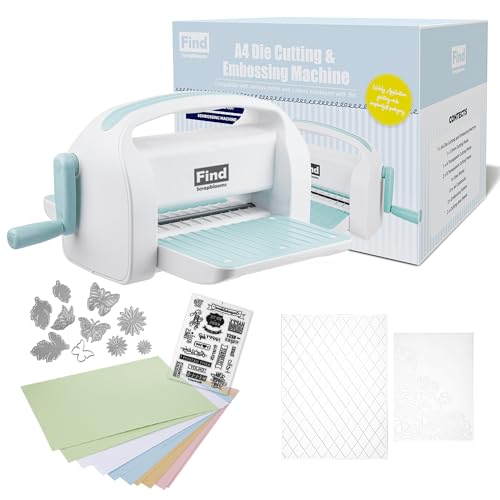
Scrapblooms keeps the manual workflow — crank, plates, dies, pressure — and changes the one thing the other presses ignore: what the machine does when it is not cutting. This press folds. For the many card makers whose studio is a dining table cleared between meals, or a corner of a bedroom desk shared with a laptop, a machine that collapses for storage removes the daily negotiation over whose surface it is.
Unfolded, it is a die cutting and embossing machine for card making and scrapbooking in the familiar pattern, feeding the standard sandwiches of cardstock and thin dies. The working experience is deliberately ordinary, which is the right ambition: novelty belongs in the hinge, not in how a die passes through. Folded, it slides into the kind of shallow storage that rigid presses refuse, and that difference decides whether a small-home crafter owns a machine within reach or one buried in a cupboard they dread opening.
Honest expectations help here. A folding frame asks its owner to set up and pack away each session, so the spontaneous single card carries slightly more friction than with a press that lives permanently on a craft desk. Pressure capacity suits the cardstock and paper layers the machine is marketed for; thick materials and the bulkiest die sandwiches belong to heavier rigid presses. Judged on the problem it actually solves — real die cutting for people without a permanent craft surface — it solves that problem directly.
- Workflow type: manual die cutting and embossing, folding frame
- Storage: folds down for drawers and small cupboards
- Power source: none, hand operated
- Audience: card making and scrapbooking in shared spaces
- Consumables: cutting plates and thin metal dies
Strengths
- Folding design fits genuinely small living spaces
- Keeps the full manual die and embossing workflow
- Encourages ownership where a rigid press would not fit
Trade-offs
- Setup and pack-away added to every session
- Not the press for the thickest material sandwiches
- Smaller platform support than the established brands
Best for: apartment crafters and shared-table card makers short on storage. Not suited for: high-volume producers with a permanent craft desk.
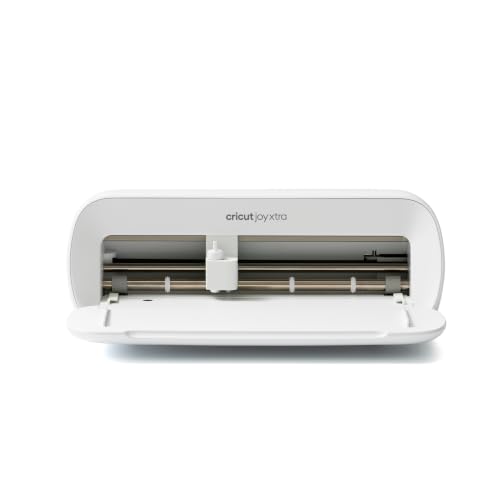
Cricut Joy Xtra Smart Cutting Machine — Best Compact Electronic Cutter
Everything changes at this pick. The Joy Xtra is an electronic cutter: you design a card front on a screen, in the Design Space app this bundle supports with thirty included images, and a small motorised blade traces the design through cardstock while the machine feeds the sheet itself. It also writes and draws with a pen and scores fold lines, which is why electronic owners talk about making cards rather than cutting shapes. There are no dies to buy, store or lose, because the library lives as digital files.
Size is the Joy Xtra’s charm and its boundary. It handles smart materials a little under nine inches wide, comfortably wider than the manual presses here, yet the machine itself stays small enough to live on a shelf and travel to a friend’s kitchen table. For cards — its home territory — that width covers folded blanks, inserts and layered fronts with room to spare. What it will not do is emboss texture into cardstock or muscle through the thick stacks a roller press shrugs at; the blade trades force for finesse.
Ownership runs on different rails from the presses. Blades dull and need swapping, mats lose their grip or smart materials must be bought to skip the mat, and the design habit depends on an app, an account and a connection behaving themselves. In exchange, every card can carry a name, a date or an inside joke in lettering that looks printed rather than stamped. Makers who personalise relentlessly will feel the trade is generous; makers who repeat one beloved design all year will feel the press calling them back.
- Workflow type: electronic cutting, writing and scoring
- Material width: a little under 9 inches on smart materials
- Software: Design Space app, bundle includes 30 images
- Power source: mains powered, app connected
- Consumables: blades, mats or smart materials, pens
Strengths
- Every design can be personalised before it is cut
- Writes lettering and scores folds in the same session
- Compact body stores and travels easily
Trade-offs
- Cannot emboss or press texture into cardstock
- Depends on app, account and connection to work
- Blade and mat replacements are ongoing costs
Best for: personalised cards, names and messages cut fresh each time. Not suited for: embossing lovers or anyone avoiding software entirely.
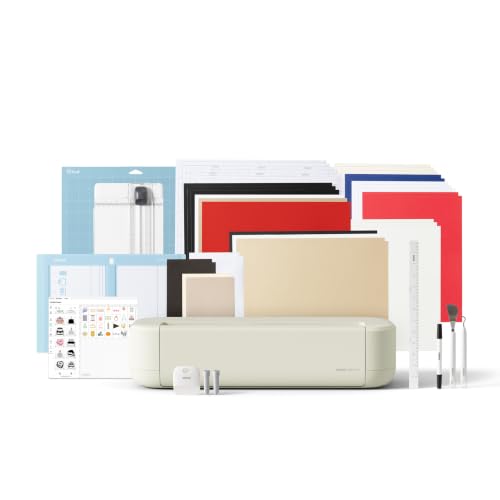
Cricut Explore 5 Essential Bundle — Best Full Electronic Bundle
The Explore 5 is the full-size expression of the electronic workflow in this guide, and this listing wraps it as an Essential Bundle with supplies the seller counts toward sixty-five projects plus bonus digital content. The machine cuts, draws and scores designs built in the Design Space app, working across twelve-inch material widths that open projects the Joy Xtra cannot attempt — larger card formats, batch-cutting many card layers from one sheet, and decorations that leave card making behind entirely.
For card makers specifically, the width changes the economics of a session. Instead of feeding one blank at a time, you arrange a sheet’s worth of fronts, sentiments and envelope liners on a single mat and let the blade work through the layout while you fold and glue the previous batch. The bundle’s included supplies matter for the same reason the Sizzix starter kit mattered earlier: the first projects begin immediately, and a new owner learns the software on materials that arrived with the machine rather than on a separate order.
Scale brings the electronic caveats with it. This is a desk machine, not a shelf ornament, and it expects a settled home near a computer or tablet. Consumables follow the Cricut pattern — blades, mats, pens, materials — and the design library habit is a subscription-shaped temptation even when the included content covers the early months. None of that dents its position here: for a maker who has outgrown die shapes, wants lettering that looks professionally printed, and plans to cut far more than cards, this bundle is the deepest electronic starting point in the guide.
- Workflow type: electronic cutting, drawing and scoring
- Material width: 12-inch class, the widest in this guide
- Bundle: supplies counted toward 65 projects plus digital content
- Software: Design Space app on computer or mobile
- Consumables: blades, mats, pens and cutting materials
Strengths
- Batch layouts cut many card pieces in one run
- Bundled supplies remove the second-purchase delay
- Project ceiling extends well beyond greeting cards
Trade-offs
- Largest footprint and the most setup of any pick
- No embossing or die-press texture capability
- Ongoing blade, mat and material spending
Best for: committed electronic crafters ready to batch and expand. Not suited for: occasional card makers with limited desk space.
How Do the Six Machines Compare Side by Side?
| Pick | Badge | Distinguishing detail |
|---|---|---|
| Sizzix Big Shot Die-Cutting and Embossing Machine | Best Manual Benchmark | Manual press, 6-inch opening, machine only in the box |
| Sizzix Big Shot Machine with Starter Kit | Best Manual Starter Bundle | Manual press with dies and embossing folder included |
| Manual Die Cutting Machine for Card Making 6 Inch | Best Budget Manual Press | Manual press built specifically around card sizes |
| Scrapblooms Die Cutting Machine for Card Making Foldable | Best Space-Saving Manual | Manual press that folds away between sessions |
| Cricut Joy Xtra Smart Cutting Machine | Best Compact Electronic Cutter | Electronic cutter for materials under 9 inches wide |
| Cricut Explore 5 Essential Bundle | Best Full Electronic Bundle | Electronic cutter in the 12-inch class with project supplies |
Should You Choose a Manual Press or an Electronic Cutter?
Answer one question honestly and the category halves itself: do your cards repeat, or does every card start from a blank screen? Repetition favours the press. A die cuts the same snowflake in December, in July, and in five years, with no file to find and no update to install, and a run of sixty identical place cards is a pleasant half hour of cranking. Variety favours the electronic cutter, where resizing a design costs nothing and a recipient’s name can be woven into the artwork itself.
Temperament matters as much as output. Some makers find screens restful and software playful; others craft precisely to escape screens, and for them a crank and a stack of dies is the hobby working as intended. Budget shape differs too: manual ownership front-loads spending into dies you keep forever, while electronic ownership spreads spending across blades, mats, materials and digital content indefinitely. Neither pattern is cheaper in the abstract — they simply bill you at different moments.
What Does the Six-Inch Opening Actually Limit?
Six inches sounds restrictive until it is measured against real cards. The common card sizes in North America and Europe — A2, A6, five-by-seven layers and square formats up to about five inches — all pass through a six-inch feed with their dies and folders. What stays outside are the grand scrapbook dies, large background dies for oversized cards, and any folder wider than the opening itself. Card makers working at greeting-card scale may never meet the ceiling; mixed-media crafters meet it quickly.
Embossing folders deserve a special note because they are the manual workflow’s quiet superpower. A folder through a press raises a pattern — lace, brick, snowfall, script — across a card front in one pass, a texture no home electronic cutter can reproduce. If textured backgrounds are central to your style, the manual family’s six inches buy something the wider electronic machines simply do not offer at any width.
How Do You Build a Die Sandwich Without Wrecking Your Plates?
Every manual press in this guide lives or dies by its sandwich: the ordered stack of platform, plates, material and die that travels through the rollers. Cutting sandwiches put the die’s sharp edge against the paper and a cutting plate; embossing sandwiches use a softer arrangement so the folder presses rather than slices. The listing and manual for your specific machine give its exact order, and following that order — never improvising extra layers to force a stubborn die — is what keeps plates flat and rollers unstrained.
Two habits extend plate life noticeably. Flip and rotate cutting plates regularly so the die’s pressure spreads across the whole surface instead of engraving one track, and accept a shim of cardstock for a tired intricate die rather than cranking harder. Plates are consumables and will eventually bow; a bowed plate is a replacement purchase, not a machine failure. Electronic owners have their own version of this discipline: a blade that has cut glitter card is a blade whose fine work is behind it, so keep a fresh blade reserved for detailed card fronts.
Which Extras Should a Beginner Budget for First?
Manual beginners should spend in a strict order: the dies for the next real project, one embossing folder in a pattern they will reuse all year, and good cardstock in two or three weights. Storage for dies matters sooner than expected — a binder or magnetic sheets — because loose dies in a drawer are dies quietly being bent. Electronic beginners should prioritise a spare blade, a second mat so one can rest while the other works, and a basic tool set for lifting delicate cuts without tearing them.
Both camps share one underrated purchase: envelopes. Cards are finished objects only when they can be posted, and a beautiful front glued to a blank that fits no envelope in the house is a project stalled at the final step. Buy envelopes in your standard card size before the machine arrives and every early success becomes a card actually sent.
What Paper Weights Suit Each Workflow Best?
Cardstock weight quietly decides whether a finished card feels luxurious or flimsy, and each workflow has a comfortable band. Manual presses are forgiving: the rollers apply even pressure across light paper, standard card blanks and heavier cover stock alike, which is why layered, substantial cards are the press family’s signature look. A die either cuts a sheet cleanly or asks for a shim, and the feedback is immediate in your hand as the sandwich travels through.
Electronic cutters reward a narrower discipline. Their blades excel on light-to-medium cardstock where intricate corners and tiny lettering survive the cut, while very heavy cover stock dulls blades quickly and very light paper tears on the mat during removal. Glitter and textured sheets are the troublemakers of the electronic world, shedding particles into the mechanism and blunting the fine point a detailed design depends on. Keep a hierarchy on the shelf: premium heavy stock for press work and card bases, smooth midweight sheets for electronic detail, and a scrap box that both machines share for tests.
How Do You Look After Dies, Plates, Blades and Mats?
Manual kit asks for dry, flat kindness. Wipe dies after cutting glitter or adhesive-backed paper, because residue left on a cutting edge becomes tomorrow’s incomplete cut. Store dies flat — in a binder, on magnetic sheets, anywhere except loose in a jumble — and keep plates away from radiators and sunny windowsills, since heat encourages the bowing that wear alone would take far longer to cause. A press itself needs almost nothing: an occasional wipe and a check that the handle turns without grit in its travel.
Electronic kit lives by replacement discipline instead. Rest mats adhesive-side down with their protective sheets on, and rotate two mats so neither is worked to exhaustion. Log blade changes somewhere unglamorous, on the machine’s box or a notebook, because nobody remembers in March what they swapped in November. When fine cuts begin tearing despite a clean mat, believe the blade before you blame the design file; nine times out of ten the edge, not the artwork, has given up.
How Should You Organise a Card-Making Corner Around the Machine?
Start with the machine’s working envelope rather than its storage size. A manual press needs clear table on both sides, because the sandwich enters one side and exits the other, and a press parked against a wall forces awkward sideways cranking. An electronic cutter needs space in front and behind for the mat or material to travel, plus a honest home for the laptop or tablet that drives it. Measuring those envelopes before ordering prevents the classic disappointment of a machine that fits the shelf but not the session.
After that, organise by frequency, not by category. The dies or files used monthly belong within arm’s reach; seasonal shapes can live in a labelled box further away without costing a single session. Card blanks and envelopes deserve a shallow tray of their own, because hunting for the right blank size mid-project breaks the flow that makes card making relaxing. Good light matters more than storage furniture — a lamp that shows true paper colours prevents the midnight mistake of layering two whites that clash at breakfast.
Which Machine Suits Wedding and Event Stationery?
Event work is repetition with consequences, and it flatters the manual family. Sixty place cards, favour tags or menu toppers cut from one die arrive identical, and an embossed motif gives paper a formality that flat cutting cannot imitate. The Big Shot platform’s deep die library includes the ornate frames and flourishes event stationery leans on, and a press cannot be defeated by a venue’s absent Wi-Fi on the morning of the celebration.
Electronic cutters answer with the one thing presses cannot do: every guest’s name, cut or written individually, in a consistent hand. Hybrid events are increasingly the norm — pressed or embossed bases produced in bulk, then personalised layers added electronically. If your calendar holds one wedding a year, choose by your everyday card habits and borrow the other workflow for the event; if events are your business, the honest answer is that the two workflows stop being rivals and become departments.
How Do You Fix a Cut That Almost Worked?
Diagnose by what the failure looks like, not by frustration. A manual die that cuts three sides and ghosts the fourth usually wants a shim under the weak corner or a plate rotation, because pressure, not sharpness, fades unevenly. A die that suddenly struggles everywhere after months of service has often met adhesive or glitter residue; clean its edge before condemning it. Fibres clinging to an otherwise clean cut point to paper that is too soft for that intricacy, not to a failing press.
Electronic failures carry their own signatures. Torn corners on detailed work suggest a dulling blade or a design scaled below the material’s tolerance. Sheets shifting mid-cut mean the mat’s grip has gone, however young the mat looks. Letters lifting with the waste point to weeding technique — slow down, use the tool, work from the inside of counters outward. In both workflows, change one variable, retest on scrap, and write down what fixed it; troubleshooting from memory is how the same ruined sheet happens twice.
How Much Will the First Year Really Cost Beyond the Machine?
Plan the year, not the checkout. A manual owner’s first-year spending typically flows to a handful of dies chosen project by project, one replacement set of cutting plates if volume is high, an embossing folder or two, and the cardstock habit itself. The comforting feature of that list is its optionality: skip a month and nothing expires, lapses or stops working. The press on the shelf in June is exactly the press that worked in January, waiting without complaint.
An electronic owner’s year looks different in texture rather than necessarily in size. Blades and mats arrive as small, recurring necessities; materials made for mat-free cutting carry their own premium; and the design library invites a steady drip of individual files or a subscription decision. None of this is hidden, but it is distributed, which makes it easier to underestimate. Tally both patterns against your temperament: some makers love a growing physical die library they can hold, others prefer a hard drive of designs and a drawer that stays empty.
What Should Left-Handed Makers and Younger Crafters Know?
Manual presses are pleasingly neutral machines. The crank turns the same way for everyone, the sandwich feeds from either side of the table, and a left-handed maker loses nothing to a right-handed one. Younger crafters, properly supervised, often take to pressing quickly because the cause and effect are visible: turn handle, receive shape. The cautions are ordinary workshop ones — fingers away from die edges, which are genuinely sharp, and an adult owning the sandwich-building until habits form.
Electronic cutters shift the skill from hands to screens, which suits screen-fluent teenagers beautifully and frustrates makers who wanted a break from devices. Blade handling is the safety core: blades are small, sharp and swapped by hand, so households with young children should treat blade changes as an adults-only ritual and store spares out of reach. For family crafting, many households land on the press for shared sessions and keep electronic personalisation as the grown-up finishing step.
How Do You Store Finished Cards and Half-Finished Projects?
Finished cards die by friction and sunlight. Store them upright in a box with dividers by occasion, each card already paired with its envelope, and embellishments protected by a sheet of plain paper between neighbours. A card stockpiled this way is a card that actually gets sent on the chaotic morning of a forgotten birthday; a card in a decorative pile is a card admired and never posted.
Work in progress needs the opposite treatment: flat, visible and labelled. Cut pieces for a batch belong in a shallow tray with a note of the design, the die or file used, and the next step owed. That tiny label is what separates a relaxing return to the project from a forensic investigation. Press owners should note the sandwich that worked; electronic owners should save the project file under the recipient’s name rather than a hopeful “final version three”.
When Does Owning a Second Machine Make Sense?
Sooner than purists admit, because the two workflows cover each other’s blind spots. The press owner who falls for personalised lettering does not need the largest electronic machine; a compact cutter like the Joy Xtra adds names and writing to an otherwise manual practice. The electronic owner who discovers embossing does not need a flagship press; any of the six-inch manuals here adds texture their blade cannot imitate. Second machines should be bought to fill a named gap, never to soothe a vague feeling of missing out.
The warning sign is duplication: a second manual press, or a second electronic cutter of similar width, adds cost without adding capability. Before buying, write down the three projects the new machine would make possible that the current one genuinely cannot do. If the list fills easily, the purchase is a tool. If it stalls at one hypothetical Christmas, the money belongs in dies, materials or simply better cardstock for the machine already on your table.
How Do You Get Cleaner Results on Intricate Designs?
Intricacy is where both workflows earn their reputations, and the rules rhyme. On a press, an intricate die wants a metal shim or an extra pass with the sandwich rotated, because fine bridges of paper tear when pressure releases unevenly. Run the sandwich through, turn it around, and run it back rather than reaching for force. A sheet of waxed paper between die and cardstock, an old dressmaker’s trick, also helps delicate pieces let go without snapping their thinnest connections.
On an electronic cutter, intricacy is a negotiation between blade, speed and scale. Slow the cut down, choose the sharpest blade you own, and resist shrinking a detailed design below the size its thinnest lines can survive in paper. Weeding — lifting the waste away — should happen on the mat with the piece still supported, working from the largest waste areas toward the fragile centres. Makers who master these small patiences produce filigree work that looks machine-shop precise from machines that sit on kitchen tables.
What Should You Check on the Listing Before You Order?
Read the box contents line by line, because this category hides its real price there. A machine-only press needs plates confirmed in the box and dies ordered alongside; a bundle should be checked for which dies, folders or materials the seller actually counts as included. For electronic bundles, confirm what the digital content consists of and whether the supplies are full packs or samples. Photographs flatter every configuration, so the text of the listing is the contract that matters.
Check the mundane logistics too. Replacement plates for a lesser-known press, spare blades for a cutter, and the availability of both in your country decide whether a small breakdown becomes a two-day pause or a month of silence. Measure your storage against the machine’s real dimensions, including, for the foldable press, its folded size. Finally, confirm the return route while you are calm: a machine whose workflow turns out not to suit your hands is far easier to exchange in week one than to resent for a year.
How Does Card Making Change Once the Machine Settles In?
The first month is about capability — look what it can cut. The sixth month is about judgement: which designs deserve the good cardstock, which occasions merit the embossed treatment, which quick cards to keep in a ready drawer. Owners consistently report that the machine’s deepest effect is not speed but willingness. A birthday that once meant a supermarket dash now means twenty unhurried minutes at the table, and the resulting card carries a weight no bought card matches.
Expect your taste to migrate as well. Press owners often begin with shapes and graduate toward texture, building cards around embossed backgrounds with a single die-cut sentiment. Electronic owners often begin with lettering and graduate toward layered construction, cutting fewer, better pieces. Neither path is progress up a ladder; both are a style clarifying itself. The machine that supports that clarification — rather than the one with the longest feature list — was the right purchase, and this guide’s six picks each support it for a different kind of maker.
How Should You Plan a Batch Session From Start to Finish?
Batching is where a card machine repays its shelf space, and a little choreography makes it pleasant rather than production-line dull. Choose one design and one colour story, then work in stages: every base cut first, every layer second, assembly last. Press owners feel the benefit as a rhythm — the crank never changes setting while forty identical pieces accumulate. Electronic owners feel it as layout discipline, filling each mat completely instead of cutting card by card and wasting the sheet’s corners.
Set the table before the first cut: blanks stacked, envelopes counted, adhesive open, and a small bin for offcuts worth keeping. Work to music or a podcast and stop the session while it is still enjoyable, with the tray labelled for next time. The makers who sustain a card habit for years are rarely the fastest; they are the ones whose sessions end tidy, whose stock box always holds a few finished cards, and whose machine waits — press or cutter — as an invitation rather than an obligation.
What Mistakes Do New Card Machine Owners Make Most Often?
Forcing a sandwich tops the manual list. When a die resists, the answer is a shim, a flipped plate or a second gentle pass — never body weight on the handle, which bends plates and strains the frame. Electronic owners make the mirror-image error: sending a detailed design to a dull blade or a mat that has lost its grip, then blaming the machine for torn petals and shifted cuts. In both workflows, the consumable is usually the culprit and the machine is usually innocent.
Buying breadth before depth is the shared mistake. Ten dies in unrelated styles produce ten half-finished ideas; three dies that layer together produce finished cards immediately. Likewise, downloading hundreds of digital files before learning the software buries the twenty designs a beginner would actually use. A small, coherent library — physical or digital — teaches faster and posts more cards.
Skipping the test cut wastes more cardstock than any other habit. Paper weight, blade depth, plate wear and die sharpness all vary quietly, so one sacrificial run on scrap, before the good sheet, is the cheapest insurance in either workflow. Keep the test piece: a labelled archive of what worked becomes your personal settings manual within a month.
Final Recommendation
Start from workflow, not from brand. If your cards repeat designs, value texture, and should still be cuttable in a decade with zero software, the manual family is home: the Sizzix Big Shot as the benchmark press, its starter-kit version if your die drawer is empty, and the foldable Scrapblooms if storage is your true constraint. If every card is a new design with names and lettering, go electronic, choosing the Joy Xtra for compact personalised work or the Explore 5 bundle when batch layouts and bigger projects are already in view.
Whichever side you land on, buy for the cards you will still be making next winter, not the ones in this week’s inspiration folder. A press or cutter that matches your real habits gets used weekly; a mismatched bargain becomes furniture. Pick the workflow that fits your hands, order the envelopes today, and let the first finished card — posted, not photographed — be the review that counts.
Frequently Asked Questions
Can a manual die-cutting machine cut fabric or felt for card embellishments?
Thin felt and fabric backed with stabiliser often pass through a roller press with the right die, because pressure cutting handles soft layers well. Results vary by die design, so test on scraps first, and keep expectations modest for very intricate shapes in fibrous materials.
Do Cricut machines need a subscription to make cards?
No subscription is required to design and cut your own work or use included bundle content, though the wider Design Space library leans on paid access for many files. Plenty of card makers run for years on included images, uploaded designs and their own lettering.
How long do cutting plates last on a manual press?
Plates are consumables whose life depends on volume and care — flipping and rotating them spreads wear considerably. Heavy daily cutting scars them within months; weekend card making stretches a set far longer. A warped plate signals replacement time, not machine trouble.
Which workflow is better for making fifty identical invitations?
The manual press usually wins on rhythm: one die, one sandwich, fifty calm repetitions with identical results. An electronic cutter can batch the same job on laid-out mats, but blade wear and mat handling add supervision the press never asks for.
Can either type of machine print colour onto a card?
Neither family prints. Colour comes from coloured cardstock, ink, stamps, pens — the Cricut pair can draw with pens — and layered paper. Plan designs around layered colour rather than printed colour and both workflows deliver rich results.
Is a card making machine worth it if I only send a few cards a year?
Judge it against what those few cards mean rather than against a supermarket multipack. A handful of deeply personal cards — each carrying a name, a texture and an hour of thought — can justify a modest press on sentiment alone, especially when the machine doubles for gift tags, place cards and school projects. Purely financial payback needs volume, so honest low-volume senders should choose the leaner manual options or the compact electronic pick rather than the flagship bundle.
Related Guides
Card making rarely stays a single-machine hobby, and the neighbouring guides cover the projects that grow out of it. When refreshments join the craft table, our roundup of the Best Juice Maker Machines keeps long sessions pleasant, while kitchen planners may prefer the appliance research in Best American Made Dishwashers. For the workshop end of home projects, the Best 3000 Psi Pressure Washers guide handles the outdoor clean-up that follows a renovation.