What's inside
- Key Takeaways
- Quick Picks
- How Did We Choose These Picks?
- Comparison Table
- Why Have the iPhone 7 Docks Disappeared?
- How Should You Charge an Ageing iPhone 7 Overnight?
- What Happens When the iPhone 7 Is Finally Replaced?
- What Are the Most Common Mistakes With Legacy Phone Setups?
- Final Recommendation
- How Do You Give an Old iPhone a Second Career at the Bedside?
- What Should You Look for in the Cable Itself?
- How Does This Setup Serve Older Users?
- What About the Phone’s Own Alarm as Part of the System?
- How Much Longer Will an iPhone 7 Setup Keep Working?
- What Does the Whole Arrangement Cost, Sensibly?
- How Do You Set Up the Nightstand in One Evening?
- What If the Household Has Two Legacy Phones?
- Why Does This Guide Refuse to Recommend a Dock, in One Argument?
- What Do Owners of Legacy Setups Know That New Buyers Do Not?
- How Should You Talk a Family Member Into Retiring Their Phone Alarm?
- A Note on Keeping the Phone Itself Alive Longer
- Frequently Asked Questions
- Related Guides
As an Amazon Associate I earn from qualifying purchases. This post may contain affiliate links at no extra cost to you.
cottageverdict.com is reader-supported. When you buy through links on our site, we may earn an affiliate commission.
Where to buy: each clock below links to its Amazon listing, where you can check price on Amazon and read the manufacturer’s own connection and charging details. With a phone of the iPhone 7’s generation, those details decide everything, because the right answer depends on two facts about the handset that no clock can change.
The best alarm clocks compatible with iPhone 7 begin with two plain facts about that phone. First, it charges through a Lightning cable plugged into an ordinary USB port, so any clock with a powered USB socket can charge it overnight, exactly as it charges a phone ten years younger. Second, its fixed docking stations, the speaker docks shaped around its connector, have largely vanished from the market, and the few remaining are old stock for a connector era that has ended. Put those facts together and the durable answer writes itself: the clocks that serve an iPhone 7 best today are the ones that never married its connector in the first place, Bluetooth clocks that stream its audio wirelessly and USB clocks that charge it through its own cable.
There is good news buried in that history. The iPhone 7’s Bluetooth is fully modern for audio purposes, pairing happily with current speakers and clocks, and its Lightning cable is the same one millions of households still keep in drawers. An owner of this handset does not need legacy equipment; they need current equipment chosen with legacy honesty. Each pick below is described by the connection its manufacturer actually specifies. Where a clock streams, the review says so. Where it merely charges, the review says that. Where a clock in this list has no phone connection in its specification at all, it is presented openly as a phone-independent clock, included because many iPhone 7 households are really shopping for a reliable alarm that lets the ageing handset retire from night duty.
That last point deserves emphasis, because it is the situation in most homes that still run this phone. A handset of its age carries a battery that has earned its tiredness, and asking it to serve as the household alarm, streaming and glowing all night, is asking the weakest device in the room to hold the most important job. The sensible architecture gives the wake-up to a clock, lets the phone charge quietly or serve as backup, and keeps the whole arrangement working when the phone is eventually replaced, since nothing in it was shaped around the phone.
Key Takeaways
- The iPhone 7 charges from any powered USB port through its Lightning cable, so modern USB clocks serve it fully.
- Fixed docks for its connector have largely vanished; surviving stock is a poor long-term buy.
- Bluetooth streaming works as well on this handset as on newer phones, making the Emerson SmartSet its natural partner.
- An ageing phone battery argues for giving the alarm job to a clock and demoting the handset to backup.
- Several picks here connect to no phone at all, deliberately, for households retiring the handset from night duty.
- Everything recommended survives the phone’s eventual replacement, because none of it is shaped around the handset.
Quick Picks
| Pick | Badge | Why it made the list |
|---|---|---|
| Emerson SmartSet Bluetooth Alarm Clock with USB Charging | The complete iPhone 7 partner | Bluetooth streaming for its music, a USB port for its Lightning cable, FM radio and a clock that sets itself. |
| Emerson SmartSet Dual Alarm Clock Radio | The self-setting radio clock | AM/FM radio with automatic time setting and dual alarms, for households whose phone has retired from the nightstand. |
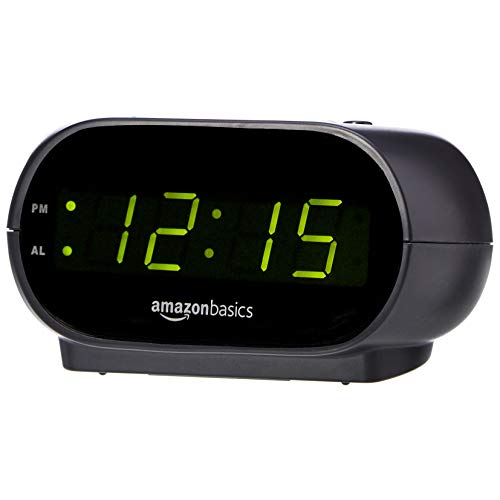
| Amazon Basics Small Digital Oval Alarm Clock | The simple oval | A compact LED clock with nightlight, snooze and battery backup that asks nothing of any phone. |
| Sharp Digital Alarm Clock with Keyboard Controls | The easiest controls in the guide | Keyboard-style setting buttons and an oversized snooze, built for hands and eyes that dislike fiddly menus. |
| REACHER Digital Alarm Clock | Charge the 7 in colour | A USB charging port for the Lightning cable beside a colourful, fully dimmable display. |
| uscce Wooden Digital Alarm Clock | The handsome loud one | A wood-finished dual alarm with full-range dimming and volume control, loud enough for deep sleepers. |
Read the table as two strategies braided together. The Emerson Bluetooth model and the REACHER keep the iPhone 7 in service, streaming and charging it. The other four set the phone free, holding the household’s mornings on clocks that will still be correct when the handset is a memory. Most households will recognise themselves in one strategy or the other within a paragraph, and the reviews are written to confirm the recognition rather than to argue against it.
How Did We Choose These Picks?
The evidentiary rule from our general iPhone guide applies with extra force here: a clock’s connection had to be stated in the manufacturer’s own product description. For this handset the claims were then tested against its two fixed facts. A USB port counts, because the Lightning cable makes it a charger for this phone. Bluetooth counts, because the handset’s wireless audio is unimpeded. Anything requiring a physical dock, a specific modern connector, or a recent operating system for its core function was excluded, since a guide for a legacy phone that recommends expiring hardware has failed at its only job.
The second screen was independence, and it mattered more here than in any other guide in this series. Every pick had to run its alarm, hold its time and survive an outage pattern without the phone’s help, because the phone in question is the household member least able to promise those things. Battery backup, self-setting time and plain durable controls all scored as heavily as any connection feature.
Price realism closed the selection. Owners keeping an iPhone 7 in service are, by revealed preference, people who extract full value from what they own, and the list respects that: one complete partner clock at a mid tier, one charger-clock, and four honest clocks at modest tiers, none of them asking the household to spend flagship money to solve a legacy problem. The most expensive mistake in this category is a surviving dock bought at a collector’s price, and the list is built to make that mistake unnecessary.

Emerson SmartSet Bluetooth Alarm Clock with USB Charging — The complete iPhone 7 partner
Everything the iPhone 7 can still do with a clock, this Emerson does. Bluetooth pairing takes seconds and is indifferent to the handset’s age, so the phone’s music library, podcasts and radio apps play through the clock’s speaker while the handset rests. The USB charging port, specified by Emerson as a proper phone-charging output, feeds the Lightning cable overnight at exactly the gentle pace an older battery prefers. An auxiliary input stands by for anything even older than the phone, and the FM radio covers the mornings when nobody wants to choose content at all.
The SmartSet system sets the time and day automatically on plug-in and recovers after outages, which quietly removes the two most common clock failures in any household. Dual alarms run in three modes for weekday and weekend patterns, and the large display dims for the night. In an iPhone 7 household this is the one-box answer: the phone keeps its dignity as a music source and a charged backup, while the clock takes the schedule, the radio and the responsibility.
Longevity is the deeper argument. When the handset is finally replaced, nothing about this purchase expires: the next phone pairs to the same Bluetooth and charges from the same port. Owners who have already buried one dock in a drawer will feel the difference in philosophy immediately, because this clock was never fitted to the phone; it was fitted to the standards both phones share.
- Connection: Bluetooth audio, USB charging port, aux input
- Alarms: dual, three modes, FM radio
- Setup: automatic time and day setting
- Display: large LED, dimmable
Strengths
- Streams and charges the iPhone 7 simultaneously
- Survives the phone’s replacement unchanged
- Self-setting clock removes outage and clock-change chores
Trade-offs
- Speaker is a bedside unit, not a room-filler
- No app features for routine builders
- Utilitarian styling
Best for: iPhone 7 owners wanting one clock that streams, charges and wakes without fuss. Not suited for: collectors still hoping to find a new dock. Check price on Amazon.
Emerson SmartSet Dual Alarm Clock Radio — The self-setting radio clock
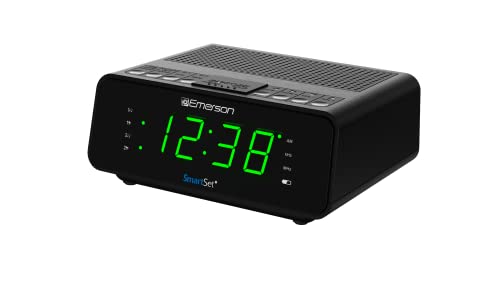
This second Emerson makes no phone connection in its specification, and the guide says so plainly: it is here for the iPhone 7 household whose handset has retired to a kitchen drawer or a child’s first phone, and whose nightstand now needs a clock that simply excels at being a clock. What it offers is considerable. AM and FM radio with twenty presets, dual alarms, a sleep timer for listeners who drift off to the evening programme, a snooze, and the same SmartSet automatic time setting that makes its Bluetooth sibling so easy to live with.
The jade-green LED display is a period pleasure, large and dimmable, readable by eyes that grew up with exactly this technology. Radio households, in particular those where the morning news is a fixed institution, will find this the most congenial object in the guide: no pairing, no accounts, no updates, just the station where you left it and an alarm that has never once needed a software patch.
Its role in an iPhone 7 home is succession planning. The phone served the bedroom for years; this clock takes over the duties permanently and cheaply, and the handset, freed from the nightstand, lasts longer as the household’s spare. Buyers who want the phone involved should choose its sibling above; buyers who want the phone excused will find this the most graceful retirement package on the list.
There is a generational comfort to this model that should not be underestimated as a feature. Its dial, its presets and its green glow are the interface a large part of the population learned first and trusts most, and a clock that its owner trusts gets its alarm set correctly every night. Technology that meets people where their habits already live outperforms cleverer technology that asks them to move, and in the iPhone 7’s second-career households that principle decides more purchases than any specification.
- Connection: none specified, a fully independent radio clock
- Radio: AM/FM with twenty presets, sleep timer
- Alarms: dual with snooze
- Setup: automatic time setting, dimmable jade display
Strengths
- Automatic setting makes it nearly maintenance-free
- Proper radio with presets for news households
- Display is large, calm and easy on older eyes
Trade-offs
- No charging or streaming for the phone
- Single-colour display will not suit colour lovers
- No battery-powered portability
Best for: radio households and anyone retiring the iPhone 7 from nightstand duty. Not suited for: owners wanting the phone charged or streamed through the clock. Check price on Amazon.

Amazon Basics Small Digital Oval Alarm Clock — The simple oval
The Amazon Basics oval is the minimal unit of alarm clock: a small LED display in a smooth pebble body, a built-in nightlight, a snooze function and battery backup so the alarm survives the night the power does not. It connects to no phone, charges nothing and streams nothing, and for a great many iPhone 7 households that is the correct specification, because the phone’s night job was only ever the alarm, and this object does the alarm for the price of a sandwich.
Its virtues compound in small rooms and second bedrooms. The footprint is tiny, the nightlight is genuinely useful for a landing or a child’s room, and the controls are few enough that a guest can set it without instructions. The display’s simplicity, time and nothing else, suits sleepers who find information-rich clocks stimulating at hours when stimulation is the enemy.
As part of an iPhone 7 strategy it plays the role of the permanent understudy: the clock that lives in the spare room, travels in a suitcase and stands ready the week the main clock or the phone gives up. Households rarely regret owning one, and its battery backup makes it the member of this list most likely to be awake and correct after a storm.
Its oval shape earns a practical footnote: there are no corners to catch a sleeve and no top surface inviting clutter to accumulate, so the little clock survives crowded nightstands and children’s dressers with unusual grace. In hospital bags, holiday cottages and festival tents with a hook-up, it is the clock that gets packed, because it is the clock that cannot really be packed wrong.
- Connection: none, a fully independent clock
- Display: LED with built-in nightlight
- Power: mains with battery backup
- Form: compact oval, small footprint
Strengths
- Battery backup keeps the alarm through outages
- Nightlight doubles its usefulness in halls and kids’ rooms
- Costs little enough to own as a spare
Trade-offs
- Single alarm and basic features only
- No phone charging or audio of any kind
- Small display for large rooms
Best for: spare rooms, travel, children and anyone wanting the simplest reliable alarm. Not suited for: dual-schedule households or phone integrators. Check price on Amazon.

Sharp Digital Alarm Clock with Keyboard Controls — The easiest controls in the guide
Sharp looked at the universal misery of setting an alarm clock, the long-presses, the cycling digits, the manual consulted by torchlight, and answered with a keyboard. The time and alarm are keyed in directly on calculator-style buttons, the way you would type the numbers anywhere else, and the whole task collapses from a ritual to a moment. A large snooze button, a front alarm switch that shows the state at a glance, and battery backup complete a design philosophy that respects its user completely.
The red LED display is the classic nightstand glow, easy to read and easy to live with for those who prefer it, and the black case keeps the object visually quiet. There is no phone connection, no radio and no library; the Sharp’s entire argument is that the two minutes of setting and the two seconds of silencing are where clocks succeed or fail, and that it wins both contests outright.
In an iPhone 7 household this is the pick for the member who never bonded with the phone’s alarm menus in the first place, often an older relative whose handset this is, or whose handset this was. Give them the keyboard, and the household’s mornings stop depending on a touchscreen’s mercy. It is also the guest-room clock least likely to be left unset by a visitor defeated by its interface, because it barely has one.
The keyboard idea sounds like a gimmick until a household times it: a wake time changed in four keystrokes, with no mode to be trapped in and no digit scrolled past and cursed. For shift workers whose alarm changes weekly, and for grandparents whose alarm changes when the family visits, that speed converts the clock from an appliance set once and feared into a tool adjusted freely. Sharp, a company that built its name on calculators, simply applied the lesson its own history taught.
- Connection: none, a fully independent clock
- Controls: direct keyboard entry, large snooze, front alarm switch
- Display: red LED
- Power: mains with battery backup
Strengths
- Fastest, clearest setting process in this guide
- Front switch makes the alarm state unmistakable
- Battery backup protects the schedule
Trade-offs
- No radio, streaming or charging
- Red display is a matter of taste
- Single-purpose design offers no extras
Best for: anyone who hates setting clocks, older users, and guest rooms. Not suited for: feature seekers or phone integrators. Check price on Amazon.
REACHER Digital Alarm Clock — Charge the 7 in colour
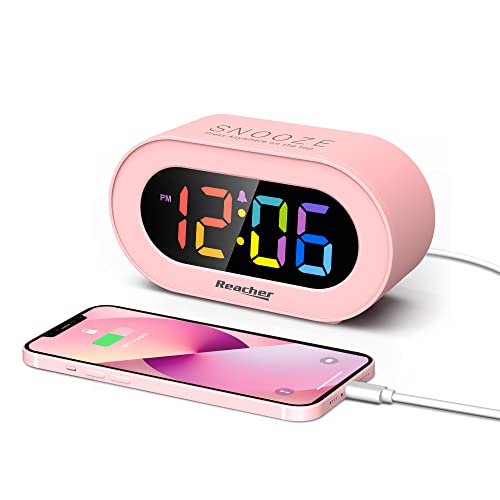
The REACHER’s contribution to an iPhone 7 household is a powered USB port and a cheerful face. Plug the phone’s own Lightning cable into the clock and the handset charges overnight at a bedside-appropriate pace, while the clock’s colourful LED display, dimmable across its full range, holds the time in digits that can shift colour to suit the room or the owner’s mood. Adjustable alarm volume and an easy snooze cover the waking side without ceremony.
There is no Bluetooth here and the review will not dress the port up as more than it is. But for the specific legacy situation, a phone whose battery fades faster than it once did, the charging arrangement is the compatibility that matters: the handset wakes full, serves as a backup alarm through its own speaker if wanted, and never again spends the night hunting for a charger in the dark. The clock, meanwhile, needs nothing from the phone and will outlast it without noticing the succession.
Compact, friendly and priced for real life, the REACHER suits the nightstand that wants one object solving the cable question with a bit of colour. Teenagers inheriting the family iPhone 7 are its happiest owners, since the display’s colour play makes the clock feel like theirs rather than like a hand-me-down’s accessory.
There is also a quiet security benefit to the charging-clock arrangement that households discover after the first burglary-scare story does the rounds: a phone that sleeps in the bedroom, charged and audible, is a phone that can call for help and be called, unlike one left charging in a kitchen. The REACHER keeps the handset where its owner is, full and reachable, which is a form of compatibility no specification sheet lists.
- Connection: USB charging port for the phone’s cable
- Display: colourful LED, fully dimmable
- Alarm: adjustable volume, easy snooze
- Form: compact bedside size
Strengths
- Charges the iPhone 7 through its own Lightning cable
- Display colour and dimming suit younger rooms
- Independent of the phone for its own duties
Trade-offs
- No streaming or app features
- Charging pace suits overnight only
- Playful styling will not suit every bedroom
Best for: teenagers and anyone whose iPhone 7 mainly needs a reliable overnight charge beside the alarm. Not suited for: listeners wanting phone audio through the clock. Check price on Amazon.

uscce Wooden Digital Alarm Clock — The handsome loud one
The uscce hides a serious alarm inside furniture. Its wood-finished body carries large, calm numerals that dim across the full range to invisible, and beneath the serenity sits a loud dual alarm with proper volume control, built for the heavy sleeper in a household that has banned ugly electronics from the bedroom. No phone connection appears in its specification; its compatibility with an iPhone 7 household is the compatibility of a clock that asks the ageing handset for nothing.
That profile fits a recognisable home: the phone is the children’s or the spare, the bedroom is an adult space with standards, and the morning still needs force. The dual alarms stage a warning and a final call, the display vanishes at night so the room stays dark, and the wooden finish lets the object sit on a good nightstand without apologising. Guests assume it is a design piece until it demonstrates otherwise at dawn.
Buyers should note the volume control as the feature that makes the loudness civilised: start moderate, raise only as needed, and the clock stays a piece of furniture rather than becoming the household’s morning argument. As a gift for the iPhone 7 owner who has everything except a morning, it is the most presentable option in this guide.
One more household claims this clock often: the guest suite in a design-conscious home, where it must wake a visitor reliably without insulting the room. Its dual alarms let a host pre-set a polite first call and a firmer second, its display can be dimmed to invisibility for guests who sleep lightly, and its face needs no explanation taped to it. Furniture that performs hospitality this quietly is rare at any tier.
- Connection: none, a fully independent clock
- Alarms: dual, loud with volume control
- Display: large numbers, dimmable from full to off
- Form: wood-finish body
Strengths
- Serious volume inside a handsome, calm object
- Display disappears completely at night
- Dual alarms support staged waking
Trade-offs
- No charging port for the phone
- Wood finish is a style commitment
- Too much alarm for light sleepers
Best for: design-conscious heavy sleepers and adult bedrooms retiring the phone from alarm duty. Not suited for: anyone wanting the handset charged or streamed. Check price on Amazon.
Comparison Table
| Pick | iPhone 7 relationship | Clock character | Standout trait |
|---|---|---|---|
| Emerson SmartSet Bluetooth Alarm Clock with USB Charging | Streams it and charges it | Radio hub | Complete partner, survives replacement |
| Emerson SmartSet Dual Alarm Clock Radio | Replaces it on the nightstand | AM/FM radio clock | Self-setting, twenty presets |
| Amazon Basics Small Digital Oval Alarm Clock | Ignores it, reliably | Compact LED | Battery backup and nightlight |
| Sharp Digital Alarm Clock with Keyboard Controls | Ignores it, easily | Keyboard-set digital | Fastest setting in the guide |
| REACHER Digital Alarm Clock | Charges it | Colourful digital | USB port, full dimming |
| uscce Wooden Digital Alarm Clock | Ignores it, handsomely | Wooden dual alarm | Loud under a calm finish |
Why Have the iPhone 7 Docks Disappeared?
A dock is a bet on a connector, and the connector lost. The iPhone 7 sits at the end of the Lightning generation’s first wave, and as the industry moved toward USB-C and wireless everything, dock production thinned to nothing. Remaining units are warehouse stock and second-hand listings, often priced by nostalgia rather than sense, with no guarantee that their electronics have aged as gracefully as their enclosures. Even a working dock answers yesterday’s question: it holds the phone upright and plays its audio through a wired fitting, when Bluetooth now does the audio and any stand does the holding.
The deeper reason is that the phone stopped needing a throne. Wireless audio, wireless updates and a cable that plugs into everything dissolved the dock’s purpose into features now spread across ordinary clocks. Readers who loved their docks, and many did, should read this guide’s Bluetooth and USB picks as the same idea continued by other means, with the expiry date removed.
How Should You Charge an Ageing iPhone 7 Overnight?
Gently, and in the same place every night. Older batteries prefer modest charging over fast charging, which makes a clock’s USB port, the REACHER’s or the Emerson’s, an accidentally ideal partner: the phone fills slowly while you sleep and is ready by morning without the heat of a rapid top-up. Keep the phone’s own Lightning cable dedicated to the nightstand so the arrangement never needs reassembling, and let the handset rest face down or in a focus mode so its charging hours are also its quiet hours.
Two habits protect the arrangement. First, let the clock be the alarm and the phone the backup, so a night when the handset dies anyway costs you nothing but a five-minute-later safety net that never fires. Second, check the cable seasonally; Lightning cables fray at the neck after years of service, and a charging system is only as honest as its cheapest link. Replace the cable, not the strategy, when the fraying starts.
What Happens When the iPhone 7 Is Finally Replaced?
Nothing in this guide needs replacing with it, and that is the selection’s founding promise. The Bluetooth Emerson pairs to the new handset in a minute. The REACHER’s port charges it through whichever cable it brings. The four independent clocks do not notice the event at all. Compare that with the dock owner’s ritual, a beloved accessory retired to a drawer with each phone generation, and the economics of standards over fittings make themselves.
The succession is also an argument for buying the clock well rather than cheaply. A nightstand object that serves three phones across a decade should be bought at the quality a decade deserves, which is why this list’s modest tiers are still chosen models rather than the cheapest available. The iPhone 7 household, of all households, understands buying once and using long; the guide simply extends their own philosophy to the clock.
What Are the Most Common Mistakes With Legacy Phone Setups?
The sentimental mistake leads: hunting down a surviving dock at a collector’s price, then discovering its sound and condition belong to its age. The optimistic mistake follows, trusting the ageing handset as the only alarm because it has not failed yet, a sentence that remains true until the morning it matters. Third comes the cable tangle, three chargers and no system, so the phone sleeps wherever it fell. Fourth, households buy a modern app-led clock whose setup assumes a recent phone, and meet the mismatch at 11 p.m. on a work night. The last is replacing the phone and the clock in the same week, then being unable to tell which change unsettled the mornings; change one variable, as every guide in this series advises, and let the system settle between upgrades.
Before ordering, run one small audit of the nightstand as it stands tonight: which cable actually charges the phone, where the phone actually sleeps, and what actually woke the household this morning. The answers usually name the correct pick from this list without further help, because the gap between the current arrangement and a system is visible the moment anyone looks at it directly.
And keep the receipt with the card by the bed for the first fortnight. Legacy households are practical people; if a clock’s controls defeat its owner in week one, exchange it for the Sharp or the radio Emerson while the window is open, and let the household’s habits, not the packaging, have the final vote.
There is a final, almost sentimental reason the standards-based system wins in these households: it can be explained in one sentence to anyone who sleeps in the house. The clock wakes us, the phone charges there, the spare alarm is set five minutes later. A system a guest, a grandparent or a housesitter can understand at a glance is a system that survives its owner’s holidays, and survival, in the end, is the only feature this guide has been selling.
Whichever pick you land on, set it up on a weekend evening rather than a work night, and let the first real morning be a low-stakes one. Systems installed in calm get judged fairly; systems installed in a panic at midnight get blamed for the panic. The iPhone 7 on the nightstand has seen enough midnights to deserve a calmer installation than that.
One more small thing: photograph the finished nightstand setup with the phone itself. When a cable is replaced or a cleaner unplugs everything, that picture restores the system in a minute, and it is the sort of humble insurance legacy households are quietly famous for keeping.
Note the date the system went in, somewhere unglamorous like the card by the bed. Households that can say how long a clock has served tend to be households whose things serve a long time, and the correlation is not a coincidence.
Final Recommendation
Let the iPhone 7 be what it now is, a good phone in its later years, and build the nightstand around standards rather than around it. If the handset still earns its place as the household’s music source, the Emerson Bluetooth model streams and charges it in one move. If its real need is a full battery by morning, the REACHER’s port and colourful calm will do. And if the phone is ready to retire from the bedroom entirely, the radio Emerson, the Sharp, the little Amazon oval and the wooden uscce divide that duty by temperament. Buy the arrangement that will still be correct on the morning after the phone is replaced, and this purchase will be the last alarm clock decision the household makes for years.
How Do You Give an Old iPhone a Second Career at the Bedside?
Many households keep the retired handset in service as a dedicated bedside device even after its replacement arrives, and the arrangement deserves respect rather than apology. Stripped of its SIM-era duties, the old phone becomes a music library, a podcast player and an audiobook machine that pairs permanently with a Bluetooth clock like the Emerson, never leaving the room and never competing with the day phone. Its battery, no longer asked to survive a day out, finds the nightstand’s gentle charging entirely sufficient.
If you adopt that pattern, finish the job properly: remove the accounts and notifications that belonged to its working life, set it to silence itself overnight, and let the clock, not the handset, own the alarm. The result is a small, stable media system built from a device the household already owns, which is the most iPhone 7 sentence imaginable. The alternative second careers, a child’s first phone or a parent’s simple handset, are covered in the questions below, and each pairs naturally with the independent clocks on this list.
What Should You Look for in the Cable Itself?
The Lightning cable is the unsung component of every setup in this guide, and the one most likely to be a decade old and silently failing. Inspect the neck at the phone end, where years of bending fray the insulation; a cable that charges only at certain angles is already telling you its retirement date. Replacements should come from reputable makers, since the cheapest cables charge erratically and can confuse an older phone’s charging behaviour. Length matters as much as quality: the cable must let the phone rest in its chosen spot with slack to spare, because a handset balanced at the stretch of a short lead eventually falls, and a fallen phone at 2 a.m. rearranges the household’s whole philosophy by morning.
Consider dedicating the good cable to the nightstand permanently and letting travel make do with the second-best. Systems survive when their parts stay put, and the nightstand arrangement this guide keeps describing, clock fixed, cable fixed, phone landing in the same place nightly, is less a product than a habit with hardware attached.
How Does This Setup Serve Older Users?
The iPhone 7’s second life is very often in an older relative’s hands, and the nightstand that goes with it should be designed for its actual user. That means the Sharp’s keyboard entry over any app, the radio Emerson’s presets over any pairing menu, displays that read across a room, and controls that work by touch in the dark. It also means writing the alarm routine on a card kept by the bed for the first week, a low-technology kindness that outperforms any manual.
Families setting this up at a distance should choose the self-setting models where possible, because a clock that recovers its own time after an outage never needs a grandchild’s visit to be correct again. The uscce’s vanishing display suits light-sensitive older sleepers, and its dual alarms can hold a medication-adjacent morning schedule as reliably as a work one. None of this is specialised equipment; it is ordinary equipment chosen with the user honestly in view, which is the whole method of this guide applied to its most deserving audience.
What About the Phone’s Own Alarm as Part of the System?
Used as a backup, the handset’s alarm earns its keep. Set it five to ten minutes after the clock, at a moderate volume, and place the phone where silencing it requires standing if the morning is critical, or on the nightstand if it is not. The two-device pattern fails only when both are set to the same minute, producing a confusion of sound that wakes the house and teaches nobody anything, or when the phone is silently promoted back to primary by habit. Keep the hierarchy written into the setup: clock first, phone as insurance, and review it when either device changes.
There is one morning the phone should lead: travel. Away from home the clock stays behind, and the handset, promoted for the trip, does the job it did for years. Households that keep its alarm settings intact for that purpose find the transition painless, another small dividend of treating the phone as a respected reserve rather than a discarded one.
How Much Longer Will an iPhone 7 Setup Keep Working?
Longer than the phone’s critics expect, provided the system is built as this guide advises. The handset’s remaining risks are its battery and its software support, and the nightstand architecture answers both: gentle nightly charging slows the battery’s decline, and a clock that owes the phone nothing keeps the mornings correct even if the handset eventually stops receiving updates or is retired mid-year. Bluetooth audio and USB charging, the two live connections here, are supported by effectively everything the household might buy next, so the arrangement has no cliff edge in it.
The honest horizon is set by the household, not the hardware. Families typically replace a phone like this when a camera, a banking app or a grandchild’s video call outgrows it, and on that day the clock system described here simply continues, pairing or charging the newcomer within the hour. Planning for that day is not pessimism; it is the reason the guide forbids docks and blesses standards, and it converts an eventual phone purchase from a nightstand crisis into a non-event.
What Does the Whole Arrangement Cost, Sensibly?
The legacy household’s advantage is that its phone is already paid for, so the entire project costs the price of one clock and perhaps one good cable. The independent clocks here sit at modest tiers, the charging REACHER likewise, and even the complete Emerson partner costs less than the accessories a new phone would demand in its first month. Against that, price the mistake this guide exists to prevent: a collectible dock, a fast charger bought to fight a dying battery’s symptoms, or a flagship app clock whose setup assumes a phone the household does not own.
Spend the small surplus where it compounds: the better cable, the clock with the battery backup, the model whose controls the actual user can run in the dark. Those choices, each worth a few coins, are what separate a legacy setup that feels thrifty from one that merely feels old, and the households that make them tend to describe their arrangement with pride rather than apology.
How Do You Set Up the Nightstand in One Evening?
Work in a fixed order and the whole system stands within the hour. Place the clock first, where its display reads from the pillow and its controls fall under the owner’s hand. Route its power cable behind the furniture once. If the clock charges or streams, pair and plug the phone second, testing the stream with the evening’s actual listening rather than a ringtone. Set the clock’s alarm for the real morning, the phone’s for five minutes later, and write both times on the card that lives by the bed for the first week. Then rehearse: trigger the alarm once while everyone is awake, silence it by touch, and adjust the volume to the level that woke the room’s attention without starting an argument.
Finish by removing the archaeology. The old chargers, the dead dock, the cable that only works at an angle, all of it leaves the bedroom that evening, because a system surrounded by its predecessors invites the household to drift back into improvisation. What remains should look inevitable: one clock, one cable, one phone in its place. Inevitable is what reliable feels like from the inside.
What If the Household Has Two Legacy Phones?
His-and-hers handsets of the same generation are common in exactly the households this guide serves, and the architecture scales gracefully. One charging clock serves the phone whose owner rises first; the second phone takes the wall adapter on the other side, or the couple shares the Emerson, streaming from whichever handset holds the evening’s programme. The independent clocks multiply cheaply here, a Sharp on one side and the little oval on the other, each set to its owner’s hour, each indifferent to the other’s existence.
The rule that keeps the peace is symmetry of reliability rather than symmetry of equipment. Both sides need an alarm that works, a display that can be read, and a charging arrangement that never requires borrowing the other’s cable at midnight. Beyond that, let each side of the bed reflect its sleeper; the uscce’s wooden calm on one nightstand and the REACHER’s colour on the other is not a mismatch but a marriage accurately described.
Why Does This Guide Refuse to Recommend a Dock, in One Argument?
Because every virtue a dock ever had is now available without its vice. The dock charged: a USB port charges, for this phone and its successor alike. The dock played audio: Bluetooth plays it, without seating the handset in a fitting. The dock held the phone upright and visible: a two-coin stand does that, or the phone can lie flat like every other object in the room. What remains uniquely the dock’s is its expiry, the guarantee that its usefulness ends with one handset’s connector. A purchase whose every benefit is portable and whose only unique feature is obsolescence is not a close call, and the guide treats it accordingly while honouring the affection owners feel for the format’s golden years.
That affection points at something real, though: the dock era understood that the nightstand wants a centre, one object that organises the phone, the time and the morning. The clocks in this guide are that centre, rebuilt on standards. The household is not being asked to abandon the idea it loved, only to stop renting it from a connector.
What Do Owners of Legacy Setups Know That New Buyers Do Not?
They know that reliability is a property of systems, not of specifications, and that their decade-old handset has taught them the difference. A legacy household has watched connectors change, apps vanish and batteries fade, and has kept its mornings intact through all of it by leaning on the boring constants: a clock that sets itself or is simple to set, a cable that stays where it was put, an alarm hierarchy with a backup that is never needed and always there. New buyers, arriving with the latest phone and a cart of fashionable accessories, are often one update away from learning the same curriculum at higher prices.
They also know the emotional truth of the category, which is that a morning system is a promise a household makes to its future selves, and promises are kept by arrangements, not by gadgets. The six clocks in this guide are arrangements made solid. The iPhone 7, in its dignified later years, turns out to be an excellent teacher of that lesson, and the households still running one are frequently its best students.
How Should You Talk a Family Member Into Retiring Their Phone Alarm?
Gently, and with evidence rather than alarmism. The argument that lands is rarely about risk; it is about mornings. Offer the clock as an upgrade in dignity, the big readable digits, the radio where the news lives, the keyboard that sets in seconds, and let the phone’s demotion happen as a side effect of the clock’s arrival rather than as a verdict on the handset. Set the system up together, rehearse it once while laughing, and leave the card by the bed. Within a fortnight the new arrangement will be the tradition, and traditions, unlike technologies, defend themselves.
If the relative is the one who gave you your first phone, expect the symmetry to be noticed and enjoy it. The household’s technology has always flowed through its people in both directions, and a well-chosen clock is a respectable vessel for the return journey.
A Note on Keeping the Phone Itself Alive Longer
The nightstand system in this guide quietly extends the handset’s life, and the mechanism is worth understanding. Batteries age fastest under heat and deep discharge; a phone that charges gently every night and never quite empties is living the easiest life a battery can have. Add a case that survives the nightstand’s occasional drops and a cable that does not strain the port at an angle, and the iPhone 7’s remaining years stretch measurably. None of this requires the phone to be pampered like an heirloom. It requires only that its nights be boring, which, not coincidentally, is also what the household’s mornings require.
Frequently Asked Questions
Can I still buy a docking clock for my iPhone 7?
Only as old or second-hand stock in most markets, and this guide advises against it. The connector era that produced docks has ended, condition is a lottery, and Bluetooth plus USB now covers everything a dock did. If you already own a working dock, enjoy it; just do not pay a premium to acquire one now.
Will a USB clock port charge the iPhone 7 properly?
Yes. The phone charges through its Lightning cable from any powered USB port, and a clock port’s modest output suits an overnight fill particularly well on an older battery. Keep the phone’s own cable at the nightstand, check it for fraying occasionally, and expect a full charge by morning rather than a fast one.
Does the iPhone 7’s Bluetooth work with new clocks?
For audio, yes, without qualification worth worrying about. The handset pairs with current Bluetooth speakers and clocks like the Emerson here, streams its library and podcasts, and remembers the pairing. Wireless audio was already a mature standard when this phone was new, which is precisely why it has aged better than its connector.
Should the iPhone 7 still be my main alarm?
It can be, but the wiser architecture demotes it to backup. An older battery, overnight updates and a phone that doubles as the evening’s entertainment all argue for giving the primary wake-up to a dedicated clock. Set the phone five minutes later as insurance and let the clock carry the responsibility nightly.
What if my iPhone 7 is now a child’s or parent’s phone?
Then this list’s independent clocks become the headline. The Sharp’s keyboard controls suit older users who never liked touchscreen alarms, the Amazon oval suits a child’s room with its nightlight, and the REACHER’s charging port keeps a teenager’s hand-me-down handset alive overnight. Match the clock to the person the phone went to.
Will these clocks work with the phone that replaces the 7?
Every one of them. Bluetooth and USB are standards the next handset also speaks, and the independent clocks need nothing from any phone. That durability is the reason this guide recommends them over any surviving dock, whose usefulness would end with the handset it was shaped for.
Related Guides
Readers setting up shared sleeping quarters should continue to Best Alarm Clocks for Dorm Rooms, where small clocks and roommate diplomacy take centre stage. For sleepers who need more than an alarm’s first call, see Best Alarm Clocks for Getting Out of Bed, and anyone refitting the room at the other end of the morning can browse Best Bathroom Sinks by Verified Ratings. Finally, the small-space households this phone so often lives in will appreciate Best Affordable Air Purifiers for a Single Room.