What's inside
- Key Takeaways
- Quick Picks
- How Did We Choose These Picks?
- Comparison Table
- What Happened to Docking Alarm Clocks?
- How Do You Pair and Set Up a Bluetooth Clock Without Tears?
- Which Connection Type Fits Your Household?
- What Are the Most Common Mistakes iPhone Owners Make With Alarm Clocks?
- Final Recommendation
- How Does the iPhone Itself Fit Into a Clock-Based Morning?
- What Should You Check in the First Week With a Connected Clock?
- How Do Subscriptions and Apps Age on a Nightstand?
- What About Android Phones and Mixed Households?
- How Should You Handle Clock Changes, Travel and Updates?
- What Does a Sensible Nightstand Cable Setup Look Like?
- How Do You Choose Between the Emerson and the Loftie?
- What Will Your Next Phone Ask of This Clock?
- How Do You Keep the Bedroom From Becoming a Charging Station?
- What Do Owners of Connected Clocks Say After a Year?
- How Does This Category Serve Guest Rooms and Second Homes?
- What Is the Sensible Buying Order If You Are Unsure?
- A Final Word on the Word Compatible
- Frequently Asked Questions
- Related Guides
As an Amazon Associate I earn from qualifying purchases. This post may contain affiliate links at no extra cost to you.
cottageverdict.com is reader-supported. When you buy through links on our site, we may earn an affiliate commission.
Where to buy: each clock below links to its Amazon listing, where you can check price on Amazon and confirm, in the manufacturer’s own words, exactly how it connects to a phone, because with this category the connection type is the product. Read the specification lines rather than the headline, and this guide will show you which lines to read.
The best alarm clocks compatible with iPhone start with an honest translation, because “compatible” has quietly changed meaning. A decade ago it meant a dock: a connector on top of the clock into which the phone physically sat, charging and playing music through the clock’s speakers. That world ended when phone connectors changed and wireless audio won. Today, an alarm clock is iPhone compatible in one of three real ways: it plays the phone’s audio over Bluetooth, it charges the phone from a USB port while the phone remains the alarm’s backup or brain, or it is set and managed through an app while remaining a fully independent clock. A fourth usage, “compatible” as pure decoration on a box, means nothing at all, and this guide exists to separate the three real meanings from the decoration.
Each pick below is labelled by the connection its manufacturer actually specifies, drawn from the maker’s own product description, and described only in those terms. Where a clock offers Bluetooth audio, the review says Bluetooth audio and nothing grander. Where it offers a charging port, the review treats it as a charging port. Where a clock has no phone connection at all, it appears on this list openly as the phone-free alternative, because some readers searching this phrase discover, on reading, that independence was what they wanted. That honesty is the guide’s whole method, and it will make your decision faster than any feature list.
Why keep a clock at all, when the iPhone contains a perfectly good alarm? Because the phone is also the last thing you scroll at night and the first thing that can die, update or fall behind the nightstand. A dedicated clock holds the time where you can see it without unlocking anything, keeps the wake-up duty on a device that does nothing else, and, in the Bluetooth and app models here, still lets the phone contribute its music, its podcasts and its charging cable. The six below span that spectrum deliberately.
Key Takeaways
- Modern iPhone compatibility means Bluetooth audio, USB charging or app control; the dock era is over.
- Check which of the three a clock actually offers, because listings use the same word for all of them.
- The Emerson SmartSet is the true Bluetooth clock here, streaming phone audio and charging by USB.
- App-led clocks like the Hatch and Loftie use the phone for setup and libraries, then run independently.
- A USB charging port, as on the REACHER and DreamSky, pairs any iPhone with any clock honestly.
- Keep the alarm itself on the clock; let the phone supply music and backup, not the wake-up.
Quick Picks
| Pick | Badge | Why it made the list |
|---|---|---|
| Emerson SmartSet Bluetooth Alarm Clock with USB Charging | The genuine Bluetooth clock | Bluetooth streaming from the phone, a USB charging port, FM radio and automatic time setting in one nightstand unit. |
| Hatch Restore 3 | The app-led routine clock | Managed through its phone app for routines and audio, then runs the night from its own tactile controls. |
| Loftie Clock | Bluetooth speaker plus calm clock | Streams phone audio over Bluetooth while keeping its own alarms, sounds library and blackout mode independent. |
| REACHER Digital Alarm Clock | Charge-and-wake simplicity | A USB port charges the iPhone overnight beside a colourful, fully dimmable dual-purpose bedside clock. |
| DreamSky Small Digital Alarm Clock | The compact charging clock | Big numbers, an adjustable everything, and a USB charging port in a small footprint for tight nightstands. |
| REACHER Sound Machine Sunrise Alarm Clock | The phone-free alternative | No phone connection at all: a sunrise clock and sound machine for bedrooms the iPhone has been banished from. |
Notice the pattern across the table: no docks, because there are effectively no docks left to recommend, and no claims of data syncing or call handling, because bedside clocks do not do those things. What remains is a sensible division of labour between the phone in your pocket and the clock on your furniture, and the reviews below keep that division in view for every model.
How Did We Choose These Picks?
The first rule was evidentiary: a clock’s connection type had to be stated in its manufacturer’s own product title or specification, the same text any buyer can read on the listing. Bluetooth had to mean a Bluetooth audio receiver in the clock. USB charging had to mean a powered port capable of charging a phone overnight. App control had to mean a real companion app that sets alarms or routines, not a QR code leading to a PDF manual. Models whose listings used the vocabulary of connection without the substance were set aside, and there were many.
The second rule was independence. However a clock uses the phone, its core job, showing the time and sounding the alarm, had to survive the phone being flat, absent or updated into a new personality. That test eliminated the pure speaker-with-a-clock-display products that lean on the phone for their alarms. Every pick below wakes you on its own authority; the phone’s role is enrichment, charging convenience or setup, never life support.
It is worth pausing on how many products failed the first rule, because the scale of the stretching is the story of this category. Clocks were found advertising phone compatibility on the strength of a USB port that powered only the clock itself, of a Bluetooth logo belonging to a different model in the same range, and of the simple fact that a phone could be photographed resting against them. Each of those listings is a small lesson in reading specifications like a lawyer, and each strengthened the case for a guide that sorts the vocabulary before it sorts the products.
Bedside manners formed the third screen: displays that dim to darkness, alarms with some graduation, controls operable by touch. Price spread closed the list, from the DreamSky’s modest tier to the Hatch’s premium, so that each of the three honest meanings of compatibility is represented at more than one budget. The REACHER sunrise model was included deliberately as the control group, the clock that proves a fine bedroom morning is available with no connection whatsoever, for readers whose search began with compatibility and ends with independence.

Emerson SmartSet Bluetooth Alarm Clock with USB Charging — The genuine Bluetooth clock
Emerson’s SmartSet is the closest living relative of the old dock clock, rebuilt for the wireless era. Its Bluetooth receiver pairs with the iPhone to play music, podcasts and radio apps through the clock’s speaker, which is the honest modern meaning of a phone-friendly clock: your audio library, on furniture-grade hardware, without the phone leaving the nightstand. Alongside it sits a USB charging port rated to charge the phone overnight, an FM radio for listeners who still want one, and an auxiliary input for anything older that speaks through a cable.
The SmartSet name refers to the clock’s party trick: it sets its own time and day automatically when plugged in and recovers correctly after outages, a small mercy that owners appreciate twice a year at the clock changes. Dual alarms with three modes cover weekday and weekend patterns, and the large LED display dims for the night. As a speaker it is a bedside speaker, clear at pillow volumes rather than a party device, which matches its actual job description.
For the iPhone household, the division of labour here is exactly right. The phone streams the evening’s audio and charges; the clock holds the time, the radio presets and the alarms. If the phone spends a night in another room, the Emerson wakes you anyway, which is the independence test this guide applies to every pick and which dock-era clocks, ironically, often failed.
One audience keeps this model on the nightstand for a decade: radio households. The presets hold the stations the morning actually runs on, the Bluetooth path takes over when a podcast replaces the broadcast, and the phone charges through all of it. Emerson has made bedside radio clocks for generations of listeners, and the SmartSet’s competence has that lineage in it: nothing experimental, everything where a hand expects it to be.
- Connection: Bluetooth audio streaming, USB charging port, aux input
- Alarms: dual, three modes, FM radio with presets
- Setup: automatic time and day setting
- Display: large LED, dimmable
Strengths
- Real Bluetooth streaming from the iPhone
- Charges the phone while it streams or sleeps
- Self-setting clock survives outages gracefully
Trade-offs
- Speaker suits bedside volumes, not filling a party
- No app control for those who want it
- Design is functional rather than decorative
Best for: iPhone owners who want their music and podcasts on the nightstand clock with charging built in. Not suited for: app-routine builders or design-led bedrooms. Check price on Amazon.

Hatch Restore 3 — The app-led routine clock
The Hatch Restore 3 uses the iPhone the way a thermostat does: as the setup screen for a device that then runs itself. Through the Hatch Sleep app you build the evening and morning as a sequence, wind-down lighting and audio, a night of darkness or sleep sounds, then a sunrise and gentle alarm, choosing from a library of more than eighty sounds, meditations and stories, with the full catalogue behind a subscription. Once built, the routine lives on the clock, worked by two big tactile controls that never ask you to unlock a phone in the bedroom.
That architecture suits iPhone households whose problem is the phone itself. The device that delivers the doomscroll is demoted to a configuration tool used in another room, while the bedroom gets light, sound and time from an object with no feed. The lighting is a soft circadian glow rather than a reading beam, and the whole pebble-shaped unit is designed to be looked at as little as possible, which is its own kind of compatibility with a good night.
Buyers should go in clear-eyed about the model: the app is not optional decoration but the control room, and the subscription decides how deep the library runs. Households comfortable with that arrangement gain the most choreographed mornings in this guide; households that want their clock to owe the phone nothing should look at the Emerson or the phone-free REACHER instead.
There is a household diplomacy angle to the Hatch worth airing: because the routine is built once and then simply happens, it ends the nightly negotiation about lights, sounds and alarm times that couples otherwise re-run at their tiredest hour. The app becomes the household’s written constitution for the night, consulted in daylight and obeyed in the dark. Families with teenagers report the same effect at one remove, the routine out-arguing nobody because it argues with nobody; it merely proceeds.
- Connection: companion app for setup, routines and audio library
- Light: circadian sunrise and warm wind-down glow
- Controls: large tactile on-device buttons for nightly use
- Note: full audio catalogue involves a subscription
Strengths
- Most complete evening-to-morning routine here
- Phone stays out of the bedroom after setup
- Deep library of sleep audio and meditations
Trade-offs
- Setup and library depend on the app ecosystem
- Best content sits behind a subscription
- Light is ambient rather than for reading
Best for: iPhone households rebuilding bedtime around a phone-free routine. Not suited for: anyone avoiding apps or subscriptions on principle. Check price on Amazon.
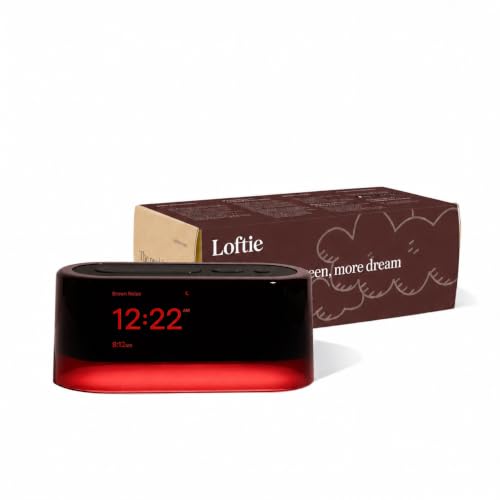
Loftie Clock — Bluetooth speaker plus calm clock
Loftie’s Bluetooth connection has a narrower, well-chosen job: the clock is a speaker for the phone’s audio when you want it, playing music or a podcast across the bedroom, while its own sound library of more than a hundred tracks, white noise and nature recordings, covers the nights you do not. The distinction matters. Streaming is a daytime and evening pleasure; the alarm and the sleep sounds belong to the clock, and an offline mode keeps them working when the WiFi sulks.
Around that connection sits the calmest clock in this guide: a warm adjustable night light, a display with a true blackout mode, and a two-phase alarm that stirs gently before it insists. Loftie emphasises that its core library needs no subscription, a pointed contrast with its app-led rival, and the clock’s furniture-like design, in soft shell colours, suits bedrooms arranged for rest rather than for technology.
As an iPhone companion it is best understood as a speaker with excellent boundaries. It will not charge the phone, manage its alarms or pretend to be a dock; it plays the phone’s audio beautifully and then minds its own business all night. For many households that is the exact amount of compatibility worth paying for, delivered in the most serene object here.
The Loftie also handles a subtle social case: the partner who falls asleep to a podcast. Streaming through the clock rather than through earbuds or the phone’s own speaker keeps the volume at room level, the sleep timer ends the programme without waking anyone to stop it, and the phone itself can rest across the room. It is a small choreography, but bedrooms are made of small choreographies, and this one replaces a nightly fumble with a single tap.
- Connection: Bluetooth speaker for phone audio
- Sounds: library of over a hundred tracks, no core subscription
- Light: warm night light, blackout display mode
- Alarm: two-phase gentle-then-firm
Strengths
- Bluetooth streaming without surrendering the alarm to the phone
- Offline mode keeps sleep sounds independent
- Blackout mode protects genuinely dark bedrooms
Trade-offs
- No USB charging for the phone
- Premium tier for a restrained feature set
- No radio for traditional listeners
Best for: iPhone owners wanting evening streaming plus a calm, independent clock. Not suited for: anyone needing phone charging on the same device. Check price on Amazon.
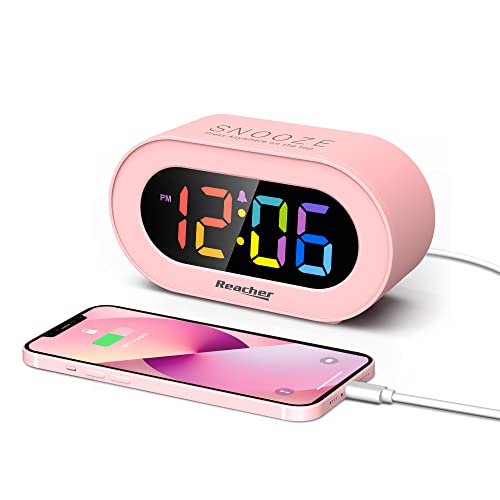
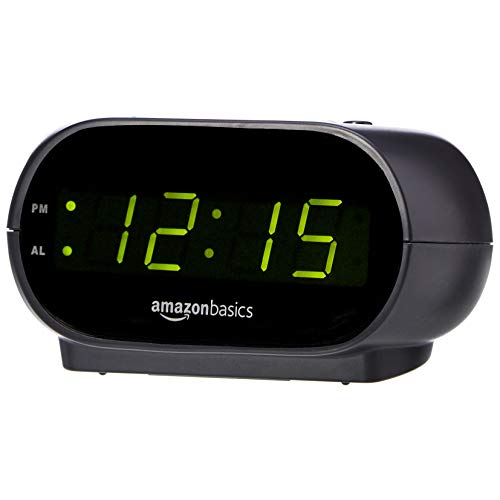
REACHER Digital Alarm Clock — Charge-and-wake simplicity
The REACHER digital clock represents the second honest meaning of compatibility: it charges the iPhone. A USB port on the clock feeds the phone overnight, so the nightstand needs one fewer plug and the phone wakes as full as you do. There is no Bluetooth and no app, and the review will not pretend otherwise; what the REACHER offers the iPhone household is a tidy charging arrangement wrapped in a genuinely pleasant clock.
That clock wears a colourful LED display whose digits can shift hue and dim across their full range, a small delight in rooms tired of red numbers, with adjustable alarm volume and an easy snooze. The footprint is compact, the controls are buttons a guest can decode, and the whole thing costs what a spare charger and a basic clock would cost together, while occupying less space than either pair.
Pairing logic is where this pick earns its place in an iPhone guide. The phone, charging beside the bed, can serve as the backup alarm and the music source through its own speaker, while the REACHER holds the primary wake-up and the always-visible time. It is the arrangement most households actually live with, sold honestly as one box plus the phone you already own.
The colour-shifting display turns out to be more than decoration in one specific household: teenagers and children who claim ownership of a colour claim ownership of the clock, and a clock a young person considers theirs gets its alarm respected rather than resented. Parents buying a first real alarm for a child’s room could do worse than letting the child pick the hue and inherit the responsibility in the same gesture.
- Connection: USB charging port for the phone
- Display: colourful LED, fully dimmable
- Alarm: adjustable volume, easy snooze
- Form: compact bedside footprint
Strengths
- Charges the iPhone from the clock’s own supply
- Colourful display that still dims to darkness
- Simple enough for guests and grandparents
Trade-offs
- No Bluetooth streaming or app features
- Charging speed suits overnight, not a quick top-up
- Single alarm focus rather than elaborate scheduling
Best for: households wanting the phone charged and the morning handled by one tidy object. Not suited for: streamers wanting phone audio through the clock. Check price on Amazon.

DreamSky Small Digital Alarm Clock — The compact charging clock
DreamSky’s small clock makes the same honest offer as the REACHER, a USB charging port for the phone, in an even tidier body with some of the clearest numerals in the business. The display’s large digits read across a room and dim smoothly, the alarm volume adjusts across a wide range, and the clock itself is powered through a USB-C adapter, which travellers and tidy-cable households will appreciate. Battery backup guards the settings when the power blips.
Its natural habitats are the small nightstand, the desk corner and the guest room: places where the phone needs a charging home and the human needs a clock that asks nothing. There is no streaming and no app, and the design does not apologise for it. What it does, it does with unusual polish for its tier, including a snooze button sized for a palm rather than a fingertip.
For an iPhone household furnishing several rooms, the DreamSky is the multiplier pick: one in the guest room where visitors’ phones land, one on the desk where the work phone charges, each quietly solving the cable question. Compatibility, at this end of the market, is mostly logistics, and this little clock is very good logistics.
Desk duty deserves its mention too. On a work desk the DreamSky’s big digits settle the time without a phone pickup, its charging port keeps the handset topped through the day, and its alarm, repurposed, ends work sessions and lunch hours with a decisiveness a software timer rarely matches. Small clocks migrate around homes across their lives, and this one’s combination of legibility and logistics makes every stop useful.
- Connection: USB charging port for the phone
- Display: large numerals, smooth dimmer
- Power: USB-C adapter powered, battery backup
- Alarm: adjustable volume, large snooze
Strengths
- Big, clear display in a small body
- USB-C power keeps cabling modern and tidy
- Easy to buy for several rooms at once
Trade-offs
- No audio streaming of any kind
- Compact speaker limits alarm richness
- Plain styling will not anchor a room
Best for: guest rooms, desks and small nightstands where the phone needs a charging base. Not suited for: music lovers or feature hunters. Check price on Amazon.

REACHER Sound Machine Sunrise Alarm Clock — The phone-free alternative
This second REACHER connects to the iPhone in no way whatsoever, and its presence on the list is the guide keeping its promise. It is a sunrise alarm clock and sound machine: a lamp that builds a dawn before the alarm, a library of nature-inspired sleep sounds, a night light, and a clock face that dims from bright to completely off. Readers who arrived asking about compatibility sometimes discover that their actual goal was a bedroom the phone no longer runs, and this is the modestly priced instrument of that independence.
Its mornings are gentle by design, light first and sound after, and its evenings offer the brown, pink and white noise varieties that mask a street or a snoring household. Children and light sleepers take to it quickly. Nothing about it requires an account, an update or a signal, and it will work identically in a cabin with no coverage at all.
Judge it as the control group and it wins its category: if the connected features on the other five picks earn their money, it will be by comparison with how complete a morning this unconnected clock already provides. Households can also pair the strategies, a sunrise REACHER for the wake and the phone charging in the kitchen, which is arguably the healthiest arrangement in the entire guide.
- Connection: none, deliberately phone-free
- Light: sunrise simulation with night light
- Sounds: nature-inspired sleep sound library
- Display: dimmable from bright to fully off
Strengths
- Complete sunrise morning with zero connectivity
- Sound library masks household and street noise
- Works anywhere, including off-grid cabins
Trade-offs
- Cannot stream or charge the phone at all
- No radio or app conveniences
- Light output suits smaller rooms
Best for: phone-free bedrooms, children, and anyone whose compatibility search ends in independence. Not suited for: readers who genuinely want streaming or charging on the clock. Check price on Amazon.
Comparison Table
| Pick | iPhone connection | Clock character | Standout trait |
|---|---|---|---|
| Emerson SmartSet Bluetooth Alarm Clock with USB Charging | Bluetooth audio, USB charging, aux | Radio clock | Self-setting time |
| Hatch Restore 3 | App setup and library | Routine light clock | Full evening-to-morning sequence |
| Loftie Clock | Bluetooth speaker | Calm sound clock | Blackout mode, offline sounds |
| REACHER Digital Alarm Clock | USB charging | Colourful digital | Charge-and-wake in one |
| DreamSky Small Digital Alarm Clock | USB charging | Compact digital | USB-C powered, big digits |
| REACHER Sound Machine Sunrise Alarm Clock | None | Sunrise sound clock | Phone-free mornings |
What Happened to Docking Alarm Clocks?
The dock died of two causes. The first was physical: Apple moved its phones from the wide thirty-pin connector to Lightning and eventually toward USB-C, orphaning a generation of beautifully made speaker docks with each transition, and manufacturers learned that building furniture around a connector is building on sand. The second cause was wireless: once Bluetooth audio became reliable and every phone carried its whole music library, the dock’s remaining job was charging, and a simple USB port does that job for every phone at once. The Emerson in this guide is the dock’s legitimate heir, keeping the nightstand hub idea while refusing to marry a connector.
The lesson for today’s buyer is to purchase connections that outlive phone models. Bluetooth audio and USB charging are standards, not fittings; they will serve the next phone and the one after. App-led clocks carry a different longevity question, since their libraries depend on a company’s servers and subscriptions, which is why this guide weighs the Hatch and Loftie partly on how much of their value works offline or on-device. Buy the standard, rent the library knowingly, and never again buy furniture shaped around a plug.
How Do You Pair and Set Up a Bluetooth Clock Without Tears?
Pair once, in daylight, with the phone in your hand and the manual open. Put the clock into pairing mode, select it in the iPhone’s Bluetooth settings, play something to confirm the audio path, and then leave the connection alone; both devices remember each other, and the morning never needs to know Bluetooth exists. Keep the phone within the same room, since bedroom walls and bathroom tiles are unkind to the signal, and if the audio ever stutters, forget and re-pair rather than living with a wounded connection.
Charging pairs itself: plug the phone’s own cable into the clock’s USB port, or use the port for a short bedside cable that lives there permanently. Overnight charging from a clock port is gentle and sufficient; keep the fast charger in the kitchen for daytime emergencies. Households with two phones and one clock should agree whose device gets the port and whose gets the wall adapter, a tiny treaty that prevents the 11 p.m. cable negotiation from becoming a nightly institution.
Which Connection Type Fits Your Household?
Choose Bluetooth if the nightstand doubles as your listening post and the phone’s speaker has always disappointed you; the Emerson for radio households, the Loftie for calm ones. Choose app control if your real project is the routine itself, evenings and mornings choreographed, and you accept a subscription as the price of the library. Choose USB charging if your needs are frankly logistical, a charged phone and a visible clock with no new systems to learn; the REACHER and DreamSky split that vote by room size and style. Choose none of it, proudly, if the phone has been exiled from your bedroom already, and let the sunrise REACHER close the argument.
Households often blend: an Emerson in the kitchen where the radio lives, a Loftie or Hatch in the main bedroom, DreamSkys wherever guests and desks collect cables. The categories in this guide are tools, not teams, and the correct number of connection types in a home is however many its rooms actually use.
What Are the Most Common Mistakes iPhone Owners Make With Alarm Clocks?
The classic mistake is buying on the word compatible without asking which of the three meanings is on offer, then discovering the clock neither streams nor charges. The second is letting the phone remain the real alarm while the clock becomes an expensive display, which surrenders the whole point of the purchase the first time an update moves a setting. Third, owners pair a Bluetooth clock and then carry the phone around the house, wondering why the bedroom audio drops, when the speaker was always meant to serve a phone that lives on the nightstand. Fourth, app-clock buyers skip the subscription maths and meet it later as a surprise. The last is forgetting the clock changes and backups on the models that need a hand, then blaming the phone era for a very analogue failure.
One last scenario deserves a sentence, because it arrives in most households eventually: the phone that spends the night in another room entirely, on doctor’s orders or a family’s. Every clock here was chosen to thrive in exactly that arrangement, holding time, light, sound and alarm without asking where the handset went. Compatibility, fully understood, includes compatibility with the phone’s absence, and a nightstand that works beautifully with the device gone is the surest sign the system was designed rather than accumulated.
Set a calendar note, while the setup is fresh, to re-check the pairing and the backup after the next phone update. It is the only maintenance connected clocks ask for, and it takes less time than finding the cable did on the first night.
And if the household includes a teenager, let them run the pairing and the first week’s tests. A young person who configured the system defends it, and a defended system survives the semester and beyond it.
Final Recommendation
Decide what you want the iPhone to do at your bedside, and let the answer pick the clock. Streaming plus charging plus radio points to the Emerson SmartSet, the most complete phone companion here. A choreographed, phone-free night built through an app points to the Hatch, with the Loftie as the calmer streaming alternative. Pure charging logistics point to the REACHER or the DreamSky, and a clean break points to the sunrise REACHER. Buy the connection you will use nightly rather than the longest list of them, and the clock will still be serving the phone you own three models from now.
How Does the iPhone Itself Fit Into a Clock-Based Morning?
Demote it, do not banish it. The phone makes an excellent second alarm, set five minutes behind the clock and left charging across the room where reaching it requires standing. It is a fine evening audio source through a Bluetooth clock and a fine sleep-sound source in a pinch. What it should stop being is the time display you check at 3 a.m., because that check comes with notifications attached, and the clock’s calm digits exist precisely to break that reflex. Households describe the change as the phone becoming a tool again rather than the room’s supervisor.
Focus modes and scheduled summaries on the phone complement the clock rather than compete with it: let the phone silence itself overnight while the clock holds the schedule. The division of labour this guide keeps recommending is really a division of attention. The clock owns the hours; the phone owns everything else, during the day, in another room’s light.
What Should You Check in the First Week With a Connected Clock?
Test the failure modes while they are still free. Unplug the clock briefly and confirm the backup behaviour and the self-setting where offered. Turn the phone off for a night and verify the alarm’s independence with your own ears rather than the brochure’s word. Stream audio from the furthest corner of the bedroom and from the bathroom doorway to learn the Bluetooth range your walls actually allow. Run the app-led routines through one router restart. A system that survives this rehearsal week will survive the year; one that fails deserves its return window.
Also test the human factors: the display at its dimmest from your pillow’s exact position, the snooze by touch with your eyes closed, the charging cable’s reach to where the phone naturally lands. Connected clocks add small frictions that only appear in the dark, and the first week is when they can still be solved by moving a cable rather than by replacing a clock.
How Do Subscriptions and Apps Age on a Nightstand?
A clock is a decade object; an app is a two-year object, and the mismatch deserves a buyer’s clear eye. The app-led picks here were chosen because their core value, the routine, the light, the alarm, lives on the device after setup, so an app redesign cannot strand your mornings. Libraries are the exposed part: sounds and content served from a catalogue can change with a company’s pricing, which is why the guide names the Hatch’s subscription plainly and credits the Loftie’s subscription-free core library as a structural advantage.
The practical rule is to buy the hardware for what it does on delivery day and treat future content as weather, pleasant when it comes. If a clock would disappoint you with its library frozen exactly as unboxed, it is the wrong clock at any subscription price. Both app-led models here pass that test for most households, the Hatch on the strength of its routine design and the Loftie on the breadth of what it includes outright.
What About Android Phones and Mixed Households?
Mixed households are the quiet majority, and the good news is that the honest connections are universal ones. Bluetooth audio does not care which phone streams it, and a USB port charges anything with the right cable, so the Emerson, Loftie, REACHER and DreamSky serve a two-phone bedside without favouritism. The app-led clocks publish apps for both major platforms as well, though households should confirm the current listing for their exact handset before treating setup as guaranteed.
The household rule that emerges is to standardise on the clock, not the phone. Phones turn over every few years and change brands on a whim or a contract; the clock that serves them all, through standards rather than fittings, is the one still on the nightstand when the next handset arrives. That is the deepest sense in which this guide’s picks are compatible: not with a model, but with the future.
How Should You Handle Clock Changes, Travel and Updates?
Twice a year the clocks change, and the six here divide into those that adjust themselves, like the self-setting Emerson, and those that expect a human minute. Put the manual ones on the same checklist as the oven clock and the car, and the problem dissolves into a household ritual. Travel argues for keeping the home system untouched and letting the phone, promoted temporarily, handle hotel mornings, rather than dismantling a tuned nightstand for a weekend.
Phone updates deserve one habit: after a major system update, glance at the pairing and the app permissions for any connected clock, because updates occasionally reset Bluetooth relationships or background permissions that routines quietly use. Thirty seconds of checking after an update prevents the one silent failure mode connected clocks possess. The unconnected REACHER, smug in the corner, remains exempt from all of this, which is its final argument.
What Does a Sensible Nightstand Cable Setup Look Like?
Work backwards from the sockets. Most bedrooms offer one double outlet within reach of the bed, and the modern nightstand asks it to feed a clock, a phone, perhaps a lamp or a purifier. The charging clocks in this guide exist partly to ration that outlet: the REACHER and DreamSky turn the clock’s own supply into the phone’s supply, collapsing two plugs into one. Where a lamp-clock also lives on the same table, a short, tidy multi-socket strip behind the nightstand is the grown-up answer, with cables routed once and forgotten.
Keep one rule sacred: the cable that charges the phone should be long enough that the phone rests flat in its chosen spot, not dangling at the stretch of a short lead. A phone that slides off a nightstand at 2 a.m. teaches its owner to keep it in the bed, and the whole architecture of this guide collapses from that one small geometry failure. Measure the distance, buy the cable once, and let the arrangement disappear into the furniture.
How Do You Choose Between the Emerson and the Loftie?
These two are the guide’s Bluetooth pair, and they diverge on temperament more than specification. The Emerson is a radio-era hub modernised: it streams, it charges, it sets its own time, it presumes the nightstand is a practical place and equips it thoroughly. The Loftie is a retreat object: it streams when asked, then devotes itself to darkness, calm sounds and a two-phase alarm, charging nothing and demanding nothing. Households that listen to talk radio in the morning and charge two devices by the bed belong to the Emerson; households designing a serene, screen-free bedroom belong to the Loftie.
Budget tells the same story from the other side. The Emerson delivers its long list at a mid-level tier, while the Loftie charges a premium for restraint, design and its included library. Neither is the sensible version of the other; they are answers to different questions that happen to share a connection type, which is precisely why this guide sorts by the household’s intent after sorting by the connection’s honesty.
What Will Your Next Phone Ask of This Clock?
Nothing new, if you buy as this guide advises. The next iPhone will still speak Bluetooth audio, still charge from a USB cable, and still run the major apps, so every pick here survives the upgrade cycle that orphans lesser accessories. The one habit worth forming is to re-pair and re-check after each phone change, a two-minute ritual during setup week, confirming streaming, charging and app links on the new handset while the old one is still in the house to compare against.
That durability is the closing argument for the whole category. A clock bought on honest standards becomes one of the few technology purchases in the home that the phone industry cannot obsolete on its own schedule. In a drawer somewhere, most households keep a dock that proves the alternative; the six clocks above are how you avoid adding to the drawer.
How Do You Keep the Bedroom From Becoming a Charging Station?
There is an aesthetic risk in this category that deserves naming: follow the compatibility logic too far and the nightstand becomes a depot, phone, tablet, watch and earbuds all queuing at the clock. Resist it. The bedroom system works because it is minimal, one clock, one phone charging in its place, everything else exiled to a hallway shelf or a kitchen counter where their lights and notifications belong to the day. The charging port on a clock is a concession to the one device that doubles as a backup alarm, not an invitation to migrate the household’s whole battery population into the room where you sleep.
Households that hold that line report the bedroom feels different within a week, quieter in a way that has nothing to do with volume. The clock’s digits become the room’s only glowing information, the phone rests face down and silent, and morning begins with an alarm rather than a feed. That atmosphere, more than any single connection type, is what the readers of this guide are usually shopping for, and every pick above can deliver it if the household lets the system stay small.
What Do Owners of Connected Clocks Say After a Year?
The pattern in long-term accounts is that the connection fades into the background and the clock-ness comes forward. Streaming, thrilling in week one, becomes simply how the evening podcast sounds; the app routine becomes simply what the light does; the charging port becomes simply where the phone lives. What owners praise at a year is what they praise in any good furniture: the display they can read without glasses, the alarm that has never once failed, the button their hand finds alone. Connectivity bought the clock its place on the shortlist; reliability kept it on the nightstand.
The corollary is a warning about buying for a feature you will use monthly. A connection exercised nightly justifies itself; a novelty exercised twice becomes a reason the clock cost more than it needed to. Audit your real evenings before ordering: how often will audio actually stream, how often will the app actually open? The answers, honestly given, sort this list faster than any comparison table, and they are the reason the guide includes an unconnected clock without embarrassment.
How Does This Category Serve Guest Rooms and Second Homes?
Guests arrive with phones and without cables, which makes the charging clocks quietly heroic in a spare room. A DreamSky or REACHER on the guest nightstand, with a short cable already in its port, tells a visitor everything: your phone lives here, the time is this, the alarm is yours to set. The host never lends a charger, the guest never asks, and the room feels considered in the way hotels spend money to achieve. In second homes and cabins the unconnected sunrise REACHER takes the same role, asking nothing of a network that may not exist.
The connected flagships, by contrast, should stay in the main bedroom where their routines belong to the household. A guest confronted by someone else’s Hatch programme learns nothing except that the house is cleverer than they are. Match the clock’s sociability to the room: private choreography for the owners, honest logistics for the visitors, and the whole house wakes on time.
What Is the Sensible Buying Order If You Are Unsure?
Start with the logistics, because they are the cheapest certainty. A charging clock like the REACHER or DreamSky answers the cable question in any household within a day, and its success or failure teaches you nothing you did not already suspect, which is fine: the experiment costs little. If evenings then reveal an appetite for audio on the nightstand, the Emerson or Loftie is the second step, chosen by temperament as described above. If the appetite turns out to be for choreography, evenings sequenced and mornings staged, the Hatch is the third step, bought with the subscription priced in and the eyes open.
Notice that this ladder never requires selling the previous rung. The charging clock retires to the guest room, the streamer moves to the kitchen, and the household ends with a system of clocks matched to rooms rather than a single compromise straining in the master bedroom. Buying in that order converts uncertainty into information at each step, which is the most this guide, or any guide, can honestly offer a reader whose nights it cannot see.
A Final Word on the Word Compatible
Keep the scepticism this guide has practised, because the word will keep being stretched. When a listing claims compatibility, ask compatible at doing what, through which named standard, stated where in the specification. Bluetooth, USB and a named app are answers; a phone pictured beside a clock is not. The six products above survive that questioning in writing, which is why they are here, and the questioning itself will serve you in categories far beyond clocks, wherever a modern accessory borrows a famous phone’s credibility.
There is a friendlier way to hold the same point. The best companions for a phone are the products honest about the relationship: the speaker that streams, the port that charges, the app that configures, the clock that minds the night. Everything in this guide was chosen to be one of those honest companions, and the household that buys on that basis rarely returns anything.
Frequently Asked Questions
Will these clocks work with any iPhone model?
The Bluetooth models pair with any iPhone that supports Bluetooth audio, which covers every model in modern use, and the USB charging ports serve any phone with the right cable. App-led clocks need a phone able to run their current app, so very old handsets should check the app store listing before relying on setup features.
Can a Bluetooth clock play my iPhone alarm sound?
Generally the alarm belongs to the clock, and the Bluetooth path carries music, podcasts and other audio you play. Treat the clock’s own alarm as the wake-up and the phone’s alarm, if you set one, as a backup sounding from the phone itself. That division is deliberate and is what keeps the system reliable.
Is charging from a clock’s USB port bad for the phone?
Overnight charging at modest power is the gentlest charging a phone gets, and clock ports are built for exactly that duty. What they are not built for is a fast top-up before you leave, so keep a faster charger elsewhere for emergencies and let the clock handle the nightly fill.
Do app-controlled clocks work if the WiFi goes down?
Their alarms and saved routines are designed to run on the device, and the Loftie explicitly offers an offline mode for its sounds. Setup changes and fresh library content need the connection back. If your home internet is unreliable, weight that toward the models whose daily life is entirely on-device.
Why is there no docking clock on this list?
Because the dock’s connector kept changing until manufacturers abandoned the format, and the surviving products are legacy stock rather than living designs. Bluetooth audio plus USB charging now does everything the dock did, for every phone, without the expiry date, which is why this guide recommends the heirs rather than the antiques.
Can I use one of these clocks without an iPhone at all?
Every pick functions as a complete alarm clock on its own; the iPhone features are additions, not requirements. The Emerson keeps its radio, the Hatch and Loftie keep their routines and libraries, and the charging clocks simply have a spare port. Android households can use the Bluetooth and USB models the same way.
Related Guides
Owners of older handsets should continue to Best Alarm Clocks Compatible with iPhone 7, where the charging and Bluetooth logic is worked through for a Lightning-era phone. Readers furnishing a parent’s bedroom will find kindred simplicity in Best Alarm Clocks for Elderly People, while anyone redesigning a whole room around better mornings can browse Best Pedestal Bathroom Sinks for the bathroom end of the house. And for the apartment that hosts all of it, see Best Air Purifiers for Apartments.
[…] comparing wake technologies should read next about Best Alarm Clocks Compatible with iPhone, where app-led clocks take a different approach to the same nightstand. For the purely practical […]