What's inside
- Key Takeaways
- Quick Picks
- How Did We Choose the Best Alarm Clocks for a Desktop?
- How Do the Six Picks Compare Side by Side?
- How Can a Desk Alarm Make Pomodoro-Style Work Sustainable?
- What Makes a Desk Nap Restorative Instead of Ruinous?
- Where on the Desk Should the Clock Actually Sit?
- How Does a Desk Clock Protect Attention Better Than a Phone?
- How Should a Desk Clock Behave During Video Calls?
- What Changes When the Desk Belongs to a Creative Worker?
- How Can a Desk Clock Help Someone Working Across a Household’s Schedule?
- How Should Students and Teachers Use a Desk Clock Differently?
- What About Standing Desks, Hot Desks and Workshop Benches?
- How Long Should a Desk Clock Last, and When Is It Time to Replace One?
- How Can a Desk Clock Mark the End of the Working Day?
- What Should You Set Up in the First Ten Minutes?
- What Are the Most Common Mistakes When Putting a Clock on a Desk?
- Final Recommendation
- Frequently Asked Questions
- Related Guides
As an Amazon Associate I earn from qualifying purchases. This post may contain affiliate links at no extra cost to you.
cottageverdict.com is reader-supported. When you buy through links on our site, we may earn an affiliate commission.
Where to buy: every clock below links to its Amazon listing, where you can check price on Amazon and confirm its footprint, display style and charging options before it claims desk space.
The best alarm clocks for a desktop answer a different question from their bedside cousins. A desk clock is not primarily for waking — although desk naps and early starts both feature in this guide — it is for knowing, at a glance, without touching a phone or waking a screen, what time it actually is. That sounds trivial until you count how often a working day is punctuated by that question: before a call, during a call, while deciding whether the report can be finished before lunch, while wondering how a twenty-minute task consumed the entire afternoon.
Desk space is the scarcest real estate in modern working life, and this guide treats every centimetre as spent money. A clock earns its footprint by combining legibility with restraint: digits readable from a chair’s natural lean-back, a display that can be dimmed when the room darkens or a video call begins, and a body small enough to share territory with a monitor stand, a notebook and the mug that never quite makes it back to the kitchen. USB charging earns genuine credit here, because a desk clock that also charges the phone justifies its socket twice over.
The alarm functions matter in their desk-specific forms. A reliable alarm ends a power nap before it becomes a lost afternoon. A quickly set timer-like alarm structures pomodoro-style work sprints and the breaks that make them sustainable. Dual alarms separate the morning start from the midday commitment. And in a shared office or a home with thin walls, volume that adjusts down to a personal level is not a luxury — it is professional courtesy in electronic form.
Six clocks earned their desk space below. They range from a keyboard-controlled Sharp built for people who set alarms daily, through wooden and colourful digitals that soften a workspace’s look, to an auto-setting radio clock that quietly removes timekeeping from the list of things its owner manages. Each pick states plainly what it is for and what it is not, because a desk has no room for an object that cannot justify itself.
Key Takeaways
- Glanceability is the desk clock’s first job: big, calm digits readable without leaning or squinting.
- Footprint is a cost — every pick here stays compact enough for a working desk’s real clutter.
- Dimming matters at a desk because lighting changes across a working day and into evening calls.
- USB charging doubles a clock’s value by keeping the phone powered from the same socket.
- Desk alarms serve naps, work sprints and hard stops, not just the morning wake-up.
- Controls you can operate by touch keep the clock faster than any phone app it replaces.
Quick Picks
| Pick | Badge | Why it made the list |
|---|---|---|
| Sharp Digital Alarm Clock with Keyboard Controls | Best for daily alarm setters | Keyboard-style controls and a big snooze make setting and silencing genuinely one-touch operations. |
| uscce Wooden Digital Alarm Clock | Best-looking desk presence | A wood-faced display with full-range dimming and dual alarms that suits a considered workspace. |
| DreamSky Small Digital Alarm Clock | Best glanceable digits | Large numbers, a proper dimmer and a charging port in a compact plug-in body made for desks. |
| Amazon Basics Small Digital Oval Alarm Clock | Best tiny footprint | A small oval clock with a nightlight and battery backup for desks with almost no spare surface. |
| Netzu Digital Alarm Clock | Best dual-alarm workhorse | Bold digits, five dimmer levels and four volumes under dual alarms for structured working days. |
| Emerson SmartSet Dual Alarm Clock Radio | Best set-and-forget radio clock | Auto time setting, dual alarms, radio presets and a sleep timer in a clock that manages itself. |
How Did We Choose the Best Alarm Clocks for a Desktop?
We judged from the chair, not the showroom. Each candidate was assessed at the distance a person actually sits from a desk’s back edge, in ordinary room light and in the dimmer conditions of evening work. Digits that demanded a lean forward failed the first test, however handsome they looked up close. Displays that could not dim failed the second, because a desk clock shares its room with video calls, films after hours and, in home offices, sometimes a sleeping household beyond the door.
Footprint came next, measured against a realistic desk rather than an empty one. The survivors are all compact, and several are small enough for the shelf above a monitor or the gap beside a laptop dock. We also weighed the controls as a daily interface: a desk alarm gets set and reset far more often than a bedside one — for naps, sprints, reminders — so buttons that can be found and understood by touch scored heavily, and menu-diving designs lost marks they never recovered.
Finally, we considered the desk’s economy of sockets and cables. Charging ports turned a clock from a consumer of scarce desk power into a provider of it. Battery backup mattered less for waking than for memory: a desk clock that survives a power cut with its alarms intact saves its owner a small, annoying reconstruction. Radio, where offered, counted as a genuine desk pleasure rather than a relic — background listening is a working-day companion for millions of people, and a clock that provides it earns its territory twice.

Sharp Digital Alarm Clock with Keyboard Controls — Best for daily alarm setters
Sharp’s idea is so obvious, once seen, that its absence elsewhere feels like an oversight: put the controls on top, laid out like a keyboard, where a hand can find them without lifting or turning the clock. Setting an alarm becomes a keypad exercise rather than a squinting negotiation with buttons hidden on the back. For desk life — where the alarm might be set for a nap at two, a hard stop at four and a call at six, all in one day — that speed is the product.
The supporting details are equally workmanlike. A large snooze button sits where a descending hand expects it. The front alarm switch makes the clock’s armed state visible and physical, which desk workers will recognise as the difference between knowing and hoping. The red LED display is unfashionable and excellent: readable at a glance, calm in peripheral vision, and honest about being an instrument rather than a decoration. Battery backup preserves the settings through outages.
It will not win a beauty contest against the wooden uscce, and it offers no charging port for the phone. Buy it for the interface. Anyone whose desk alarm changes daily — freelancers structuring their own time, students between lectures, nap strategists — will feel the benefit every single time their hand moves to set it.
- Type: digital clock with top keyboard-style controls
- Display: red LED, clear and calm at desk distance
- Controls: large snooze button and a front alarm switch
- Power: mains operation with battery backup for settings
- Best setting: busy desks where alarms change several times daily
Strengths
- Keyboard controls make setting an alarm a two-second job.
- The front switch shows the alarm state without any menu.
- Large snooze is findable by touch during a desk nap.
Trade-offs
- No USB charging for the phone sharing the desk.
- The red display divides taste more than softer colours.
- Looks are functional; design-led desks may prefer wood.
Best for: freelancers and nap strategists who reset alarms constantly.
Not suited for: buyers wanting a clock that doubles as desk decor.

uscce Wooden Digital Alarm Clock — Best-looking desk presence
A desk is looked at for more hours than most furniture in a life, and the uscce is the pick for people who feel that fact. Its wooden face turns a digital display into something closer to a small piece of joinery: the numbers glow through the wood-toned surface, present when needed and visually quiet the rest of the time. On a desk with a plant, a notebook and any pretension to calm, it is the only clock here that actively improves the view.
Beneath the surface it is a serious instrument. The display dims across the full range, so an evening work session or a video call after dark is not conducted against a glowing billboard. Dual alarms with volume control handle the structured day — a start alarm and a hard-stop alarm, or weekday and weekend patterns for a home office that doubles as a bedroom. The large numbers stay legible from the chair and from the doorway, which matters in studios where the desk clock serves the whole room.
The honest cost is that beauty is the premium here; the Sharp sets alarms faster and the DreamSky reads bigger. But a workspace is an environment, not a machine, and the uscce is the pick that understands the difference. For a desk that clients see on video calls, it is practically set dressing with a function.
- Type: wooden-faced digital clock with dual alarms
- Display: large numbers dimming from bright to fully dark
- Sound: volume control suited to shared and home offices
- Finish: wood styling that suits considered workspaces
- Best setting: home offices and desks visible on video calls
Strengths
- The wooden face makes a workspace feel deliberately composed.
- Full-range dimming adapts from bright mornings to dark evenings.
- Dual alarms structure a working day with two fixed points.
Trade-offs
- Setting is slower than the Sharp’s keyboard approach.
- No charging port for desk devices.
- The premium is aesthetic, which not every desk budget values.
Best for: home workers whose desk is also their public backdrop.
Not suited for: purely functional setups where looks earn nothing.

DreamSky Small Digital Alarm Clock — Best glanceable digits
If the desk clock’s first job is to be read in half a second, the DreamSky is the purest expression of that job here. Its numbers are large out of proportion to its compact body, so the time registers from the chair, from a standing stretch, from the doorway with a coffee in hand. There is no decoration competing with the information. During a long call, a glance settles the question of how long has passed without a phone being touched or a screen being woken — a small defence of attention that compounds across a working life.
The dimmer keeps those big digits civilised after dark, and the adjustable volume keeps its alarm personal in shared spaces. The USB charging port makes the clock a citizen of the desk’s power economy rather than a tenant: the phone charges from the clock’s socket, and the clock’s small footprint beside a monitor stand stops looking like a cost at all. It plugs in via a USB-C adapter, keeping the cable situation tidy.
Choose it when reading the time is the main event and the desk is shared with work that matters more than the clock’s appearance. It is the least decorative pick here after the Sharp, and for many desks that restraint is exactly right: the clock as instrument, consulted constantly and noticed rarely.
- Type: compact plug-in clock with oversized digits
- Display: large numbers with a proper dimmer control
- Sound: adjustable volume for shared workspaces
- Extras: USB charging port for the desk phone
- Best setting: monitor-side placement on a busy working desk
Strengths
- Digits readable at every distance a desk worker occupies.
- Charging port repays the socket the clock occupies.
- Compact body fits the gaps other desk objects leave.
Trade-offs
- Plain styling contributes nothing to a desk’s look.
- Single-alarm thinking suits one main daily signal best.
- Big digits dominate a very small desk’s visual field.
Best for: workers who check the time constantly and hate distractions.
Not suited for: desks bought as design statements first.

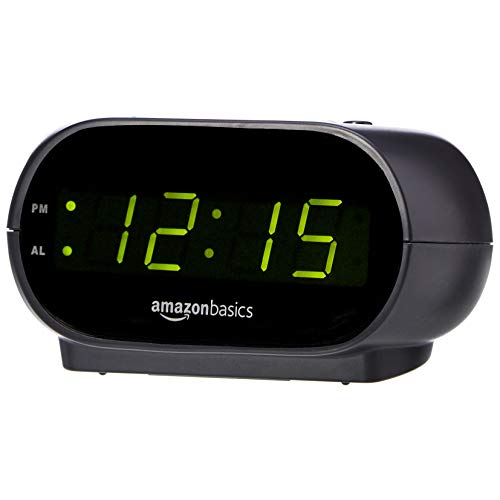
Amazon Basics Small Digital Oval Alarm Clock — Best tiny footprint
Some desks have no spare surface at all — only ledges, corners and the narrow strip behind a keyboard. The little Amazon Basics oval was made for those desks. A few inches in each direction, it perches where bulkier clocks cannot: on a monitor shelf, beside a dock, on the windowsill that serves as the office’s overflow territory. Its LED display is clear, its snooze simple, and its built-in nightlight serves the after-hours session when the room’s main light feels too much like daytime.
Battery backup is the feature that elevates it from trinket to tool: unplug it to rearrange the desk, suffer a power cut mid-afternoon, and the time and alarm survive the interruption. As a secondary clock — the one that lives at the desk while a fuller-featured model runs the bedroom — it is almost perfectly judged, and its modest cost makes that two-clock arrangement painless.
Its limits are the usual ones for its size: a single alarm, no charging port, controls that serve occasional setting rather than daily reprogramming. A worker whose desk alarm changes three times a day should take the Sharp. A worker who needs the time visible and one reliable daily signal from almost no space at all should take this, and spend the saved surface on the work itself.
- Type: small oval digital clock; mains powered with battery backup
- Display: clear LED with a built-in nightlight
- Alarms: single alarm with a simple snooze
- Size: a few inches each way, shelf and sill friendly
- Best setting: cramped desks and secondary-clock duty
Strengths
- Fits surfaces that no other pick here can use.
- Battery backup survives desk rearrangements and outages.
- Gentle cost makes it an easy second clock for the desk.
Trade-offs
- One alarm only for the whole working pattern.
- No charging port to serve the phone.
- Controls suit weekly setting, not constant changes.
Best for: minimal desks needing time and one daily signal.
Not suited for: workers juggling several timed commitments daily.

Netzu Digital Alarm Clock — Best dual-alarm workhorse
The Netzu brings a timetable brain to the desk. Dual alarms let a worker pin the day’s two immovable points — the start, and the moment work must stop for the school run, the train, the call — without touching the settings in between. Bold digits read from anywhere in the room, five dimmer levels adapt the display from a bright morning office to a darkened evening one, and four volume levels scale the alarm from a private nudge to a room-clearing instruction.
That volume range deserves a desk-specific note. In a shared office, the lowest settings keep a nap alarm or a break reminder personal; at home, the higher settings reach a worker wearing headphones in the next room, which is a real pattern in houses where the office is a corner of somewhere else. The snooze is large enough to operate without looking, useful for the desk nap that must end on schedule rather than on impulse.
It lacks a charging port, and its styling is plainly functional. What it offers instead is the most complete scheduling behaviour in this list at a desk-friendly size, and for workers whose days are genuinely structured by the clock — carers, traders, teachers between lessons — that completeness is the whole argument.
- Type: plug-in digital clock with dual alarms
- Display: bold digits with five dimmer levels
- Sound: four volume levels from private to penetrating
- Snooze: operable by touch without looking down
- Best setting: structured days with two fixed daily points
Strengths
- Dual alarms hold a working day’s shape without daily effort.
- Volume range serves both shared offices and headphone wearers.
- Dimmer levels track a desk’s changing light across the day.
Trade-offs
- No USB port for charging at the desk.
- Functional looks will not elevate a styled workspace.
- Bold digits may feel large on the very smallest desks.
Best for: workers whose day hangs on two non-negotiable times.
Not suited for: anyone wanting one clock to charge everything too.
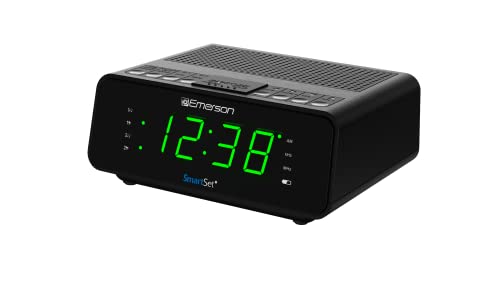
Emerson SmartSet Dual Alarm Clock Radio — Best set-and-forget radio clock
The Emerson’s party trick is that it sets itself. Plug it in and the SmartSet system establishes the correct time and day automatically — and restores them after outages — which removes the two most annoying desk-clock chores at a stroke. On a desk, where the clock is infrastructure rather than a hobby, that self-sufficiency is deeply attractive: the time is simply right, always, without its owner ever thinking about it.
Around that trick sits a complete radio clock. Dual alarms allow waking to radio or buzzer on two schedules, twenty presets keep favourite stations a button away, and a sleep timer lets background listening end itself — a feature desk workers use more than they admit, for the focus playlist that should stop when the work does, or the radio that accompanies the first hour and then falls silent. The jade-green display, just under an inch tall, dims for evening use and reads clearly without shouting.
It is the largest personality here and the least minimal; a cramped desk should measure first. But for a spacious home office, a workshop bench or a studio desk, the Emerson is the pick that gives back attention: radio for company, alarms for structure, and a clock that maintains itself while its owner gets on with literally anything else.
- Type: dual-alarm clock radio with automatic time setting
- Display: jade-green LED just under an inch, dimmable
- Radio: AM and FM with twenty station presets
- Extras: sleep timer for self-ending background listening
- Best setting: roomy desks, workshops and studio workspaces
Strengths
- Automatic setting ends time and date chores permanently.
- Radio presets make background listening a one-touch habit.
- Dual alarms with radio or buzzer suit varied routines.
Trade-offs
- The fullest feature set needs the most desk room here.
- No USB charging port for phones or tablets.
- Radio is wasted on workers who listen through a computer.
Best for: desk workers who want company, structure and zero upkeep.
Not suited for: the tightest desks or committed minimalists.
How Do the Six Picks Compare Side by Side?
| Pick | Setting speed | Charging | Desk character |
|---|---|---|---|
| Sharp Digital Alarm Clock with Keyboard Controls | Fastest, keyboard layout | No port | Pure instrument |
| uscce Wooden Digital Alarm Clock | Standard controls | No port | Calm and decorative |
| DreamSky Small Digital Alarm Clock | Standard controls | USB port | Legibility first |
| Amazon Basics Small Digital Oval Alarm Clock | Occasional setting | No port | Smallest footprint |
| Netzu Digital Alarm Clock | Dual-alarm scheduling | No port | Structured workhorse |
| Emerson SmartSet Dual Alarm Clock Radio | Automatic time setting | No port | Radio companion |
How Can a Desk Alarm Make Pomodoro-Style Work Sustainable?
The pomodoro pattern — focused sprints separated by real breaks — fails most often at its boundaries. A sprint that drifts ten minutes over steals the break; a break that drifts twenty minutes over steals the afternoon. A desk alarm draws both lines without negotiation, and a clock that sets in seconds, like the Sharp with its keyboard controls, gets used for this where a phone timer buried in menus does not. The alarm’s impersonality is the point: the clock ends the sprint, so the worker does not have to spend willpower on ending it themselves.
Breaks deserve the same rigour as sprints. Set the return alarm before standing up, because a break without a defined end is just an interruption of unknown length. The Netzu’s dual alarms can hold a whole morning’s architecture — sprint end and break end as a repeating pair — while workers who prefer sound cues can let the Emerson’s radio mark the break and its silence mark the return. Experiment honestly for a week; most people discover their sustainable sprint is shorter than their ambition and their useful break longer than their guilt allows, and the clock, unlike the ego, reports both findings without commentary.
Keep the alarm’s volume at the personal end of the range for this job. A sprint boundary is information, not an emergency, and a gentle signal repeated reliably trains a rhythm that a startling one merely interrupts.
What Makes a Desk Nap Restorative Instead of Ruinous?
The desk nap obeys the same arithmetic as every nap: short restores, long disorients. Twenty minutes at a desk, head on arms or reclined in a decent chair, can return an afternoon; an hour returns a groggy worker who has traded the evening’s sleep for the afternoon’s stupor. The alarm is therefore not an accessory to the desk nap but its defining technology — set before lying back, at a volume that will certainly register, on a clock whose snooze cannot be negotiated with from a horizontal position.
Choose the clock for the nap you actually take. The Sharp’s big snooze is a temptation to be managed with a house rule — one press, then feet on the floor — while the Netzu’s firmer volumes suit workers who surface slowly. Light matters as much as sound: dim the display, draw the blind if the office has one, and let the alarm’s moment coincide with lights returning, because the body takes its cue from brightness as much as from noise. Workers in shared offices should treat the nap alarm as a social contract — quiet setting, headphones where possible, and a duration that respects the room.
And keep the nap at the same time when you can. A body that expects rest at two receives it efficiently; a body ambushed by exhaustion at random hours merely collapses. The clock’s job is to make the rest a scheduled instrument of the working day rather than an accident that happens to it.
Where on the Desk Should the Clock Actually Sit?
Placement follows the sightline, not the spare space. The natural resting gaze of a seated worker falls slightly downward and to one side of the monitor; a clock placed there is consulted effortlessly a hundred times a day, while a clock behind the screen or across the room is consulted never. The DreamSky and Netzu, with their bold digits, tolerate the back-of-desk position beside a monitor stand. Smaller displays like the little oval’s belong closer — on a shelf at seated eye level, or at the desk’s front corner where a glance lands without a head turn.
Cables decide more placements than taste does. A charging model like the DreamSky should sit where its port serves the phone’s natural resting place, or the cable will migrate across the keyboard within a week. Radio models like the Emerson want a little air around them for reception and sound, and their slightly larger presence suits the desk’s end rather than its crowded centre. Whatever the model, leave the clock’s controls physically reachable: an alarm that must be silenced by standing and leaning will be silenced, eventually, by being unplugged.
Finally, consider the evening transformation. Many desks become leisure territory after hours — gaming, films, letters to friends — and a display that dims gracefully, like the uscce’s or the Netzu’s, lets the clock retire into the background instead of presiding over the room. A desk clock is a daytime instrument that should know how to be quiet at night.
How Does a Desk Clock Protect Attention Better Than a Phone?
Every time a worker picks up a phone to check the time, the phone presents its other offers: messages, feeds, the small red numbers that exist to be cleared. A glance that was meant to cost one second costs four minutes, several times a day, and the arithmetic of that leak across a career is sobering. A desk clock answers the original question and nothing else. It has no notifications, no opinions, no next thing. In an economy where attention is the worker’s actual capital, that dumbness is a sophisticated feature.
The protection extends to meetings and calls. A visible clock lets a worker pace a conversation — opening, substance, close — without the social signal of checking a phone, which reads as boredom even when it is really timekeeping. Presenters, therapists, teachers and anyone whose work is other people will recognise the value: the clock on the desk or shelf is a professional instrument precisely because everyone can see it is only a clock.
None of this requires banishing the phone; it requires demoting it. Charge it at the clock’s port, face down, at the desk’s far corner, and let the clock handle the day’s hundred small time questions. The workers who make this change rarely reverse it, because the calm it produces is noticeable within a single afternoon.
How Should a Desk Clock Behave During Video Calls?
The modern desk is a broadcast studio several times a day, and the clock sits inside the frame more often than its owner realises. A display that dims — the uscce to darkness, the Netzu across five levels — avoids the glowing rectangle that draws a caller’s eye, and a clock placed just below or beside the camera gives its owner a private timekeeper for pacing the call: the two-minute warning you give yourself before wrapping up, invisible to everyone else on screen. Radio models should be silenced before the call, obviously, but their sleep timer offers a subtler trick — background music that ends itself as the meeting begins, so the room’s atmosphere changes on schedule without a scramble.
Time zones are the video call’s hidden curriculum, and a desk clock helps more than expected. Workers whose colleagues span continents develop the habit of glancing before messaging — is it a reasonable hour there? — and a clock set as the day’s anchor, checked against the calendar’s conversions, prevents the cheerful midnight ping that damages professional friendships. Some workers keep the desk clock deliberately on a partner office’s time during a shared project, letting the computer keep local time; the arrangement sounds eccentric and works beautifully, because the clock becomes a small embassy of the other team’s day.
When the calls end, the clock resumes its ordinary duties without having demanded anything. That discretion — visible when wanted, invisible when not — is the quality that separates desk equipment from desk clutter, and every pick in this guide was chosen partly for possessing it.
What Changes When the Desk Belongs to a Creative Worker?
Creative work runs on a different relationship with time. Writers, designers and musicians need long unbroken stretches in which the clock should disappear — and then hard, external boundaries, because a flow state will happily consume the evening, the meal and the night’s sleep if nothing interrupts it. For this rhythm, the desk clock’s alarm matters more than its display, and its display should be the kind that can be turned away, dimmed to nothing, or placed outside the immediate sightline during deep work. The uscce’s vanishing display and the Sharp’s set-it-and-forget-it controls serve the two halves of that pattern respectively.
The break structure differs too. Creative breaks are not rests from thinking so much as changes of input — a walk, a record played on the Emerson’s radio, ten minutes of looking at anything that is not the work — and the alarm that ends them should be gentle, because the worker is returning to a half-built mental structure that a startling noise can scatter. Volume at the personal end, a tone rather than a buzzer, and a snooze policy agreed in advance: these small settings protect the fragile cargo of an interrupted idea.
Finally, creative workers should defend the day’s end with the same dual-alarm discipline the Netzu offers the structured professions. A hard-stop alarm, treated as a client appointment with oneself, is often the only thing standing between a healthy practice and the slow creep of work into every hour the desk is occupied — which, in a home studio, is all of them.
How Can a Desk Clock Help Someone Working Across a Household’s Schedule?
Home working rarely happens in an empty house. It happens around school runs, deliveries, a partner’s shifts and the general weather of domestic life, and the desk clock becomes the household’s quiet coordinator when it is used deliberately. A dual alarm can hold the two domestic fixed points — the departure that cannot slip, the video call that cannot move — while the working day flexes between them. The clock’s visibility helps here too: family members learn to read it, and a child who can see that the clock says twenty minutes remain before the school-run alarm has information that no amount of parental announcement delivers as calmly.
Shared home offices raise the stakes. Two workers, one desk’s worth of territory each, and alarms that belong to different lives: volume discipline and placement become domestic diplomacy, exactly as they are in a student suite. The worker with the earlier hard stop keeps the alarm personal and the display angled home; the radio, if used, is a negotiated pleasure rather than a default. Households that treat these courtesies as part of the equipment’s setup keep both the work and the peace, which is more than can be said for households that discover the issues at full volume in the first week.
The deeper point is that a desk clock in a home is never only office equipment. It is a household object with an office job, and the picks that succeed longest are the ones — dimmable, adjustable, unobtrusive — that respect both identities.
How Should Students and Teachers Use a Desk Clock Differently?
A student’s desk clock serves revision, and revision has a known failure mode: sessions that expand until they collapse. The pomodoro discipline described earlier is the standard remedy, but the desk clock adds a second, quieter service — it makes the total visible. A student who glances up and sees that the evening has genuinely reached ten o’clock can make an honest decision about stopping, whereas the phone-checking student discovers the same fact at midnight, inside a social feed, with the decision already made by drift. Teachers marking at a home desk live the mirror image of the same problem, with piles that expand to fill the night unless an alarm defends the boundary; the Netzu’s second alarm, set for the marking’s end rather than its start, is the professional’s version of a school bell.
Exam preparation sharpens the case. Practising under timed conditions requires a visible, impersonal timekeeper — the Sharp’s clear display and instant setting were made for past-paper drills — and the habit of working to a clock on the desk transfers directly to the examination hall, where a personal sense of elapsed time is a measurable advantage. Students who train with a clock arrive knowing what twenty minutes feels like. Students who train with a phone arrive knowing what their notifications feel like, which is a different and less useful education.
For both groups, the desk clock also marks the territory. A clock that lives on the study desk, used only for study rhythms, becomes part of the ritual that tells the brain which mode to enter — the same reason writers keep a particular chair and athletes a particular warm-up. Small, consistent signals are how disciplines are built, and a clock is among the cheapest of them.
What About Standing Desks, Hot Desks and Workshop Benches?
Standing desks change the sightline and therefore the clock. A display sized for a seated glance may sit too low when the desk rises, so the clock migrates to a shelf or a monitor arm’s neighbourhood — positions where the bolder digits of the DreamSky and Netzu earn their size. Cable length becomes a real consideration as the desk travels up and down; a clock whose lead cannot accommodate the full range will either strangle its own cable or be left behind at sitting height, serving nobody. Route the cable with the desk’s other moving leads, with slack for the highest position, and the clock joins the desk’s choreography instead of resisting it.
Hot-desking strips the question to portability. A worker who changes desks daily needs a clock that packs into a laptop bag and sets up in seconds — the little oval Amazon Basics is the natural candidate, with the Sharp as the choice for anyone whose daily alarm-setting justifies a slightly larger bag footprint. Battery backup matters here out of proportion, because a hot-desk clock is unplugged constantly and a model that loses its mind at every move will be abandoned within the month.
Workshop benches and studio desks add dust, knocks and distance to the specification. The Emerson’s radio earns its place in these rooms — company during long manual tasks, alarms for the glue’s curing and the kiln’s timing — while its auto-setting survives the bench’s casual relationship with power. In every variant, the principle survives: match the clock to the surface’s real life, not to the photograph of the surface on a tidy Sunday.
How Long Should a Desk Clock Last, and When Is It Time to Replace One?
A decent digital desk clock should give years of uneventful service, and its failures announce themselves honestly: a display segment fading until sevens and ones become ambiguous, buttons that need a second press, an alarm that occasionally forgets its orders. Any of those is a retirement signal, because a clock’s entire value is trust, and a clock that must be double-checked has already been replaced in its owner’s habits by the phone it was bought to displace. The honourable exceptions are batteries — backup cells are consumables, and replacing one annually is maintenance, not decline.
Replacement is also the moment to reassess the desk itself. The worker who bought a tiny oval for a cramped first job may now run a studio desk that deserves the Emerson; the freelancer whose alarms multiply yearly may finally need the Sharp’s keyboard. Desks evolve, and the clock should evolve at the same pace rather than fossilising the first arrangement. The old unit, if it still keeps honest time, graduates to the kitchen shelf, the guest room or the workshop, where its remaining virtues — and every pick in this guide has some — continue to be useful long after its desk tenure ends.
How Can a Desk Clock Mark the End of the Working Day?
The most valuable alarm on a home worker’s clock may be the last one. Remote work dissolved the commute that once separated the office from the evening, and without a boundary the working day seeps — an email at seven, a document at nine, a mind that never quite leaves the desk it can see from the sofa. A hard-stop alarm, set on the Netzu’s second channel or the uscce’s dual system, re-creates the boundary artificially: when it sounds, the laptop closes, the desk lamp goes off, and the room returns to being a room. The ritual feels theatrical for three days and indispensable by the second week.
Make the stop alarm different in character from the day’s other signals — a distinct tone or the Emerson’s radio switching to a favourite evening station — so the body learns its meaning the way it once learned the meaning of a station platform. Pair it with one physical act, repeated daily: clearing the desk surface, covering the monitor, moving the clock’s dimmer to its night setting. The sequence matters more than any single element, because the brain closes the day in response to the pattern, not the noise.
Households benefit as much as workers. A family that can hear the day end — that knows the alarm means the parent is now fully theirs — stops negotiating with a half-present person at the dinner table. Of all the services a thirty-dollar object can perform for a working life, drawing that line daily may be the largest, and it costs nothing beyond the decision to set it.
What Should You Set Up in the First Ten Minutes?
A desk clock rewards a deliberate first setup out of proportion to the minutes it takes. Set the time — or, with the Emerson, verify that it has set itself — then set the display’s brightness twice: once for the room’s daytime light and once after dark, because a dimmer adjusted only at noon will glare at nine in the evening. Program the standing alarms that structure every day, not the exceptional ones, and test each at a low volume so the sound’s character is known before it is ever needed in earnest.
Then place the phone where the new arrangement intends it to live — at the charging port if your clock has one, face down at the desk’s far corner if it does not — and work one full session under the new regime. Most workers feel the difference within that single session: fewer pickups, cleaner sprint boundaries, a day whose shape is visible at a glance. The clock has then stopped being a purchase and become part of the desk’s operating system, which is the moment this guide has been aiming at all along.
What Are the Most Common Mistakes When Putting a Clock on a Desk?
Buying by looks alone leads, as it does in most categories: a beautiful clock with digits too small to read from the chair becomes an ornament that its owner checks by phone, which defeats the entire purchase. The second mistake is ignoring the dimmer, then spending evenings with a display that turns a home office into a lit aquarium. Third comes the socket error — choosing a clock without a charging port for a desk where every outlet is already spoken for, then unplugging the clock whenever the laptop needs power, until the clock quietly leaves the desk altogether.
Placement errors follow: the clock exiled to a shelf behind the worker, the clock buried behind a monitor where only its glow is visible, the radio clock wedged into a corner that strangles its sound. And the subtlest mistake is expecting a desk clock to fix a schedule. A clock reports time and enforces chosen boundaries; it cannot choose them. Workers who set no boundaries own, eventually, a very punctual record of their own overwork.
Final Recommendation
For most desks, the DreamSky is the balanced buy: the most glanceable digits here, a dimmer that behaves, a charging port that repays its socket, and a footprint that respects a working surface. Workers who set alarms all day should take the Sharp instead, because its keyboard controls turn a daily chore into a reflex. The uscce is the choice when the desk is seen — by clients, by cameras, by a worker who simply cares — and the Netzu serves anyone whose day hangs on two fixed points. The little Amazon Basics oval owns the cramped desk and the second-clock role, while the Emerson is the spacious desk’s companion, setting itself and providing the radio.
Whichever you choose, place it where your resting gaze already falls and set its first alarm for something that matters tomorrow — a desk clock earns trust the same way a colleague does, by being right, visible and undemanding from the very first day.
Frequently Asked Questions
Is a desk clock not redundant when a computer shows the time?
The computer’s clock hides behind windows, full-screen calls and presentations, and checking it often means waking a screen or moving a mouse — small frictions that push people towards the phone instead. A desk clock is simply always there, visible in peripheral vision, which is why workers who add one consistently report checking their phones less. There is also a subtler gain during screen-shared work: presentations and shared documents routinely hide the system clock at exactly the moments a presenter needs it, while the physical clock on the desk keeps the schedule visible without breaking the flow of the meeting or revealing a desktop full of distractions to the audience.
How large should desk clock digits be?
Large enough to read at your actual working distance without leaning — for most desks, that means the bold displays of the DreamSky or Netzu rather than a compact travel clock’s face. If you wear reading glasses for the screen but not for the room, test the clock from your chair before committing to a small display.
Can a desk alarm be polite in a shared office?
Yes, with the volume set at the personal end of its range and the clock placed on your own territory. Several picks here adjust down to levels a neighbour two desks away will barely register. Agree norms with nearby colleagues for nap alarms especially, and the clock stays a tool rather than becoming an office talking point. In open-plan spaces, a vibrating phone placed on a notebook can serve as the silent first stage, with the clock’s quiet tone held in reserve for the days when the first stage is not enough.
Is radio still worth having at a desk?
For workers who like background voices or music without a computer’s distractions, absolutely — the Emerson’s presets make it a one-button habit, and its sleep timer ends the listening when the work block ends. Those who already listen through their computer gain nothing, and should spend the desk space on a purer clock. Workshops, kitchens and studios remain the radio clock’s natural strongholds, where hands are busy and screens are far away.
Where should a desk clock go in a home office that doubles as a bedroom?
On the desk, angled for the chair, with the dimmer set low enough that the display does not light the bed at night — the uscce’s full-range dimming is ideal here. Keep its alarm role to daytime commitments and let a separate bedside clock own the morning, so the room’s two lives keep their own equipment.
Do I need battery backup for a desk clock?
It is a convenience rather than a necessity at a desk, but a real one: backup preserves the time and alarms through outages and desk rearrangements, and the Emerson’s automatic resetting achieves the same end by another route. Workers who run timed sessions daily will feel the benefit the first time the power blips mid-week. Backup also protects the less dramatic interruptions of desk life — the cleaner unplugging a socket, the rearranged power strip, the borrowed adapter — which together happen far more often than genuine outages and are just as capable of wiping an unprotected clock’s memory.
Should the desk clock face the room or just the worker?
Face it to the worker first; the desk is a workstation before it is a display. In studios and consulting rooms where clients also rely on it, angle it between the two audiences or choose one of the bolder displays, like the Netzu’s, that reads from several seats at once. A clock nobody can read from the chair it serves has failed its only examination, whatever it contributes to the room’s appearance.
Related Guides
Desks connect to the wider home in these companion guides on waking, bathing and storage: Best Alarm Clocks for Elderly People Best Pedestal Bathroom Sinks Best Bathroom Vanities with Tops Best Air Purifiers for a 500 Sq Ft Room
[…] well connects to the rest of the home’s daily equipment in these companion guides: Best Alarm Clocks for a Desktop Best Bath Towel Sheets Best 60-Inch Bathroom Vanities with One Sink Best Air Purifiers for […]