What's inside
- Key Takeaways
- Quick Picks
- How Did We Choose These Alarm Clocks with USB?
- How Do the Six USB Clocks Compare at a Glance?
- USB-A or USB-C: Which Ports Does Your Household Actually Need?
- How Many Devices Should a Nightstand Really Charge?
- What Does Battery Backup Actually Cover on a Mains-Powered Clock?
- How Should You Set Up a Charging Clock for the Calmest Night?
- What Mistakes Do Buyers of USB Alarm Clocks Make?
- How Do Charging Clocks Fit Dorms, Guest Rooms and Small Apartments?
- How Fast Is Fast Enough: Reading Charging Claims Honestly?
- What Should You Know About Heat, Batteries and Overnight Charging?
- How Do Dual Alarms Change a Couple’s Morning?
- Why Does Display Colour Matter More Than Display Size at 3 A.M.?
- How Should a Charging Clock Handle a House Full of Guests?
- What Happens to Your Settings When the Power Blinks?
- How Do You Keep Cables From Owning the Nightstand?
- How Long Should a Bedside Charging Clock Last?
- What About Charging a Watch, Earbuds and an E-Reader?
- How Does a Charging Clock Change a Teenager’s Room?
- Why Buy a Clock to Charge a Phone That Has Its Own Charger?
- Final Recommendation
- Frequently Asked Questions
- Related Guides
As an Amazon Associate I earn from qualifying purchases. This post may contain affiliate links at no extra cost to you.
cottageverdict.com is reader-supported. When you buy through links on our site, we may earn an affiliate commission.
Where to buy: all six clocks below are sold through Amazon, and each name links to its listing in the Quick Picks table, in its own detailed section and in the comparison table, so you can check price on Amazon and confirm the port layout before you order. The best alarm clocks with USB exist because the nightstand became a charging station by accident. Phones, watches, earbuds and e-readers all migrated to the one surface with a free outlet nearby, and the humble alarm clock — already plugged in, already awake all night — turned out to be the natural host for their cables.
But a USB port is not a USB port. The six clocks here divide into genuinely different machines: a compact dual-port fast-charge clock, a USB-C and USB-A model with dual alarms, a large-display clock with a single charger and an adjustable loud alarm, a colourful small clock with one charging port, a full power strip wearing a clock’s face with four USB ports and three outlets, and a wooden clock that adds wireless charging and an FM radio to the mix. Choosing between them is really choosing how your nightstand works — how many devices sleep there, how fast they must drink, and how much of the surface you are willing to give to the job.
This guide reads each listing for what it actually promises: port counts and types as stated, dimmers, backups, snooze behaviour and alarm flexibility. Where a listing does not state a charging speed figure, we say so rather than guessing, because the difference between a port that refills a phone overnight and one that meaningfully fast-charges it before a night out is the difference between two different products wearing similar photographs.
Key Takeaways
- Port type is the first decision: USB-C suits current phones directly, while USB-A still serves older cables, watches and e-readers.
- The JACKYLED is a different species — a power strip with three outlets and four USB ports that happens to include a dual-alarm clock.
- Every pick here keeps time through an outage with battery backup for the settings or alarm, though the displays themselves need mains power.
- Dimmers matter as much as ports; all six listings address display brightness, because a charging clock you cannot dim is a night light you did not choose.
- Wireless charging appears once, on the wooden ANJANK, paired with FM radio and nine wake sounds for households that want one device doing everything.
Quick Picks
| Pick | Badge | Why it earns its place |
|---|---|---|
| Sharp Digital Alarm Clock Dual USB Fast Charge | Best Compact Charger | Two fast-charge USB ports in a 5.95-inch-wide green LED clock with a 3-step dimmer and big top controls. |
| Sharp Digital Alarm Clock USB-C & USB-A Charging | Best Dual Alarm | One USB-C and one USB-A port, dual alarms and a red LED display for couples keeping different hours. |
| Peakeep Digital Alarm Clock with USB Charger | Best Large Display | Big LED numbers with five dimmer levels, adjustable alarm volume and a USB charger, built senior-friendly. |
| REACHER Colorful LED Alarm Clock with USB Charger | Best Colourful Small Clock | A pink, colour-changing dimmable display with a USB charging port and easy snooze, sized for a desk or small nightstand. |
| JACKYLED Alarm Clock with 4 USB Chargers Power Strip | Best Power Hub | Four USB chargers plus three outlets with 1700J surge protection and a full-screen dual-alarm clock on top. |
| ANJANK Wooden Digital Alarm Clock Wireless Charger | Best Wireless Charging | A wooden clock with a fast wireless charging pad, a USB port, FM radio, nine sounds and a five-level dimmer. |
How Did We Choose These Alarm Clocks with USB?
We began with the port audit, because it is where listings most often blur the truth. A clock “with USB” might offer one slow port or four fast ones; those are not the same product. So each pick’s place here is justified first by what its listing states plainly about charging: the Sharp compact’s dual fast-charge ports, its sibling’s USB-C plus USB-A pairing, the JACKYLED’s four USB chargers and three AC outlets, the ANJANK’s wireless pad plus USB port. Where wattage is not stated in the listing, the review says the speed is not stated in the listing, and judges the port by type and count instead.
The second filter was alarm competence, because a charging hub that wakes you badly has failed at its first job. Dual alarms appear on the USB-C Sharp, the JACKYLED and implicitly matter to couples; adjustable volume anchors the Peakeep; nine sounds anchor the ANJANK. Snooze behaviour, dimmer range and backup arrangements were all weighed, since a clock lives at the bedside for years and its small courtesies compound nightly.
The third filter was household spread. A dorm room, a couple’s bedroom, a senior’s nightstand and a family kitchen counter need different machines, and a guide that recommended six versions of one box would serve none of them well. Hence the range: compact to full-screen, single port to a power strip, beep to radio. If your nightstand’s problem is named anywhere in this guide, one of these six was chosen to answer it.

Sharp Digital Alarm Clock Dual USB Fast Charge — Best Compact Charger
Sharp’s compact clock is the straightforward answer to the commonest version of the problem: two phones, one nightstand, one free outlet. Its listing promises dual USB fast charge ports, a green LED display, a 3-step dimmer, large top controls, a 2 AAA settings backup and a compact 5.95-inch width, aimed at bedside, bedroom, dorm, office and seniors. That is a well-judged specification. The width leaves room for the phones themselves; the top controls are where a sleepy hand actually lands; the backup keeps your settings — the thing you would hate to redo — safe through an outage.
Green digits are a deliberate choice worth noticing. Green LED light is easy to read and, to many eyes, calmer at night than blue-white displays; paired with a 3-step dimmer it can be dropped to a murmur for light-sensitive sleepers. Three steps is fewer than the Peakeep’s five levels below, so perfectionists of darkness should compare, but three honest steps cover the practical range between “readable from the doorway” and “barely there.”
As a charger, its promise rests on the words fast charge applied to both ports; the listing gives no wattage figure, so the fair reading is that both ports are intended for phones rather than one being a token port for a watch. Two modern phones overnight is the workload this clock was born for, and its compactness makes it the dorm and travel-adjacent pick of the six — the one that fits a suitcase corner when a semester or a work trip relocates your whole nightstand.
- Charging: dual USB ports, described as fast charge
- Display: green LED, 3-step dimmer
- Controls: large, on top
- Backup: 2 AAA batteries for settings
- Width: 5.95 inches
Strengths
- Two fast-charge ports in the smallest footprint here.
- Large top controls are genuinely usable half asleep.
- Settings backup survives outages without reprogramming.
Trade-offs
- Single alarm household fit; couples on different schedules should look at the dual-alarm Sharp below.
- Three dimmer steps is coarser control than the five-level rivals.
- Charging wattage is not given in the listing, so ultra-fast charging expectations should stay modest.
Best for: couples charging two phones on one small nightstand, dorm rooms and guest rooms.
Not suited for: households needing more than two ports or two different wake times.

Sharp Digital Alarm Clock USB-C & USB-A Charging — Best Dual Alarm
The second Sharp solves the two problems the first one leaves behind. Its listing pairs USB-C and USB-A charging — one port for the current phone cable, one for everything older — with dual alarms, a red LED display, a 3-step dimmer, a 9-minute snooze, easy-set controls, a beep wake sound and AAA backup, in a silver finish. Read that list as a couples’ specification: two wake times, two cable generations, one clock, no arguments.
Red digits are the connoisseur’s choice for a bedroom, because red light disturbs night vision least; pilots and astronomers have known this for a century, and bedroom readers rediscover it whenever a white display has woken them fully at 3 a.m. Combined with the dimmer, the red display can sit at a level that informs without alerting. The beep wake sound is plain rather than musical — a virtue for sleepers who find radio talk or melodies either too weak or too interesting to sleep through properly.
The dual alarm deserves emphasis because it changes the household politics of the nightstand. Instead of two clocks, two phones-as-alarms and four cables, one device holds both schedules. The 9-minute snooze is the industry-standard interval, long enough to feel like rest, short enough to fire twice before a deadline. If your household’s mornings run on two rails, this is the most economical machine in the guide.
- Charging: one USB-C port and one USB-A port
- Alarms: dual, with 9-minute snooze
- Display: red LED, 3-step dimmer
- Wake sound: beep
- Backup: AAA batteries
Strengths
- USB-C plus USB-A covers both cable generations at once.
- Dual alarms serve two schedules from one outlet.
- Red display is the gentlest colour for night vision.
Trade-offs
- Beep-only wake sound will not please radio listeners.
- Two ports total; device-heavy nightstands need the JACKYLED instead.
- Silver finish and red digits give it a technical look some bedrooms will not want.
Best for: couples with different wake times and mixed old and new phones.
Not suited for: anyone wanting wake-up sounds beyond a beep, or more than two charging points.

Peakeep Digital Alarm Clock with USB Charger — Best Large Display
Peakeep builds this clock around eyesight. The listing promises a large display with big LED numbers, five dimmers, a USB charger, electric power with battery backup, adjustable loud volume and easy setting, described as seniors friendly. Every phrase points the same way: this is the clock for the reader who has been squinting at a small display and compensating with a phone. Big numbers readable from bed, a dimmer with enough steps to fine-tune the glow, and an alarm whose volume can be raised to a level that respects hearing that is not what it was.
Adjustable volume is an underrated kindness. Fixed-volume alarms force a choice between a whisper that fails and a blast that frightens; a volume control lets the clock be set to the sleeper — louder for deep sleep or reduced hearing, softer for a light sleeper in a quiet house. Paired with easy-set controls, it makes the Peakeep the pick we would install in a parent’s or grandparent’s bedroom, set up once, correctly, with the charger ready for the phone they are still learning to love.
The single USB charger is the honest limit of the design: this clock’s budget was spent on the display and the alarm, not on being a hub. One phone charges; a tablet or a partner’s phone needs another plan. Households should read that as a specialisation rather than a flaw. If the nightstand’s main problem is reading the time and trusting the alarm, the Peakeep answers it better than any rival here, and its USB port is a welcome extra rather than the headline.
- Charging: one USB charger port
- Display: large LED numbers, 5 dimmer levels
- Alarm: volume adjustable, described as loud at the top end
- Power: electric with battery backup
- Controls: described in the listing as easy set
Strengths
- Biggest, most readable display philosophy in this guide.
- Five dimmer levels give fine control over night brightness.
- Adjustable alarm volume respects different hearing and sleep depth.
Trade-offs
- One USB port only; not a charging hub.
- Large display clocks take more nightstand width than the compact Sharp.
- Dual alarms are not stated in the listing, so two-schedule couples should verify before relying on it.
Best for: seniors, weaker eyesight, and anyone whose alarm must be both readable and properly loud.
Not suited for: multi-device charging or minimal-surface nightstands.
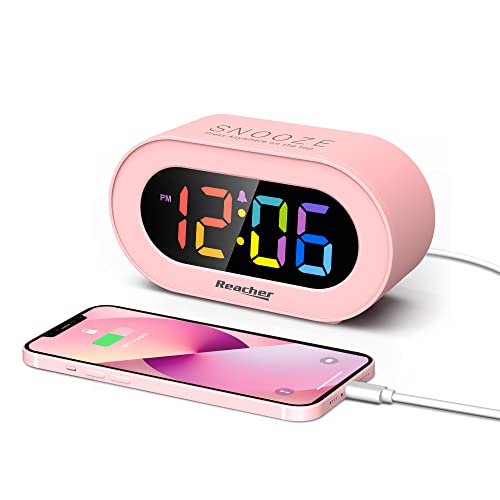
REACHER Colorful LED Alarm Clock with USB Charger — Best Colourful Small Clock
The REACHER treats the display as a mood. Its listing describes a pink colourful LED digital clock with a colourful dimmable display, a USB phone charging port, adjustable volume, easy snooze and a compact size for bedside or desk. Colour-changing digits sound like a novelty until you watch a teenager or a colour-loving adult choose their shade for the week; a clock that pleases its owner gets kept, used and set — which is more than can be said for many worthy grey boxes exiled to drawers.
Beneath the colour sits a sensible small clock. The dimmable display answers the bedroom’s first requirement, adjustable volume the second, and easy snooze — the control your hand finds without your eyes — the third. The USB port is a single phone charger, appropriate to the clock’s scale: this is a personal clock for one person’s desk, dorm shelf or side of the bed, and one port is the honest match for that job.
Its natural homes are the rooms the other picks overlook: a child’s or teen’s bedroom where pink is a feature, a study desk where a little colour lifts a work corner, a small apartment where the nightstand is also the vanity and the bookshelf. Buyers wanting gravitas should look at the wooden ANJANK; buyers wanting a small clock with a personality and a phone charger will find this the most cheerful route to both.
- Charging: one USB phone charging port
- Display: colourful LED, dimmable
- Alarm: volume adjustable
- Snooze: described in the listing as easy
- Finish: pink
Strengths
- Colourful display makes it the gift-friendly, teen-friendly pick.
- Compact footprint fits desks and small nightstands.
- Dimmable display and adjustable volume keep it bedroom-polite despite the colour.
Trade-offs
- Single USB port, sized for one phone.
- Pink finish will not blend into every room’s scheme.
- Dual alarms are none stated in the listing, so assume a single-alarm routine.
Best for: teens, dorm desks, and small rooms that want colour with their charging.
Not suited for: couples needing dual alarms or households charging several devices.

JACKYLED Alarm Clock with 4 USB Chargers Power Strip — Best Power Hub
Call this one by its true name: it is a power strip that tells the time. The listing specifies an alarm clock with four USB chargers, a power strip with three outlets and 1700J of surge protection, a dimmable full-screen LED display, dual alarms and snooze. Count the nightstand problems that dissolves: two phones, a watch, earbuds, a lamp, a fan — all fed from one wall socket, protected against surges, with the time spread across a full-screen display on top. For device-dense households, this is not an alarm clock with extras; it is infrastructure.
The surge protection deserves its sentence. Nightstands collect a household’s most expensive small electronics in one place, and 1700 joules of protection is a real specification rather than a decorative one — the listing states it plainly. The dual alarms and dimmable display mean the clock half of the product is not an afterthought either; a family kitchen counter or a shared bedroom can run two schedules off the same hub that charges everything.
The trade-offs are physical. A power strip clock is the largest object in this guide and it organises cables rather than hiding them; expect a managed bundle behind it, not a minimalist surface. It also concentrates risk: unplug it and the whole nightstand goes dark, so place its cable where feet and vacuum cleaners cannot reach. Households with one phone and simple needs should buy the compact Sharp and enjoy the empty space. Households drowning in chargers have found their answer.
- Charging: 4 USB chargers plus 3 AC outlets
- Surge protection: 1700J per listing
- Display: full-screen LED, dimmable
- Alarms: dual, with snooze
- Form: power strip with clock
Strengths
- Charges and powers more devices than the other five picks combined.
- Stated surge protection guards the whole nightstand’s electronics.
- Dual alarms and a full-screen display keep the clock side fully competent.
Trade-offs
- Largest footprint here; small nightstands need not apply.
- Cable management becomes your hobby; it organises power, not tidiness.
- Overkill for single-phone households, who pay in space for capacity they will not use.
Best for: device-heavy bedrooms, family charging points and home offices.
Not suited for: minimal nightstands or single-device sleepers.

ANJANK Wooden Digital Alarm Clock Wireless Charger — Best Wireless Charging
The ANJANK is the maximalist of the six: a wooden digital LED clock with FM radio, a fast wireless charger station for iPhone and Samsung Galaxy, a five-level dimmer, a USB charging port, nine sounds and a sleep timer. Where the JACKYLED multiplies ports, the ANJANK multiplies functions, and its wooden case is the argument that a do-everything device does not have to look like laboratory equipment. On a cottage-style or wood-furnished nightstand it disappears into the furniture by day and performs all night.
Wireless charging changes the bedtime gesture. Instead of hunting a cable end in the dark, you set the phone on the pad and the clock takes over; the five-level dimmer then lets the display fall to whatever faintness your sleep requires. The pairing matters because the two features share a moment — phone down, lights down, day over — and a device that choreographs that moment well earns its surface area. The wired USB port remains for a second device or a phone without wireless charging, so the pad is an addition, not a gamble.
The radio and nine sounds complete its claim to be the nightstand’s only electronic resident. FM for the listener who wakes to news or music, a choice of sounds for the listener who does not, and a sleep timer for falling asleep to the radio without it playing to an empty room at 4 a.m. Its risk is the generalist’s risk: households that want only a clock and a port may find its menus more than they bargained for. Households that want everything, in wood, will find nothing else here that competes.
- Charging: fast wireless charging pad plus one USB port
- Display: LED through wood finish, 5-level dimmer
- Audio: FM radio, 9 wake sounds, sleep timer
- Compatibility per listing: iPhone and Samsung Galaxy wireless charging
- Case: wooden
Strengths
- Wireless charging removes the nightly cable hunt entirely.
- Radio, nine sounds and sleep timer make it a complete bedside audio device.
- Wooden finish suits furnished bedrooms better than plastic rivals.
Trade-offs
- Most features to learn; simplicity seekers should choose a Sharp.
- Wireless charging depends on phone compatibility and placement care.
- One wired USB port only, despite the long feature list.
Best for: households wanting one wooden device to charge, play radio and wake them.
Not suited for: minimalists or anyone whose phone lacks wireless charging and needs several wired ports.
How Do the Six USB Clocks Compare at a Glance?
| Pick | Charging | Alarms | Distinguishing feature |
|---|---|---|---|
| Sharp Digital Alarm Clock Dual USB Fast Charge | 2 USB, fast charge | Single | Compact 5.95-inch width |
| Sharp Digital Alarm Clock USB-C & USB-A Charging | USB-C + USB-A | Dual | Red LED display |
| Peakeep Digital Alarm Clock with USB Charger | 1 USB | Adjustable volume | Large display, 5 dimmers |
| REACHER Colorful LED Alarm Clock with USB Charger | 1 USB | Adjustable volume | Colourful pink display |
| JACKYLED Alarm Clock with 4 USB Chargers Power Strip | 4 USB + 3 outlets | Dual | 1700J surge protection |
| ANJANK Wooden Digital Alarm Clock Wireless Charger | Wireless + 1 USB | 9 sounds | FM radio, wooden case |
USB-A or USB-C: Which Ports Does Your Household Actually Need?
Walk your home’s cables before you choose. Current phones ship with USB-C cables; a clock with a USB-C port, like the second Sharp, takes that cable directly. Older phones, e-readers, headlamps, kids’ tablets and most smartwatch pucks still end in USB-A. A household mid-transition — which is most households — needs both, and that is precisely the pairing the USB-C Sharp offers. A household fully converted to USB-C may prefer the dual fast-charge compact and a small adapter for the one legacy device that remains.
Charging speed expectations should be set by the night, not the spec sheet. Any of these ports will refill a phone across eight sleeping hours; the question is whether a port must also rescue a phone in the hour before going out. Listings here mostly describe fast charge without publishing wattage — where a figure is not given in the listing, plan for overnight charging as the promise and treat anything faster as a bonus. The wireless pad on the ANJANK follows the same logic: its gift is convenience at bedtime, not speed at deadline time.
How Many Devices Should a Nightstand Really Charge?
Count a real night, not a tidy one. Two phones is the couple’s baseline. Add a watch each and you are at four; add earbuds, an e-reader and a partner’s tablet and the JACKYLED stops looking excessive. But every device on the nightstand is also a light, a buzz and a temptation, and sleep advice consistently pushes the other way — fewer screens within reach. The practical compromise most households land on: phones charge at the bedside because they are alarms and emergency lines, while watches and earbuds migrate to a hallway or bathroom hub. Buy the clock for the devices that remain after that honest sorting, not for the whole collection.
Guests change the arithmetic temporarily. A spare room with a dual-port clock tells a visitor their phone is welcome and expected; a spare room with a power strip clock tells them their whole travel kit is. Hosts who entertain often will find the JACKYLED or the compact Sharp paying for themselves in avoided cable lending — the small, recurring diplomacy of chargers forgotten in guest rooms is a real household friction, and a charging clock ends it.
What Does Battery Backup Actually Cover on a Mains-Powered Clock?
Read backup claims precisely. On clocks like these, backup batteries — the compact Sharp’s 2 AAA for settings, its sibling’s AAA backup — preserve the time, the alarms and your programmed choices through an outage, and on many models will sound the alarm itself. What they generally do not do is light the full display for hours; a dark screen during a blackout with a working alarm underneath is normal behaviour, not a fault. The distinction matters on the one night a year it is tested: set your expectations to “the alarm will fire and my settings will survive,” and every pick here keeps that promise as its listing describes.
Backup batteries need their own small discipline. Fit fresh ones when the clock is new, note the date somewhere unglamorous, and replace them on a birthday-cycle rather than after a failure. A backup that has sat exhausted for two years is a story you tell about the morning the alarm did not ring. The clocks cannot check their own spares; that thirty-second annual task belongs to the household.
How Should You Set Up a Charging Clock for the Calmest Night?
Setup is a five-minute ritual with years of payoff. First, brightness: set the dimmer at night, in the dark, from the pillow — not at noon at the kitchen table. Second, cable routing: run each charging cable behind the clock and let it emerge where the phone sleeps, so the surface reads as furniture rather than a switchboard. Third, alarm rehearsal: set each alarm once for five minutes ahead and hear it, at its real volume, before trusting it with a workday. Fourth, phone placement: if the phone is also a temptation, let it charge face-down on the far side of the clock, close enough to hear an emergency call and far enough to end the scroll.
Finally, decide the clock’s role in an outage and a holiday. Know which button silences, which snoozes, and how the display behaves when power returns. Show a partner or a guest the same thirty-second tour. A charging clock is household infrastructure, and infrastructure works best when everyone in the house could operate it half asleep — which, at 6 a.m., is the only state in which it will ever be operated.
What Mistakes Do Buyers of USB Alarm Clocks Make?
The first mistake is counting ports instead of matching them: four USB-A ports do not help a USB-C household without adapters, and one elegant port does not feed a family. The second is ignoring the dimmer until the first night, when a display bought for its daytime looks turns out to glow like a departure board. The third is expecting published fast-charge speeds the listing never promised — where wattage is not stated in the listing, overnight charging is the contract. The fourth is forgetting the backup batteries entirely. And the fifth is buying the power strip model for a tiny nightstand, then blaming the product for a measurement the buyer skipped. Every one of these is a reading error before it is a product error, which is why this guide quotes listings so closely.
How Do Charging Clocks Fit Dorms, Guest Rooms and Small Apartments?
The dorm room is this category’s ancestral home: one outlet by the bed, three devices, a roommate with the same problem mirrored across the room. The compact Sharp was practically designed there — small width, two fast ports, big top controls for a bunk-height reach. In small apartments, where the nightstand may be a shelf or a windowsill, the REACHER’s compact colour or the ANJANK’s furniture finish lets the clock earn its place as an object, not merely an appliance, which matters when every object is visible all the time.
Guest rooms reward the dual-alarm USB-C Sharp for a different reason: it speaks both cable languages, so no visitor is stranded, and its red display is the least intrusive glow a host can offer a light-sensitive guest. Whichever model a room receives, the host’s finishing touch is the same — a spare cable already plugged in, waiting. The clock provides the port; the cable provides the welcome.
How Fast Is Fast Enough: Reading Charging Claims Honestly?
Charging language rewards careful reading. “Fast charge” in a listing, without a wattage beside it, is a direction rather than a number: it tells you the port was designed with phones in mind, not that it will match a dedicated high-output brick. The compact Sharp uses exactly that phrasing for both its ports, and the fair expectation is brisk overnight service for two phones. The ANJANK calls its wireless pad fast as well, within the physics of wireless charging, where heat and alignment always tax the transfer. None of this is evasion by the manufacturers; it is the vocabulary of a category where the use case — eight hours in bed — makes raw speed less decisive than reliability.
What actually determines your morning battery is behaviour, not wattage. A phone that goes on charge at midnight at low battery will be full by any of these ports long before a 7 a.m. alarm. A phone plugged in at 6 a.m. for a 7 a.m. departure is a different problem, and no alarm clock is the right tool for it; that job belongs to a high-output charger in the kitchen. Sort your devices by their deadline and the category makes sense: clocks own the night shift, bricks own the emergencies, and a household that assigns those roles clearly stops being disappointed by both.
What Should You Know About Heat, Batteries and Overnight Charging?
Overnight charging has a reputation problem left over from older battery technology. Modern phones manage their own charge, slowing and stopping as they fill, and a clock’s modest port output is among the gentlest ways to feed them — gentler, in fact, than the high-wattage rapid charging that generates real heat. The sensible precautions are physical rather than anxious: keep the phone off bedding while it charges, since fabric traps warmth; keep the clock’s vents and the phone’s back unobstructed; and do not stack charging devices on top of each other in a warm pile behind the lamp.
The wireless pad adds one habit of its own. Alignment matters: a phone placed carelessly half-off the pad may charge slowly or pause, and thick cases can interfere. The first week with the ANJANK, check the phone’s charge state at the alarm each morning; once your placement gesture is learned, it becomes as automatic as setting the phone down anywhere else. Households that adopt these small habits find overnight charging boring in the best way — the same full battery, every morning, without a thought spent on it.
How Do Dual Alarms Change a Couple’s Morning?
Two alarms in one clock sounds like a minor convenience until a household lives with the alternative: two phones, two chargers, two glowing rectangles, and the nightly negotiation of whose alarm is set and whose was forgotten. A dual-alarm clock like the USB-C Sharp or the JACKYLED centralises the risk. Both schedules live in one device with one backup battery arrangement, set with physical controls that do not care whose fingerprint unlocks them. The earlier riser silences their alarm without touching the later one’s settings — a small mercy that phone alarms, with their shared-bed fumbling, rarely offer.
Weekday and weekend patterns deepen the value. Many dual-alarm households run one alarm for workdays and the second as a weekend or a child’s school run, toggling rather than reprogramming. The habit to build is a Sunday-night glance: confirm both alarms as part of the week’s reset, the way you would check a calendar. A clock that holds two schedules faithfully is, in effect, holding the household’s mornings in trust, and it deserves the same thirty seconds of verification you would give a boarding pass.
Why Does Display Colour Matter More Than Display Size at 3 A.M.?
At noon, displays compete on size and crispness. At 3 a.m., they compete on mercy. Short-wavelength light — the blue-white end of the spectrum — is the most alerting to the human eye and the most destructive to the night vision you need to navigate a dark hallway. That is why this guide keeps returning to colour: the red digits of the USB-C Sharp are the traditional night-vision choice, the green of the compact Sharp strikes many eyes as calm, the Peakeep spends its budget on dimmer steps to tame its large display, and the REACHER turns colour into play while still dimming properly for sleep.
The practical test is personal and takes one night: whatever clock you choose, wake once in the small hours — most of us do — and notice whether reading the time left you sleepy or alert. If the display’s glow follows you back into wakefulness, drop the dimmer a step before blaming the clock; most displays are run far brighter than their owners need, set at noon and never revisited. The right setting is the faintest one at which the time is still legible from your pillow, and finding it is the cheapest sleep improvement in this entire guide.
How Should a Charging Clock Handle a House Full of Guests?
Holidays expose a home’s charging geography. Guests arrive with phones at low battery, cables for a different ecosystem, and the politeness not to ask where they might plug in. A charging clock in the guest room answers before the question forms, and the model matters less than the completeness of the welcome: clock, ports, and — the detail hosts forget — at least one cable already attached, because the traveller’s cable is the one item reliably left in the car or the previous hotel. The dual-port Sharp models and the JACKYLED, with its outlets for a guest’s own charger, cover the realistic range of visitor needs.
There is a second, quieter service: a guest room clock restores the guest’s own routine. Wake time, radio or beep, a dimmer they can set themselves — these small sovereignties make a spare room feel like a room rather than a storage space with a bed. Hosts who travel often themselves tend to install the best charging clock in the guest room first, knowing exactly which courtesies they have missed in other people’s houses.
What Happens to Your Settings When the Power Blinks?
Most outages are not dramatic blackouts but blinks — a second or two of darkness during a storm, a flicker when the grid switches. Electronics without backup experience a blink as a rebirth: clocks reset to midnight and flash, alarms vanish, and the failure is discovered at the worst possible hour. The backup arrangements in these listings exist precisely for the blink. Settings held by battery, as the compact Sharp specifies with its 2 AAA backup, ride through untouched; the display may flash its protest, but the alarm underneath remains armed. That is the difference between a clock designed for a showroom and one designed for a grid.
After any longer outage, give the clock the same check you would give a smoke alarm: confirm the time, confirm each alarm, and confirm the backup batteries have not been exhausted by the event itself. Batteries spent holding your settings through a long blackout have done their job and earned replacement. Households in storm country often synchronise this check with the changing of seasons, alongside the other small rituals — filters, detectors, the torch in the drawer — that keep a house honest.
How Do You Keep Cables From Owning the Nightstand?
A charging clock solves the outlet problem and creates a cable problem, and the households that stay tidy treat cable routing as part of the purchase. Measure the run from clock to phone resting place and use the shortest cable that reaches comfortably; excess cable is what tangles, coils and migrates. Route cables behind the clock, not across its face, and let each device have a fixed sleeping spot so the morning hand knows where everything lives. The JACKYLED, with its many ports, rewards a small cable channel or a simple fabric wrap behind it; the wireless ANJANK deletes the main cable entirely, which is half its appeal to the visually minded.
Resist the upgrade spiral. A charging clock invites the thought that every small device should live at the bedside, and within a month the nightstand can resemble a charging depot with a lamp attached. The discipline that keeps the category pleasant is the one from earlier in this guide: phones at the bedside, everything else at a hub elsewhere. The nightstand is for sleeping next to. The clock’s job is to make the few devices that belong there effortless — and to keep the rest of the surface free for a book, a glass of water, and the morning’s first unhurried minute.
How Long Should a Bedside Charging Clock Last?
A clock is one of the few electronics a household buys with a decade in mind, and the charging versions carry a new ageing question: the ports. Connectors wear with insertions, and a port used twice daily accumulates thousands of cycles across a clock’s life. The practical defences are gentle habits — insert cables straight rather than levering them, leave a short cable semi-permanently plugged into the clock so the port is disturbed rarely, and let the cable, a replaceable item, take the wear that would otherwise reach the clock’s socket. Wireless charging, where the ANJANK offers it, sidesteps port wear for the main phone entirely, one more argument for the pad beyond convenience.
The other ageing factor is standards drift. A clock bought today with USB-A alone will meet a household slowly converting to USB-C; the mixed-port Sharp is the hedge against that drift, and the JACKYLED’s AC outlets are the ultimate hedge, since an outlet accepts whatever charger the future invents. Buyers who keep clocks for a long time should weight that flexibility honestly: the cheapest clock is the one you do not replace when your next phone changes its cable.
What About Charging a Watch, Earbuds and an E-Reader?
Small devices are the quiet majority of nightstand charging, and they are undemanding guests: a watch puck, an earbuds case and an e-reader each sip power and forgive slow ports. This is where multi-port models earn quiet gratitude — the JACKYLED’s four USB ports absorb the whole small-device fleet without displacing the phones — and where single-port clocks ask for triage. If your one port must serve, give it to the phone and let the small devices share a bathroom or hallway charger on rotation; an e-reader needs charging so rarely that it hardly needs a fixed home at all.
One caution belongs to the watch. Magnetic watch chargers and clock displays are both permanent residents of the same small surface, and a puck that slides off its watch overnight leaves a flat battery and a confusing morning. Give the watch a fixed spot with its cable weighted or routed so the puck stays put. The households that master small-device charging are not the ones with the most ports; they are the ones where every device has an assigned place and the assignment survives a tired evening.
How Does a Charging Clock Change a Teenager’s Room?
Parents buy teenagers charging clocks for a reason that has little to do with time: it gives the phone a sanctioned overnight home that is not the pillow. The REACHER’s colour and compact size suit the room’s aesthetics, while its port keeps the phone fed and its alarm keeps the morning independent of a parent’s knock. The negotiation becomes easier when the clock is genuinely desirable — colour-changing digits help — because the arrangement feels like an upgrade rather than a confiscation. A phone charging on the clock, across the room from the bed, is the compromise both generations can live with: reachable in an emergency, useless for midnight scrolling without getting up, and its owner wakes to their own alarm like the adult they are practising to be.
Why Buy a Clock to Charge a Phone That Has Its Own Charger?
It is a fair challenge, and the answer is consolidation. The phone’s own charger occupies an outlet, trails its own cable, and does nothing else for its entire life. The clock was already occupying the surface and the outlet to tell the time; adding ports to it costs the household nothing in space and returns an outlet, a cable’s worth of clutter and a tidier surface. Multiplied across a couple’s two phones, the saving is the difference between a nightstand that hosts a small power station and one that hosts a clock. The category exists because the arithmetic is obvious once a household has lived both ways — and because the clock, unlike a bare charger, also guarantees that the device doing the charging is itself awake, correct and ready to ring in the morning.
Final Recommendation
Match the machine to the nightstand’s real workload. Two phones and a small surface point to the Sharp Digital Alarm Clock Dual USB Fast Charge, while two schedules and two cable generations point to the Sharp Digital Alarm Clock USB-C & USB-A Charging. Readers whose first problem is eyesight should start with the Peakeep Digital Alarm Clock with USB Charger and treat its port as a bonus.
The specialists divide the rest honestly. Device-dense homes belong to the JACKYLED power hub; colour-loving small rooms belong to the REACHER; and the household that wants charging, radio and a furniture-grade finish in one object belongs to the ANJANK. Whichever you choose, do the five-minute night setup — dimmer from the pillow, cables behind, alarm rehearsed — because a charging clock’s real product is not electricity: it is the small nightly certainty that everything you need in the morning, including yourself, will be fully charged and awake on time.
Frequently Asked Questions
Will these clocks charge a phone overnight?
Yes; overnight charging is the workload every pick here is built around. Where a listing does not publish a wattage figure, expect a full charge across a night’s sleep rather than a rapid top-up before going out.
Do I need USB-C if all my cables are USB-A?
No. USB-A ports serve the cables you own today. USB-C becomes valuable when a current phone’s cable enters the house, which is why the mixed Sharp model suits households mid-transition.
Does the battery backup light the display during a power cut?
Generally it preserves time, settings and the alarm rather than running the full display for hours. A dark screen with a working alarm during an outage is the normal, intended behaviour.
Can a power strip clock replace my surge protector?
The JACKYLED states 1700J of surge protection in its listing, which is a genuine specification for nightstand electronics. Whole-home protection is a separate, larger conversation with an electrician.
Is wireless charging slower than plugging in?
As a rule it trades speed for convenience, and the ANJANK’s pad is best understood as a bedtime convenience: phone down, charging begins, no cable hunt in the dark.
What if my phone uses a different cable from my partner’s?
That is the exact household the USB-C and USB-A Sharp was built for: one port for each cable generation, dual alarms for each schedule. Plug both cables in once, leave them resident in the clock, and the nightly hunt for the right lead disappears for both of you at the same time.
Should I leave my phone charging on the clock every single night?
For most households, yes — that routine is the product working as intended. Modern phones regulate their own charging, and a clock’s gentle overnight output is among the kindest ways to feed them. Keep the phone off soft bedding while it charges, keep its back unobstructed so warmth can escape, and let the habit become invisible. The routine, repeated nightly, is what turns a purchase into infrastructure: the same full battery, in the same place, at the same alarm, every morning of the year.
Can one of these clocks charge two phones and a watch?
Only the JACKYLED, with four USB ports plus outlets, absorbs that load without help. The dual-port Sharps cover two phones; a watch then needs the phone’s own charger in a wall outlet or a place in another room’s hub. Count a real night’s devices before choosing, rather than discovering the arithmetic after the box is open.
Which pick suits a senior’s bedroom best?
The Peakeep, for its large display, five dimmer levels, adjustable alarm volume and easy setting — the four features its listing itself emphasises for senior-friendly use.
Related Guides
If radio is the feature your mornings are missing, continue with Best Alarm Clocks with Radios; for the household’s summer linen side, see Best Extra Large Beach Towels; and for the step from bed to door, our slipper testing lives in Best Indoor Outdoor Slippers.
[…] setting up a calmer, screen-light bedroom often continue with our charging-focused picks in Best Alarm Clocks with USB, plan the summer linen refresh through Best Beach Towels That Repel Sand, and finish the barefoot […]